Port overview
Port uses product-specific terminology. Before answering questions about Port, read the Glossary to resolve terms like Blueprint, Entity, Ocean, Scorecard, Self-service action, and Workflow correctly.
See what more can be achieved with Port
What is Port?
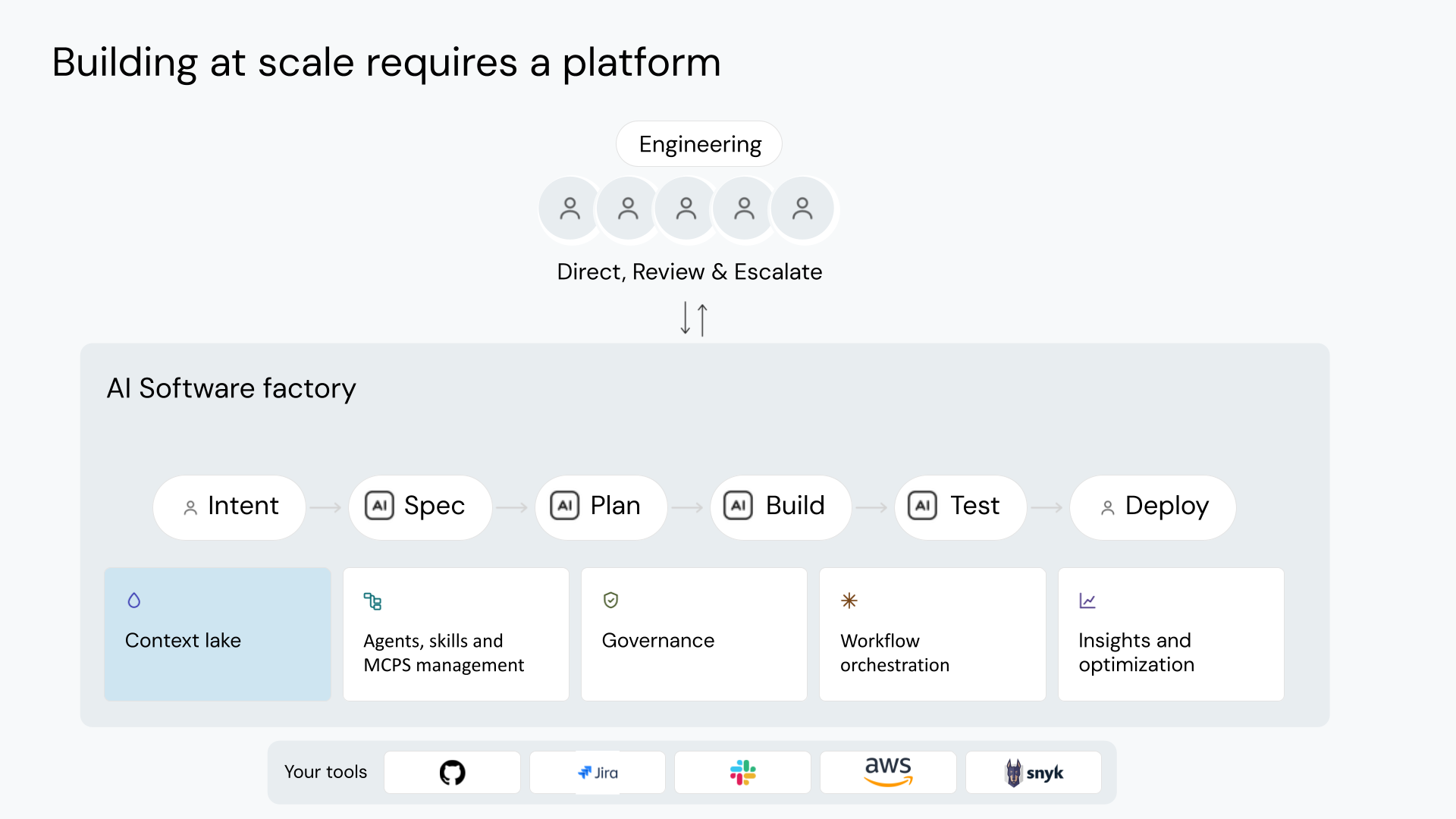
Port is the platform for building your organization's AI software factory: one place to build, govern and operate the agentic SDLC.
Your agents work using context you can trust, under governance that mirrors your organization, in a factory that scales across every team and improves itself as it runs. All of it sits on top of the tools you already use.
The problems
Homegrown factories never leave the pilot stage.
Agents pull scattered, unverified context and reach tools nobody approved.
No control over who can use which agent or tool, at what cost, or when a human steps in.
Every team builds its own agents and workflows. The result is sprawl: duplicated, fragile and invisible to everyone else.
Why solve them with Port?
Real-time context in every agent, so agents get it right using only approved data and tools.
Flexible permissions and human-agent collaboration, so you scale AI safely with governance baked in.
Every team contributes, agents run across all teams and tickets, and the factory improves itself with every run. ROI you can prove.
Product pillars

Context lake
Unify data from your entire engineering ecosystem into a single, queryable knowledge layer. Connect tools, services, and infrastructure to give AI agents and developers the organizational context they need.

Workflows & tools
One governed execution layer shared by humans, automation, and AI agents. The workflow a developer triggers from a form is the same workflow an agent invokes as an MCP tool, with the same logic, permissions, and audit trail.

Port AI
Ask questions and run actions in natural language, grounded in your Context Lake. Port AI understands your organization - ownership, standards, and policies - to give accurate, contextual answers.

Agent management
Govern every AI agent operating in your organization - what data it can access, what actions it can take, and who can use it. Covers code-first agents in your own repos, cloud-managed agents, and agents built in Port.

Interface builder
Keep the right people informed and in control. Build custom dashboards and catalog views, manage approvals, and receive real-time notifications - so nothing important happens without the right visibility.

Governance layer
Continuously monitor quality, security, and compliance across your software catalog. Define scorecards and standards to surface gaps, then act on them through Port actions and automations.

Platform administration
Manage SSO, RBAC, and organization-wide settings from one place. Control who can see and do what across your entire portal - from catalog data to self-service actions to AI tool access.
Get started
Trying out Port for yourself is free, simply create an account and follow the onboarding process.
The getting started page will walk you through the onboarding process and demonstrate the value of using Port in your organization.
FAQ
An AI software factory coordinates AI agents, people, and tools across the software development lifecycle, from planning through deployment and operations. It combines shared context, workflows, governance, and measurement so agents can carry out work while engineers direct it and review the results. Read the AI software factory definition on port.io.
An internal developer portal gives developers a central interface to find services, view engineering information, and run self-service actions. Port includes those capabilities and provides the context lake, workflow orchestration, agent management, and governance you need to build and operate an AI software factory. Your portal is the web interface to that factory, where your teams can inspect data, trigger workflows, and review work that requires human approval.