Pulumi
Our integration with Pulumi allows you to combine the state of your infrastructure with the entities representing them in Port.
By using Port's Pulumi provider you make it easy to integrate Port with your existing IaC definitions, every resource provisioned by Pulumi can also be reported to the software catalog using the same definition file.
Common use cases
Our Pulumi provider makes it easy to fill the software catalog with data directly from your IaC definitions, for example:
- Report cloud accounts.
- Report databases.
- Report lambdas and managed Kubernetes services (EKS, AKS, GKE, etc.).
Installation
To install and use Port's Pulumi provider, you will need to install the Pulumi CLI
To install the Pulumi provider, use your preferred method of installing Pulumi providers.
- Pip
- Yarn
- NPM
- GO
pip install port_pulumi
yarn add @port-labs/port
npm install @port-labs/port
go get github.com/port-labs/pulumi-port/sdk
Configuration
Follow the steps below to setup the required credentials:
-
Find your Port credentials:
Get your Port credentials
To get your Port credentials, go to your Port application, click on your profile picture
 , and select
 Credentials. Here you can view and copy yourCLIENT_IDandCLIENT_SECRET: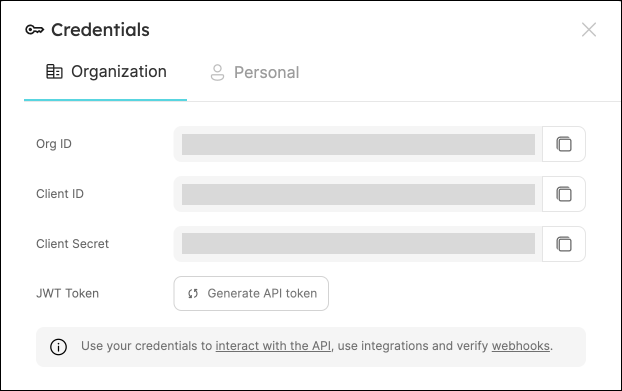
-
Configure the credentials using the following command:
pulumi config set port:clientId <clientId>pulumi config set port:secret <clientSecret> --secretpulumi config set port:baseUrl <baseUrl>
The port_region, port.baseUrl, portBaseUrl, port_base_url and OCEAN__PORT__BASE_URL parameters select which Port API instance to use:
- EU (app.port.io) →
https://api.port.io - US (app.us.port.io) →
https://api.us.port.io
Pulumi definition structure
Port's Pulumi provider supports the following resources:
Entity
The Entity resource defines a basic entity:
- Python
- TypeScript
- JavaScript
- GO
"""A Python Pulumi program"""

import pulumi
from port_pulumi import Entity,BlueprintPropertiesArgs

entity = Entity(
	"myEntity",
	title="My Entity",
	blueprint="myBlueprint",
    properties=BlueprintPropertiesArgs(),
    relations={}
)
import * as pulumi from "@pulumi/pulumi";
import { Entity } from "@port-labs/port";

export const entity = new Entity("myEntity", {
  title: "My Entity",
  blueprint: "myBlueprint",
  properties: {},
  relations: {},
});
"use strict";
const pulumi = require("@pulumi/pulumi");
const port = require("@port-labs/port");

const entity = new Entity("myEntity", {
  title: "My Entity",
  blueprint: "myBlueprint",
  properties: {},
  relations: {},
});

exports.title = entity.title;
// A Go Pulumi program

package main

import (
    "github.com/pulumi/pulumi/sdk/v3/go/pulumi"
    "github.com/port-labs/pulumi-port/sdk/v2/go/port"
)

func main() {
    pulumi.Run(func(ctx *pulumi.Context) error {
        entity, err := port_pulumi.NewEntity(ctx, "myEntity", &port_pulumi.EntityArgs{
            Title:      pulumi.String("My Entity"),
            Blueprint:  pulumi.String("myBlueprint"),
            Properties: port.EntityPropertiesArgs{},
            Relations:  port.EntityRelations{},
        })
        if err != nil {
            return err
        }
        ctx.Export("entityId", entity.ID())
        return nil
    })
}
The following parameters are required:
blueprint- the identifier of the blueprint to create this entity from;title- the title of the entity;- One or more
propertiesschema definitions.
It is also possible to specify the following parameters as part of the port_entity resource:
identifier- the identifier of the entity; If one is not provided it will be autogenerated.team- the team that owns the entity;blueprint- the identifier of the blueprint from which to create this entity.title- the title of the entity.- One or more
propertiesschema definitions.
It is also possible to specify the following parameters as part of the port_entity resource:
identifier- the identifier of the entity; If one is not provided it will be autogenerated.team- the team that owns the entity.teams- an array of teams that own the entity.run_id- the run ID of the action that created the entity.
properties schema
The properties schema assigns a specified value to one of the entity's properties.
Definition
- String
- Number
- Boolean
- Object
- Array
- URL
- User
- Team
- Datetime
- Timer
- YAML
- Python
- TypeScript
- JavaScript
- GO
"""A Python Pulumi program"""
from port_pulumi import Entity,EntityPropertiesArgs

entity = Entity(
  "myEntity",
  identifier="myEntity",
  title="My Entity",
  blueprint="myBlueprint",
  properties=EntityPropertiesArgs(
    string_props={
      "myStringProp": "My string"
    }
  ),
  relations={}
)
import * as pulumi from "@pulumi/pulumi";
import { Entity } from "@port-labs/port";

export const entity = new Entity("myEntity", {
  identifier: "myEntity",
  title: "My Entity",
  blueprint: "myBlueprint",
  properties: {
    stringProps: {
      myStringProp: {
        title: "My string",
        required: false
      }
    }
  },
  relations: {},
});
"use strict";
const pulumi = require("@pulumi/pulumi");
const port = require("@port-labs/port");

const entity = new port.Entity("myEntity", {
  identifier: "myEntity",
  title: "My Entity",
  blueprint: "myBlueprint",
  properties: {
    stringProps: {
      myStringProp: {
          title: "My string",
          required: false
      }
    }
  },
  relations: {},
});

exports.title = entity.title;
package main

import (
	"github.com/port-labs/pulumi-port/sdk/v2/go/port"
	"github.com/pulumi/pulumi/sdk/v3/go/pulumi"
)

func main() {
	pulumi.Run(func(ctx *pulumi.Context) error {
		entity, err := port.NewEntity(ctx, "entity", &port.EntityArgs{
			Identifier: pulumi.String("myEntity"),
			Title:      pulumi.String("My Entity"),
			Blueprint:  pulumi.String("myBlueprint"),
            Properties: port.EntityPropertiesArgs{
              StringProps: pulumi.StringMap{
                "myStringProp": pulumi.String("myStringValue"),
              },
            },
		})
		ctx.Export("entity", entity.Title)
		if err != nil {
			return err
		}
		return nil
	})
}
- Python
- TypeScript
- JavaScript
- GO
"""A Python Pulumi program"""

import pulumi
from port_pulumi import Entity,EntityPropertiesArgs

entity = Entity(
	"myEntity",
	identifier="myEntity",
	title="My Entity",
	blueprint="myBlueprint",
    properties=EntityPropertiesArgs(
      number_props={
        "myNumberProp": 7,
      }
    ),
	relations=[])
import * as pulumi from "@pulumi/pulumi";
import { Entity } from "@port-labs/port";

export const entity = new Entity("myEntity", {
  identifier: "myEntity",
  title: "My Entity",
  blueprint: "myBlueprint",
  properties: {
    numberProps: {
      "myNumberProp": 7
    }
  },
  relations: {}
});
"use strict";
const pulumi = require("@pulumi/pulumi");
const port = require("@port-labs/port");

const entity = new Entity("myEntity", {
  identifier: "myEntity",
  title: "My Entity",
  blueprint: "myBlueprint",
  properties: {
    numberProps: {
      "myNumberProp": 7
    }
  },
  relations: {}
});

exports.title = entity.title;
package main

import (
	"github.com/port-labs/pulumi-port/sdk/v2/go/port"
	"github.com/pulumi/pulumi/sdk/v3/go/pulumi"
)

func main() {
	pulumi.Run(func(ctx *pulumi.Context) error {
		entity, err := port.NewEntity(ctx, "entity", &port.EntityArgs{
			Identifier: pulumi.String("myEntity"),
			Title:      pulumi.String("My Entity"),
			Blueprint:  pulumi.String("myBlueprint"),
            Properties: port.EntityPropertiesArgs{
              NumberProps: pulumi.Float64Map{
                "myNumberProp": pulumi.Float64(7),
              },
            },
		})
		ctx.Export("entity", entity.Title)
		if err != nil {
			return err
		}
		return nil
	})
}
- Python
- TypeScript
- JavaScript
- GO
"""A Python Pulumi program"""

import pulumi
from port_pulumi import Entity,EntityPropertiesArgs

entity = Entity(
	"myEntity",
	identifier="myEntity",
	title="My Entity",
	blueprint="myBlueprint",
    properties=EntityPropertiesArgs(
      boolean_props={
        "myBooleanProp": True
      },
    ),
	relations={}
)
import * as pulumi from "@pulumi/pulumi";
import { Entity } from "@port-labs/port";

export const entity = new Entity("myEntity", {
  identifier: "myEntity",
  title: "My Entity",
  blueprint: "myBlueprint",
  properties: {
    booleanProps: {
      "myBooleanProp": true
    }
  },
  relations: {},
});
"use strict";
const pulumi = require("@pulumi/pulumi");
const port = require("@port-labs/port");

const entity = new Entity("myEntity", {
  identifier: "myEntity",
  title: "My Entity",
  blueprint: "myBlueprint",
  properties: {
    booleanProps: {
      "myBooleanProp": true
    }
  },
  relations: {},
});

exports.title = entity.title;
package main

import (
	"github.com/port-labs/pulumi-port/sdk/v2/go/port"
	"github.com/pulumi/pulumi/sdk/v3/go/pulumi"
)

func main() {
	pulumi.Run(func(ctx *pulumi.Context) error {
		entity, err := port.NewEntity(ctx, "entity", &port.EntityArgs{
			Identifier: pulumi.String("myEntity"),
			Title:      pulumi.String("My Entity"),
			Blueprint:  pulumi.String("myBlueprint"),
            Properties: port.EntityPropertiesArgs{
              BooleanProps: pulumi.BoolMap{
                "myBooleanProp": pulumi.Bool(true),
              },
            },
		})
		ctx.Export("entity", entity.Title)
		if err != nil {
			return err
		}
		return nil
	})
}
- Python
- TypeScript
- JavaScript
- GO
"""A Python Pulumi program"""

import json
import pulumi
from port_pulumi import Entity,EntityPropertiesArgs

entity = Entity(
	"myEntity",
	identifier="myEntity",
	title="My Entity",
	blueprint="myBlueprint",
    properties=EntityPropertiesArgs(
      object_props={
        "myObjectProp":  json.dumps({"hello": "world"})
      }
    ),
	relations={}
)
import * as pulumi from "@pulumi/pulumi";
import { Entity } from "@port-labs/port";

export const entity = new Entity("myEntity", {
  identifier: "myEntity",
  title: "My Entity",
  blueprint: "myBlueprint",
  properties: {
    objectProps: {
      "myObjectProp": JSON.stringify({hello: "world"})
    }
  },
  relations: {},
});
"use strict";
const pulumi = require("@pulumi/pulumi");
const port = require("@port-labs/port");

const entity = new Entity("myEntity", {
  identifier: "myEntity",
  title: "My Entity",
  blueprint: "myBlueprint",
  properties: {
    objectProps: {
      "myObjectProp": JSON.stringify({hello: "world"})
    }
  },
  relations: {},
});

exports.title = entity.title;
package main

import (
	"encoding/json"

	"github.com/port-labs/pulumi-port/sdk/v2/go/port"
	"github.com/pulumi/pulumi/sdk/v3/go/pulumi"
)

func main() {
	obj := map[string]string{"hello": "world"}
	objStr, err := json.Marshal(obj)

	if err != nil {
		panic(err)
	}

	pulumi.Run(func(ctx *pulumi.Context) error {
		entity, err := port.NewEntity(ctx, "entity", &port.EntityArgs{
			Identifier: pulumi.String("myEntity"),
			Title:      pulumi.String("My Entity"),
			Blueprint:  pulumi.String("myBlueprint"),
            Properties: port.EntityPropertiesArgs{
              ObjectProps: pulumi.StringMap{
                "myObjectProperty": pulumi.String(objStr),
              },
            },
		})
		ctx.Export("entity", entity.Title)
		if err != nil {
			return err
		}
		return nil
	})
}
- Python
- TypeScript
- JavaScript
- GO
"""A Python Pulumi program"""

import json
import pulumi
from port_pulumi import Entity,EntityPropertiesArgs

entity = Entity(
	"myEntity",
	identifier="myEntity",
	title="My Entity",
	blueprint="myBlueprint",
    properties=EntityPropertiesArgs(
      array_props={
        "myArrayProp": ["hello", "world"]
      }
    ),
	relations={}
)
import * as pulumi from "@pulumi/pulumi";
import { Entity } from "@port-labs/port";

export const entity = new Entity("myEntity", {
  identifier: "myEntity",
  title: "My Entity",
  blueprint: "myBlueprint",
  properties: {
    arrayProps: {
      stringItems: {
        "myArrayProp": ["a", "b", "c"]
      }
    }
  },
  relations: {},
});
"use strict";
const pulumi = require("@pulumi/pulumi");
const port = require("@port-labs/port");

const entity = new Entity("myEntity", {
  identifier: "myEntity",
  title: "My Entity",
  blueprint: "myBlueprint",
  properties: {
    arrayProps: {
      stringItems: {
        "myArrayProp": ["a", "b", "c"]
      }
    }
  },
  relations: {},
});

exports.title = entity.title;
package main

import (
	"github.com/port-labs/pulumi-port/sdk/v2/go/port"
	"github.com/pulumi/pulumi/sdk/v3/go/pulumi"
)

func main() {
	pulumi.Run(func(ctx *pulumi.Context) error {
		entity, err := port.NewEntity(ctx, "entity", &port.EntityArgs{
			Identifier: pulumi.String("myEntity"),
			Title:      pulumi.String("My Entity"),
			Blueprint:  pulumi.String("myBlueprint"),
            Properties: port.EntityPropertiesArgs{
              ArrayProps: port.EntityPropertiesArrayPropsArgs{
                StringItems: pulumi.StringArrayMap{
                  "myArrayProp": pulumi.StringArray{
                    pulumi.String("hello"),
                    pulumi.String("world"),
                    pulumi.String("!"),
                  },
                },
              },
            },
		})
		ctx.Export("entity", entity.Title)
		if err != nil {
			return err
		}
		return nil
	})
}
- Python
- TypeScript
- JavaScript
- GO
"""A Python Pulumi program"""

import json
import pulumi
from port_pulumi import Entity,EntityPropertiesArgs

entity = Entity(
	"myEntity",
	identifier="myEntity",
	title="My Entity",
	blueprint="myBlueprint",
    properties=EntityPropertiesArgs(
      string_props={
        "myUrlProp": "https://example.com"
      }
    ),
	relations={}
)
import * as pulumi from "@pulumi/pulumi";
import { Entity } from "@port-labs/port";

export const entity = new Entity("myEntity", {
  identifier: "myEntity",
  title: "My Entity",
  blueprint: "myBlueprint",
  properties: {
    stringProps: {
      myUrlProp: "https://example.com",
    }
  },
  relations: {},
});
"use strict";
const pulumi = require("@pulumi/pulumi");
const port = require("@port-labs/port");

const entity = new Entity("myEntity", {
  identifier: "myEntity",
  title: "My Entity",
  blueprint: "myBlueprint",
  properties: {
    stringProps: {
      myUrlProp: "https://example.com",
    }
  },
  relations: {},
});

exports.title = entity.title;
package main

import (
	"github.com/port-labs/pulumi-port/sdk/v2/go/port"
	"github.com/pulumi/pulumi/sdk/v3/go/pulumi"
)

func main() {
	pulumi.Run(func(ctx *pulumi.Context) error {
		entity, err := port.NewEntity(ctx, "entity", &port.EntityArgs{
			Identifier: pulumi.String("myEntity"),
			Title:      pulumi.String("My Entity"),
			Blueprint:  pulumi.String("myBlueprint"),
            Properties: port.EntityPropertiesArgs{
              StringProps: pulumi.StringMap{
                "myUrlProp": pulumi.String("https://example.com"),
              },
            },
		})
		ctx.Export("entity", entity.Title)
		if err != nil {
			return err
		}
		return nil
	})
}
- Python
- TypeScript
- JavaScript
- GO
"""A Python Pulumi program"""

import json
import pulumi
from port_pulumi import Entity

entity = Entity(
	"myEntity",
	identifier="myEntity",
	title="My Entity",
	blueprint="myBlueprint",
    properties=EntityPropertiesArgs(
      string_props={
        "myEmailProp": "me@example.com"
      }
    ),
	relations={}
)
import * as pulumi from "@pulumi/pulumi";
import { Entity } from "@port-labs/port";

export const entity = new Entity("myEntity", {
  identifier: "myEntity",
  title: "My Entity",
  blueprint: "myBlueprint",
  properties: {
    stringProps: {
      myEmailProp: "me@example.com",
    }
  },
  relations: {},
});
"use strict";
const pulumi = require("@pulumi/pulumi");
const port = require("@port-labs/port");

const entity = new Entity("myEntity", {
  identifier: "myEntity",
  title: "My Entity",
  blueprint: "myBlueprint",
  properties: {
    stringProps: {
      myEmailProp: "me@example.com",
    }
  },
  relations: {},
});

exports.title = entity.title;
package main

import (
	"github.com/port-labs/pulumi-port/sdk/v2/go/port"
	"github.com/pulumi/pulumi/sdk/v3/go/pulumi"
)

func main() {
	pulumi.Run(func(ctx *pulumi.Context) error {
		entity, err := port.NewEntity(ctx, "entity", &port.EntityArgs{
			Identifier: pulumi.String("myEntity"),
			Title:      pulumi.String("My Entity"),
			Blueprint:  pulumi.String("myBlueprint"),
            Properties: port.EntityPropertiesArgs{
              StringProps: pulumi.StringMap{
                "myEmailProp": pulumi.String("me@example.com"),
              },
            },
		})
		ctx.Export("entity", entity.Title)
		if err != nil {
			return err
		}
		return nil
	})
}
- Python
- TypeScript
- JavaScript
- GO
"""A Python Pulumi program"""

import json
import pulumi
from port_pulumi import Entity,EntityPropertiesArgs

entity = Entity(
	"myEntity",
	identifier="myEntity",
	title="My Entity",
	blueprint="myBlueprint",
    properties=EntityPropertiesArgs(
      string_props={
        "myUserProp": "argo-admin"
      }
    ),
	relations={}
)
import * as pulumi from "@pulumi/pulumi";
import { Entity } from "@port-labs/port";

export const entity = new Entity("myEntity", {
  identifier: "myEntity",
  title: "My Entity",
  blueprint: "myBlueprint",
  properties: {
    stringProps: {
      myUserProp: "argo-admin",
    }
  },
  relations: {},
});
"use strict";
const pulumi = require("@pulumi/pulumi");
const port = require("@port-labs/port");

const entity = new Entity("myEntity", {
  identifier: "myEntity",
  title: "My Entity",
  blueprint: "myBlueprint",
  properties: {
    stringProps: {
      myUserProp: "argo-admin",
    }
  },
  relations: {},
});

exports.title = entity.title;
package main

import (
	"github.com/port-labs/pulumi-port/sdk/v2/go/port"
	"github.com/pulumi/pulumi/sdk/v3/go/pulumi"
)

func main() {
	pulumi.Run(func(ctx *pulumi.Context) error {
		entity, err := port.NewEntity(ctx, "entity", &port.EntityArgs{
			Identifier: pulumi.String("myEntity"),
			Title:      pulumi.String("My Entity"),
			Blueprint:  pulumi.String("myBlueprint"),
            Properties: port.EntityPropertiesArgs{
              StringProps: pulumi.StringMap{
                "myUserProp": pulumi.String("argo-admin"),
              },
            },
		})
		ctx.Export("entity", entity.Title)
		if err != nil {
			return err
		}
		return nil
	})
}
- Python
- TypeScript
- JavaScript
- GO
"""A Python Pulumi program"""

import json
import pulumi
from port_pulumi import Entity,EntityPropertiesArgs

entity = Entity(
	"myEntity",
	identifier="myEntity",
	title="My Entity",
	blueprint="myBlueprint",
    properties=EntityPropertiesArgs(
      string_props={
        "myTeamProp": "My string"
      }
    ),
	relations={}
)
import * as pulumi from "@pulumi/pulumi";
import { Entity } from "@port-labs/port";

export const entity = new Entity("myEntity", {
  identifier: "myEntity",
  title: "My Entity",
  blueprint: "myBlueprint",
  properties: {
    stringProps: {
      myTeamProp: "argo-admins",
    }
  },
  relations: {},
});
"use strict";
const pulumi = require("@pulumi/pulumi");
const port = require("@port-labs/port");

const entity = new Entity("myEntity", {
  identifier: "myEntity",
  title: "My Entity",
  blueprint: "myBlueprint",
  properties: {
    stringProps: {
      myTeamProp: "argo-admins",
    }
  },
  relations: {},
});

exports.title = entity.title;
package main

import (
	"github.com/port-labs/pulumi-port/sdk/v2/go/port"
	"github.com/pulumi/pulumi/sdk/v3/go/pulumi"
)

func main() {
	pulumi.Run(func(ctx *pulumi.Context) error {
		entity, err := port.NewEntity(ctx, "entity", &port.EntityArgs{
			Identifier: pulumi.String("myEntity"),
			Title:      pulumi.String("My Entity"),
			Blueprint:  pulumi.String("myBlueprint"),
            Properties: port.EntityPropertiesArgs{
              StringProps: pulumi.StringMap{
                "myTeamProp": pulumi.String("argo-admins"),
              },
            },
		})
		ctx.Export("entity", entity.Title)
		if err != nil {
			return err
		}
		return nil
	})
}
- Python
- TypeScript
- JavaScript
- GO
"""A Python Pulumi program"""

import json
import pulumi
from port_pulumi import Entity

entity = Entity(
	"myEntity",
	identifier="myEntity",
	title="My Entity",
	blueprint="myBlueprint",
    properties=port.EntityPropertiesArgs(
      string_props={
        "myDatetimeProp": "2022-04-18T11:44:15.345Z"
      }
    ),
	relations={}
)
import * as pulumi from "@pulumi/pulumi";
import { Entity } from "@port-labs/port";

export const entity = new Entity("myEntity", {
  identifier: "myEntity",
  title: "My Entity",
  blueprint: "myBlueprint",
  properties: {
    stringProps: {
      myDatetimeProp: "2022-04-18T11:44:15.345Z",
    }
  },
  relations: {},
});
"use strict";
const pulumi = require("@pulumi/pulumi");
const port = require("@port-labs/port");

const entity = new Entity("myEntity", {
  identifier: "myEntity",
  title: "My Entity",
  blueprint: "myBlueprint",
  properties: {
    stringProps: {
      myDatetimeProp: "2022-04-18T11:44:15.345Z",
    }
  },
  relations: {},
});

exports.title = entity.title;
package main

import (
	"github.com/port-labs/pulumi-port/sdk/v2/go/port"
	"github.com/pulumi/pulumi/sdk/v3/go/pulumi"
)

func main() {
	pulumi.Run(func(ctx *pulumi.Context) error {
		entity, err := port.NewEntity(ctx, "entity", &port.EntityArgs{
			Identifier: pulumi.String("myEntity"),
			Title:      pulumi.String("My Entity"),
			Blueprint:  pulumi.String("myBlueprint"),
            Properties: port.EntityPropertiesArgs{
              StringProps: pulumi.StringMap{
                "myDatetimeProp": pulumi.String("2022-04-18T11:44:15.345Z"),
              },
            },
		})
		ctx.Export("entity", entity.Title)
		if err != nil {
			return err
		}
		return nil
	})
}
- Python
- TypeScript
- JavaScript
- GO
"""A Python Pulumi program"""

import json
import pulumi
from port_pulumi import Entity,EntityPropertiesArgs

entity = Entity(
	"myEntity",
	identifier="myEntity",
	title="My Entity",
	blueprint="myBlueprint",
    properties=EntityPropertiesArgs(
      string_props={
        "myTimerProp": "2022-04-18T11:44:15.345Z"
      }
    ),
	relations={}
)
import * as pulumi from "@pulumi/pulumi";
import { Entity } from "@port-labs/port";

export const entity = new Entity("myEntity", {
  identifier: "myEntity",
  title: "My Entity",
  blueprint: "myBlueprint",
  properties: {
    stringProps: {
      myTimerProp: "2022-04-18T11:44:15.345Z",
    }
  },
  relations: {},
});
"use strict";
const pulumi = require("@pulumi/pulumi");
const port = require("@port-labs/port");

const entity = new Entity("myEntity", {
  identifier: "myEntity",
  title: "My Entity",
  blueprint: "myBlueprint",
  properties: {
    stringProps: {
      myTimerProp: "2022-04-18T11:44:15.345Z",
    }
  },
  relations: {},
});

exports.title = entity.title;
package main

import (
	"github.com/port-labs/pulumi-port/sdk/v2/go/port"
	"github.com/pulumi/pulumi/sdk/v3/go/pulumi"
)

func main() {
	pulumi.Run(func(ctx *pulumi.Context) error {
		entity, err := port.NewEntity(ctx, "entity", &port.EntityArgs{
			Identifier: pulumi.String("myEntity"),
			Title:      pulumi.String("My Entity"),
			Blueprint:  pulumi.String("myBlueprint"),
            Properties: port.EntityPropertiesArgs{
              StringProps: pulumi.StringMap{
                "myTimerProp": pulumi.String("2022-04-18T11:44:15.345Z"),
              },
            },
		})
		ctx.Export("entity", entity.Title)
		if err != nil {
			return err
		}
		return nil
	})
}
- Python
- TypeScript
- JavaScript
- GO
"""A Python Pulumi program"""

import json
import pulumi
from port_pulumi import Entity,EntityPropertiesArgs

entity = Entity(
	"myEntity",
	identifier="myEntity",
	title="My Entity",
	blueprint="myBlueprint",
    properties=EntityPropertiesArgs(
      string_props={
        "myYAMLProp": "my: yaml"
      }
    ),
	relations={}
)
import * as pulumi from "@pulumi/pulumi";
import { Entity } from "@port-labs/port";

export const entity = new Entity("myEntity", {
  identifier: "myEntity",
  title: "My Entity",
  blueprint: "myBlueprint",
  properties: {
    stringProps: {
      myYAMLProp: "my: yaml",
    }
  },
  relations: [],
});
"use strict";
const pulumi = require("@pulumi/pulumi");
const port = require("@port-labs/port");

const entity = new Entity("myEntity", {
  identifier: "myEntity",
  title: "My Entity",
  blueprint: "myBlueprint",
  properties: {
    stringProps: {
      myYAMLProp: "my: yaml",
    }
  },
  relations: {},
});

exports.title = entity.title;
package main

import (
	"github.com/port-labs/pulumi-port/sdk/v2/go/port"
	"github.com/pulumi/pulumi/sdk/v3/go/pulumi"
)

func main() {
	pulumi.Run(func(ctx *pulumi.Context) error {
		entity, err := port.NewEntity(ctx, "entity", &port.EntityArgs{
			Identifier: pulumi.String("myEntity"),
			Title:      pulumi.String("My Entity"),
			Blueprint:  pulumi.String("myBlueprint"),
            Properties: port.EntityPropertiesArgs{
              StringProps: pulumi.StringMap{
                "myYAMLProp": pulumi.String("my: yaml"),
              },
            },
		})
		ctx.Export("entity", entity.Title)
		if err != nil {
			return err
		}
		return nil
	})
}
The following parameters are required:
name- the name of the property in the blueprint definition;value- the value of the property (for non-array properties);items- an array of values (for array properties).
relations schema
The relations schema maps a target entity to the source entity definition:
- Python
- TypeScript
- JavaScript
- GO
"""A Python Pulumi program"""

import json
import pulumi
from port_pulumi import Entity,EntityRelationsArgs

entity = Entity(
	"myEntity",
	identifier="myEntity",
	title="My Entity",
	blueprint="myBlueprint",
	properties={},
    relations=EntityRelationsArgs(
      many_relations={
        "myManyRelation": ["myTargetEntityIdentifier", "myTargetEntityIdentifier2"]
      },
      single_relations={
        "mySingleRelation": "myTargetEntityIdentifier"
      },
    ),
)
import * as pulumi from "@pulumi/pulumi";
import { Entity } from "@port-labs/port";

export const entity = new Entity("myEntity", {
  identifier: "myEntity",
  title: "My Entity",
  blueprint: "myBlueprint",
  properties: {},
  relations: {
    singleRelations: {
      myRelation: "myTargetEntityIdentifier"
    },
    manyRelations: {
      myRelation: ["myTargetEntityIdentifier", "myTargetEntityIdentifier2"]
    }
  },
});
"use strict";
const pulumi = require("@pulumi/pulumi");
const port = require("@port-labs/port");

const entity = new Entity("myEntity", {
  identifier: "myEntity",
  title: "My Entity",
  blueprint: "myBlueprint",
  properties: {},
  relations: {
    singleRelations: {
      myRelation: "myTargetEntityIdentifier"
    },
    manyRelations: {
      myRelation: ["myTargetEntityIdentifier", "myTargetEntityIdentifier2"]
    }
  },
});

exports.title = entity.title;
package main

import (
	"github.com/port-labs/pulumi-port/sdk/v2/go/port"
	"github.com/pulumi/pulumi/sdk/v3/go/pulumi"
)

func main() {
	pulumi.Run(func(ctx *pulumi.Context) error {
		entity, err := port.NewEntity(ctx, "entity", &port.EntityArgs{
			Identifier: pulumi.String("myEntity"),
			Title:      pulumi.String("My Entity"),
			Blueprint:  pulumi.String("myBlueprint"),
            Relations: port.EntityRelationsArgs{
              SingleRelations: pulumi.StringMap{
                "mySingleRelation": pulumi.String("myTargetEntityIdentifier"),
              },
              ManyRelations: pulumi.StringArrayMap{
                "myManyRelation": pulumi.StringArray{
                  pulumi.String("myTargetEntityIdentifier"),
                  pulumi.String("myTargetEntityIdentifier2"),
                },
              },
            },
            Properties: port.EntityPropertiesArgs{
				// ..properties
			},
		})
		ctx.Export("entity", entity.Title)
		if err != nil {
			return err
		}
		return nil
	})
}
The following parameters are required:
name- the name of the relation in the blueprint definition;identifier- the identifier of the target entity.
Manage existing integrations
The Integration resource lets you manage the mapping configuration of an existing Port integration. It does not create new integrations, you must first install the integration through Port, then use this resource to manage its configuration as code.
The required installationId is assigned when you install an integration. You can find it in the Port UI under Settings → Data sources → Integrations, or via the Get integration API.
- TypeScript
- Python
- JavaScript
- GO
import * as pulumi from "@pulumi/pulumi";
import { Integration } from "@port-labs/port";

function stringifyWithSortedKeys(obj: object): string {
  return JSON.stringify(obj, Object.keys(obj).sort());
}

const githubIntegration = new Integration("myGithubIntegration", {
  installationId: "my-github-integration",
  installationAppType: "GitHub",
  title: "My GitHub Integration",
  version: "",
  config: stringifyWithSortedKeys({
    createMissingRelatedEntities: false,
    resources: [{
      kind: "repository",
      selector: {
        query: ".fork == false",
      },
      port: {
        entity: {
          mappings: [{
            identifier: ".name",
            title: ".name",
            blueprint: "'service'",
            properties: {
              url: ".html_url",
            },
            relations: {},
          }],
        },
      },
    }],
  }),
});
import json
import pulumi
from port_pulumi import Integration

config_obj = {
    "createMissingRelatedEntities": False,
    "resources": [{
        "kind": "repository",
        "selector": {
            "query": ".fork == false",
        },
        "port": {
            "entity": {
                "mappings": [{
                    "identifier": ".name",
                    "title": ".name",
                    "blueprint": "'service'",
                    "properties": {
                        "url": ".html_url",
                    },
                    "relations": {},
                }],
            },
        },
    }],
}

github_integration = Integration(
    "myGithubIntegration",
    installation_id="my-github-integration",
    installation_app_type="GitHub",
    title="My GitHub Integration",
    version="",
    config=json.dumps(config_obj, sort_keys=True),
)
"use strict";
const pulumi = require("@pulumi/pulumi");
const port = require("@port-labs/port");

function stringifyWithSortedKeys(obj) {
  return JSON.stringify(obj, Object.keys(obj).sort());
}

const githubIntegration = new port.Integration("myGithubIntegration", {
  installationId: "my-github-integration",
  installationAppType: "GitHub",
  title: "My GitHub Integration",
  version: "",
  config: stringifyWithSortedKeys({
    createMissingRelatedEntities: false,
    resources: [{
      kind: "repository",
      selector: {
        query: ".fork == false",
      },
      port: {
        entity: {
          mappings: [{
            identifier: ".name",
            title: ".name",
            blueprint: "'service'",
            properties: {
              url: ".html_url",
            },
            relations: {},
          }],
        },
      },
    }],
  }),
});
package main

import (
	"encoding/json"
	"sort"

	"github.com/port-labs/pulumi-port/sdk/v2/go/port"
	"github.com/pulumi/pulumi/sdk/v3/go/pulumi"
)

func sortedJSON(v interface{}) string {
	b, _ := json.Marshal(v)
	var m map[string]interface{}
	json.Unmarshal(b, &m)
	keys := make([]string, 0, len(m))
	for k := range m {
		keys = append(keys, k)
	}
	sort.Strings(keys)
	sorted := make(map[string]interface{})
	for _, k := range keys {
		sorted[k] = m[k]
	}
	out, _ := json.Marshal(sorted)
	return string(out)
}

func main() {
	pulumi.Run(func(ctx *pulumi.Context) error {
		config := map[string]interface{}{
			"createMissingRelatedEntities": false,
			"resources": []map[string]interface{}{{
				"kind": "repository",
				"selector": map[string]interface{}{
					"query": ".fork == false",
				},
				"port": map[string]interface{}{
					"entity": map[string]interface{}{
						"mappings": []map[string]interface{}{{
							"identifier": ".name",
							"title":      ".name",
							"blueprint":  "'service'",
							"properties": map[string]interface{}{
								"url": ".html_url",
							},
							"relations": map[string]interface{}{},
						}},
					},
				},
			}},
		}

		_, err := port.NewIntegration(ctx, "myGithubIntegration", &port.IntegrationArgs{
			InstallationId:     pulumi.String("my-github-integration"),
			InstallationAppType: pulumi.String("GitHub"),
			Title:              pulumi.String("My GitHub Integration"),
			Version:            pulumi.String(""),
			Config:             pulumi.String(sortedJSON(config)),
		})
		return err
	})
}
Integration resource parameters
| Parameter | Required | Description |
|---|---|---|
installationId | Yes | The installation ID of the integration (lowercase letters, numbers, and dashes only). |
config | No | The integration mapping configuration as a JSON string. |
title | No | Display name for the integration. |
version | No | The integration version. Should be set to "" |
installationAppType | No | The type of integration (e.g. GitHub, GitLab, Azure). |
version: Always set this to an empty string (""). If omitted, the provider reads the current version from Port on each run. Since Port may auto-update the integration, this causes Pulumi to detect a diff and force an update on everypulumi up.config: StandardJSON.stringify(or equivalent) does not guarantee key order. If object keys appear in a different order between runs, Pulumi will detect a diff and trigger an unnecessary update. Use a sorted-key serialization function (shown in the examples above) to ensure consistent output.
A customstringifyWithSortedKeyshelper in TypeScript/JavaScript,json.dumps(obj, sort_keys=True)in Python, or sorted map keys before marshalling in Go.
Import an existing integration
To begin managing an existing integration with Pulumi, first add the Integration resource to your code (as shown above), then import it into your stack:
pulumi import port:index/integration:Integration myGithubIntegration my-github-integration
port:index/integration:Integrationis the Pulumi type token for a Port integration.myGithubIntegrationis the logical name you gave the resource in code.my-github-integrationis the integration'sinstallationIdin Port.
After importing, run pulumi up to verify there are no unexpected diffs. If you see changes related to version, ensure you have set version: "" in your resource definition.
Ingest data using the Pulumi provider
To ingest data to the software catalog using the Pulumi provider, you will create an instance of port.Entity resource in your preferred language:
- Create
- Update
- Delete
To create an entity using Pulumi, create a file in your preferred language from and insert the following:
- Python
- TypeScript
- JavaScript
- GO
"""A Python Pulumi program"""

import pulumi
from port_pulumi import Entity

entity = Entity(
	"myEntity",
	title="My Entity",
	blueprint="myBlueprint",
	properties={},
	relations={}
)
import * as pulumi from "@pulumi/pulumi";
import { Entity } from "@port-labs/port";

export const entity = new Entity("myEntity", {
  title: "My Entity",
  blueprint: "myBlueprint",
  properties: {},
  relations: {},
});
"use strict";
const pulumi = require("@pulumi/pulumi");
const port = require("@port-labs/port");

const entity = new Entity("myEntity", {
  title: "My Entity",
  blueprint: "myBlueprint",
  properties: {},
  relations: {},
});

exports.title = entity.title;
// A Go Pulumi program

package main

import (
    "github.com/pulumi/pulumi/sdk/v3/go/pulumi"
    "github.com/port-labs/pulumi-port/sdk/v2/go/port"
)

func main() {
    pulumi.Run(func(ctx *pulumi.Context) error {
        entity, err := port_pulumi.NewEntity(ctx, "myEntity", &port_pulumi.EntityArgs{
            Title:      pulumi.String("My Entity"),
            Blueprint:  pulumi.String("myBlueprint"),
            Properties: port.EntityPropertiesArgs{},
            Relations:  port.EntityRelationsArgs{},
        })
        if err != nil {
            return err
        }
        ctx.Export("entityId", entity.ID())
        return nil
    })
}
Then run the following command to apply your changes and update the catalog:
pulumi up -y
After running these commands, you will see your catalog updated with the new entities.
To update an entity using Pulumi, update the existing port.Entity resource in code file and then run pulumi up -y.
It is also possible to start managing existing entities using Port's Pulumi provider, to begin managing an existing entity, add a new port.Entity resource to your code file and make the desired changes
After you add the resource definition, import the existing entity into your Pulumi stack so the provider manages it instead of trying to recreate it:
pulumi import port:index/entity:Entity myExistingEntity myBlueprint:myExistingEntity
port:index/entity:Entityis the Pulumi type token for a Port entity.myExistingEntityis the logical name you gave the resource in code.myBlueprint:myExistingEntityfollows the<blueprintIdentifier>:<entityIdentifier>format that matches the entity already in Port.
Then run pulumi up -y to apply any changes.
- It is important to specify the
identifierof the entity, otherwise Pulumi will create a new entity with an autogenerated identifier. - Port's Pulumi provider uses the create/override strategy, meaning for an existing entity, any properties not defined in the resource definition will be overridden with empty values.
To delete an entity using Pulumi, simply remove the port.Entity resource defined in code file and then run pulumi up -y.