Wiz

Port's Wiz integration allows you to model Wiz resources in your software catalog and ingest data into them.
 ProjectIssueControlService ticketVulnerabilitySBOM artifactRepositoryTechnologyHosted technology
Prerequisites
Wiz Credentials
You will need the following connection details to configure Wiz:
- Wiz API URL (API Endpoint URL)
- Wiz Token URL
There are two possible endpoints depending on your service account's identity provider:- Amazon Cognito: https://auth.app.wiz.io/oauth/token
- Auth0: https://auth.wiz.io/oauth/token
- Client ID and Client Secret
-
Find Your Wiz API URL:
-
Login to Wiz account.
-
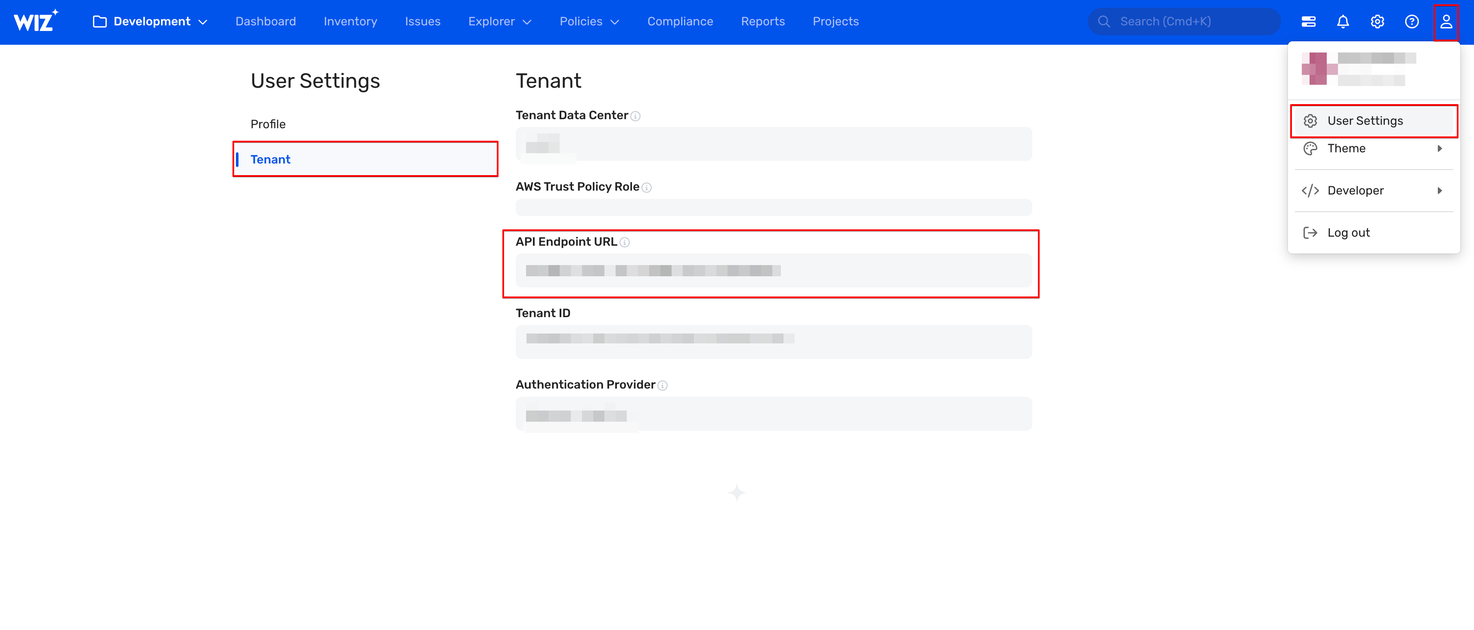
Click the User Profile icon available at the top right of the screen and click the User Settings option.
-
Click the Tenant option from the left options menu.
-
The system displays the API Endpoint URL.
-
Copy and save the API URL to use while configuring the Wiz integration.
-
-
Get the Client ID and Client Secret
You must create a service account in Wiz to generate the Client ID and Client Secret. Follow the below steps to get the Client ID and Client Secret:
-
Login to Wiz with the Project Admin role.
-
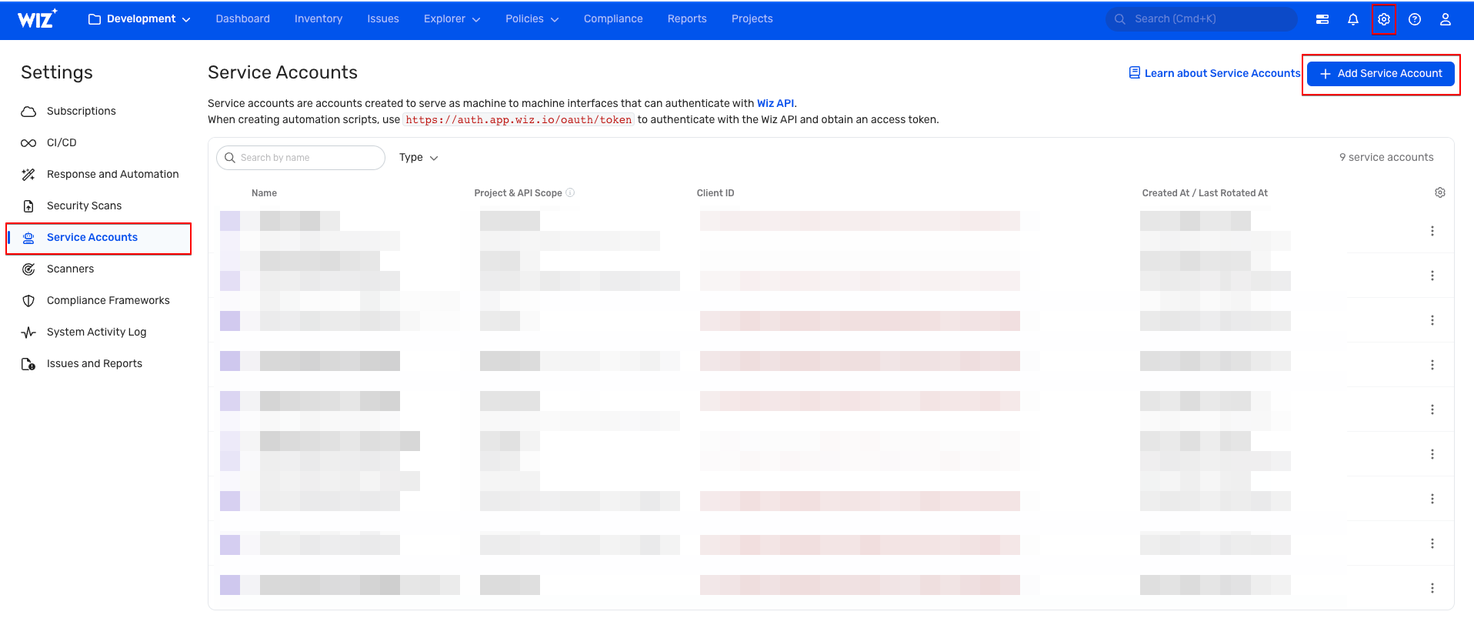
Click the Settings icon available at the top-right of the page.
-
On the Settings page, Click Service Accounts from the left menu.
-
Create a Service Account:
- Click Add Service Account.
- Provide a descriptive Service Account Name.
- Type: Select Custom Integration (GraphQL API).
- Project: Choose the relevant project(s).
- API Scopes: Select only the
read:projects,read:issues,read:vulnerabilities,read:inventoryandread:sbom_artifactspermissions. - Click Add Service Account at the bottom of the page to save.
-
Retrieve Credentials: Wiz will display your Client ID and Client Secret.
-
Save Credentials: Copy and store them securely for use in Port.
-
Setup
Choose your preferred installation method below. Not sure which to pick? See the installation methods overview.
Configuration
Port integrations use a YAML mapping block to ingest data from the third-party api into Port.
The mapping makes use of the JQ JSON processor to select, modify, concatenate, transform and perform other operations on existing fields and values from the integration API.
Default mapping configuration
This is the default mapping configuration for this integration:
Default mapping configuration (Click to expand)
createMissingRelatedEntities: true
deleteDependentEntities: true
resources:
- kind: project
  selector:
    query: 'true'
  port:
    entity:
      mappings:
        blueprint: '"wizProject"'
        identifier: .id
        title: .name
        properties:
          archived: .archived
          businessUnit: .businessUnit
          description: .description
- kind: issue
  selector:
    query: 'true'
  port:
    entity:
      mappings:
        blueprint: '"wizIssue"'
        identifier: .id
        title: .entitySnapshot.name + " | " + .entitySnapshot.type
        properties:
          url: .id as $id | "https://app.wiz.io/issues#~(issue~'" + $id + ")"
          status: .status
          severity: .severity
          vulnerabilityType: .type
          notes: .notes
          wizIssueID: .entitySnapshot.id
          cloudResourceType: .entitySnapshot.type
          resourceName: .entitySnapshot.name
          cloudPlatform: .entitySnapshot.cloudPlatform
          linkToResource: if .entitySnapshot.cloudProviderURL == "" then null else .entitySnapshot.cloudProviderURL end
          cloudResourceID: .entitySnapshot.providerId
          cloudRegion: .entitySnapshot.region
          resourceGroupExternalId: .entitySnapshot.resourceGroupExternalId
          subscriptionExternalId: .entitySnapshot.subscriptionExternalId
          subscriptionName: .entitySnapshot.subscriptionName
          subscriptionTags: .entitySnapshot.subscriptionTags
          resourceTags: .entitySnapshot.tags
          vulnerability: .entitySnapshot
          createdAt: .createdAt
          updatedAt: .updatedAt
          statusChangedAt: .statusChangedAt
          resolvedAt: .resolvedAt
        relations:
          projects: .projects | map(.id)
          serviceTickets: .serviceTickets[].externalId
          control: .sourceRule.id
- kind: control
  selector:
    query: 'true'
  port:
    entity:
      mappings:
        blueprint: '"wizControl"'
        identifier: .id
        title: .name
        properties:
          controlDescription: .controlDescription
          resolutionRecommendation: .resolutionRecommendation
- kind: serviceTicket
  selector:
    query: 'true'
  port:
    entity:
      mappings:
        blueprint: '"wizServiceTicket"'
        identifier: .externalId
        title: .name
        properties:
          url: .url
- kind: vulnerability-finding
  selector:
    query: 'true'
  port:
    entity:
      mappings:
        blueprint: '"wizVulnerabilityFinding"'
        identifier: .id
        title: .name
        properties:
          status: .status
          severity: .severity
          categories: .categories
          version: .version
          score: .score
          description: .description
          detailedName: .detailedName
          artifactMetadata: .artifactType
          remediation: .remediation
          detectionMethod: .detectionMethod
          environments: .environments
          link: .link
          portalUrl: .portalUrl
          origin: .origin
          vulnerabilityExternalId: .vulnerabilityExternalId
          CVEDescription: .CVEDescription
          hasFix: .hasFix
          hasExploit: .hasExploit
          isHighProfileThreat: .isHighProfileThreat
          updatedAt: .updatedAt
          resolvedAt: .resolvedAt
          firstDetectedAt: .firstDetectedAt
          publishedDate: .publishedDate
          rootComponent: .rootComponent
          applicationServices: .applicationServices
        relations:
          projects: .projects | map(.id)
- kind: repository
  selector:
    query: 'true'
  port:
    entity:
      mappings:
        blueprint: '"wizRepository"'
        identifier: .id
        title: .name
        properties:
          url: .url
          platform: .platform
          public: .public
          archived: .archived
          visibility: .visibility
          organization: .organization.id
          branches: .branches | map(.id)
        relations:
          projects: .projects | map(.id)
- kind: technology
  selector:
    query: 'true'
  port:
    entity:
      mappings:
        blueprint: '"wizTechnology"'
        identifier: .id
        title: .name
        properties:
          description: .description
          categories: .categories | map(.name)
          usage: .usage
          status: .status
          risk: .risk
          note: .note
          ownerName: .ownerName
          businessModel: .businessModel
          popularity: .popularity
          projectCount: .projectCount
          codeRepoCount: .codeRepoCount
          isCloudService: .isCloudService
          supportedOperatingSystems: .supportedOperatingSystems
- kind: hosted-technology
  selector:
    query: 'true'
  port:
    entity:
      mappings:
        blueprint: '"wizHostedTechnology"'
        identifier: .id
        title: .name
        properties:
          detectionMethods: .detectionMethods
          installedPackages: .installedPackages
          firstSeen: .firstSeen
          updatedAt: .updatedAt
          cpe: .cpe
        relations:
          technology: .technology.id
Monitoring and sync status
To learn more about how to monitor and check the sync status of your integration, see the relevant documentation.
Mapping & selectors per resource
Use the explorer below to view sample payloads and the resulting Port entities for each resource type. For additional resources and advanced configurations, see the examples page.
Examples
To view and test the integration's mapping against examples of the third-party API responses, use the jq playground in your data sources page. Find the integration in the list of data sources and click on it to open the playground.
Examples of blueprints and the relevant integration configurations can be found on the Wiz examples page.