Auto-label your GitHub PRs with Sonar Scans
This guide includes steps that require integration with GitHub:
- GitHub (Ocean) - uses the Ocean framework. We strongly recommend this integration for new and migrated setups.
- GitHub (Sunset) - uses a GitHub app that is in sunset and will be fully deprecated on September 15, 2026.
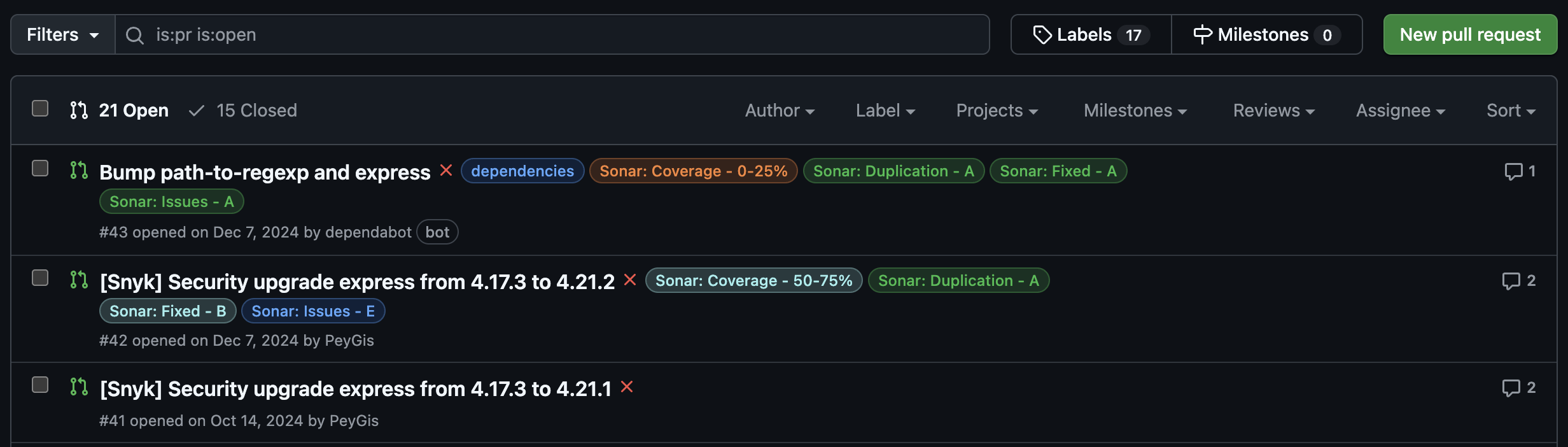
This guide demonstrates how to set up an automation in Port that applies color-coded labels to your GitHub pull requests based on SonarCloud scan reports. These labels help you classify vulnerabilities, code smells, security hotspots, and bugs right from the pull request view.
Common use cases
- Enforce code quality standards: Highlight PRs with poor test coverage, high duplication, or critical issues.
- Encourage developer accountability: Make quality regressions visible and traceable at the PR level.
Prerequisites
This guide assumes the following:
- You have a Port account and have completed the onboarding process.
- Port's SonarQube integration is installed in your account.
- GitHub (Ocean)
- GitHub (Sunset)
- GitHub Ocean integration is installed in your account.
- Port's GitHub app is installed in your account.
Set up data model
To connect scan data with the correct pull requests, you'll need to link the Pull Request blueprint with the SonarQube Analysis blueprint.
Follow the Connect GitHub PR to SonarQube analysis guide to set this up.
Set up automation
Once the SonarQube scan entities are linked to their corresponding pull requests, you can configure an automation in Port that triggers a GitHub workflow on PR updates and applies Sonar-based labels directly to the pull request.
This setup involves two parts:
- Defining the automation in Port.
- Creating the GitHub workflow in your dedicated workflows repository.
Add Port secrets
When using the Legacy GITHUB or Ocean INTEGRATION_ACTION invocation methods, you do not need to add GitHub tokens to Port secrets. Ensure your GitHub workflow repository has the required secrets (see the workflow section below).
Define automation backend
-
Go to the Automations page in your portal.
-
Click on the
+ Automationbutton. -
Copy and paste the following JSON configuration into the editor:
- GitHub (Ocean)
- GitHub (Sunset)
Apply SonarCloud label automation (Click to expand)
Replace placeholdersMake sure to replace
<YOUR_GITHUB_OCEAN_INTEGRATION_ID>,<YOUR_GITHUB_ORG>, and<YOUR_GITHUB_REPO>with your GitHub Ocean integration ID and the organization and repository where yourapply-sonar-scan-on-pr.yamlworkflow resides.{"identifier": "addLabelOnGithubPR","title": "Add Sonar Scan Label On PR Updated","description": "Automation to add Sonar scan label to the GitHub PR upon update","trigger": {"type": "automation","event": {"type": "ENTITY_UPDATED","blueprintIdentifier": "githubPullRequest"},"condition": {"type": "JQ","expressions": [".diff.after.relations.sonarAnalysis != null"],"combinator": "and"}},"invocationMethod": {"type": "INTEGRATION_ACTION","installationId": "<YOUR_GITHUB_OCEAN_INTEGRATION_ID>","integrationActionType": "dispatch_workflow","integrationActionExecutionProperties": {"org": "<YOUR_GITHUB_ORG>","repo": "<YOUR_GITHUB_REPO>","workflow": "apply-sonar-scan-on-pr.yaml","workflowInputs": {"prNumber": "{{ .event.diff.after.properties.prNumber | tostring }}","repository": "{{ .event.diff.after.relations.repository }}","sonarEntity": "{{ .event.diff.after.relations.sonarAnalysis }}","runID": "{{ .run.id }}"},"reportWorkflowStatus": true}},"publish": true}Apply SonarCloud label automation (Click to expand)
Replace placeholdersMake sure to replace
<YOUR_GITHUB_ORG>and<YOUR_GITHUB_REPO>with the actual organization and repository where yourapply-sonar-scan-on-pr.yamlworkflow resides.{"identifier": "addLabelOnGithubPR","title": "Add Sonar Scan Label On PR Updated","description": "Automation to add Sonar scan label to the GitHub PR upon update","trigger": {"type": "automation","event": {"type": "ENTITY_UPDATED","blueprintIdentifier": "githubPullRequest"},"condition": {"type": "JQ","expressions": [".diff.after.relations.sonarAnalysis != null"],"combinator": "and"}},"invocationMethod": {"type": "GITHUB","org": "<YOUR_GITHUB_ORG>","repo": "<YOUR_GITHUB_REPO>","workflow": "apply-sonar-scan-on-pr.yaml","workflowInputs": {"prNumber": "{{ .event.diff.after.properties.prNumber | tostring }}","repository": "{{ .event.diff.after.relations.repository }}","sonarEntity": "{{ .event.diff.after.relations.sonarAnalysis }}","runID": "{{ .run.id }}"},"reportWorkflowStatus": true},"publish": true} -
Click
Save.
Create the GitHub workflow
Now let us define the GitHub Actions workflow that receives the input and applies labels to the pull request.
We recommend creating a dedicated repository for the workflows that are used by Port actions.
In your dedicated workflow repository, ensure you have a .github/workflows directory.
-
Create a new file named
apply-sonar-scan-on-pr.yaml -
Copy and paste the following workflow configuration:
Apply SonarCloud labels workflow (Click to expand)
name: Apply Sonar Scan on PRon:workflow_dispatch:inputs:prNumber:required: truetype: stringrepository:required: truetype: stringsonarEntity:required: truetype: stringrunID:required: truetype: stringjobs:analyze_sonar:runs-on: ubuntu-latestenv:GH_TOKEN: ${{ secrets.MY_GITHUB_TOKEN }}steps:- name: Checkoutuses: actions/checkout@v6- name: Fetch Port Access Tokenid: fetch_port_tokenrun: |PORT_ACCESS_TOKEN=$(curl -s -L 'https://api.port.io/v1/auth/access_token' \-H 'Content-Type: application/json' \-H 'Accept: application/json' \-d '{"clientId": "${{ secrets.PORT_CLIENT_ID }}","clientSecret": "${{ secrets.PORT_CLIENT_SECRET }}"}' | jq -r '.accessToken')echo "PORT_ACCESS_TOKEN=$PORT_ACCESS_TOKEN" >> "$GITHUB_ENV"- name: Get Sonar Entity from Portid: get_sonarrun: |sonar_entity_id="${{ github.event.inputs.sonarEntity }}"echo "🔍 Fetching Sonar entity $sonar_entity_id"sonar_response=$(curl -s -X GET "https://api.port.io/v1/blueprints/sonarQubeAnalysis/entities/$sonar_entity_id" \-H "Content-Type: application/json" \-H "Authorization: Bearer ${{ env.PORT_ACCESS_TOKEN }}")echo "$sonar_response"FIXED_ISSUES=$(echo "$sonar_response" | jq '.entity.properties.fixedIssues // 0')NEW_ISSUES=$(echo "$sonar_response" | jq '.entity.properties.newIssues // 0')COVERAGE=$(echo "$sonar_response" | jq '.entity.properties.coverage // 0')DUPLICATIONS=$(echo "$sonar_response" | jq '.entity.properties.duplications // 0')echo "FIXED_ISSUES=$FIXED_ISSUES" >> "$GITHUB_ENV"echo "NEW_ISSUES=$NEW_ISSUES" >> "$GITHUB_ENV"echo "COVERAGE=$COVERAGE" >> "$GITHUB_ENV"echo "DUPLICATIONS=$DUPLICATIONS" >> "$GITHUB_ENV"- name: Classify and Apply Sonar Labelsid: apply_pr_labelrun: |set -erepo="${{ github.event.inputs.repository }}"owner="${{ github.repository_owner }}"pr_number=$(echo "${{ github.event.inputs.prNumber }}" | grep -o '[0-9]\+$')# Classify coverageif (( $(echo "$COVERAGE < 25" | bc -l) )); thencoverage_label="Sonar: Coverage - 0-25%"elif (( $(echo "$COVERAGE < 50" | bc -l) )); thencoverage_label="Sonar: Coverage - 25-50%"elif (( $(echo "$COVERAGE < 75" | bc -l) )); thencoverage_label="Sonar: Coverage - 50-75%"elsecoverage_label="Sonar: Coverage - 75-100%"fi# Classify new issuesif (( NEW_ISSUES == 0 )); thennew_issues_label="Sonar: Issues - A"elif (( NEW_ISSUES <= 5 )); thennew_issues_label="Sonar: Issues - B"elif (( NEW_ISSUES <= 10 )); thennew_issues_label="Sonar: Issues - C"elif (( NEW_ISSUES <= 20 )); thennew_issues_label="Sonar: Issues - D"elsenew_issues_label="Sonar: Issues - E"fi# Classify fixed issuesif (( FIXED_ISSUES == 0 )); thenfixed_issues_label="Sonar: Fixed - A"elif (( FIXED_ISSUES <= 5 )); thenfixed_issues_label="Sonar: Fixed - B"elif (( FIXED_ISSUES <= 10 )); thenfixed_issues_label="Sonar: Fixed - C"elif (( FIXED_ISSUES <= 20 )); thenfixed_issues_label="Sonar: Fixed - D"elsefixed_issues_label="Sonar: Fixed - E"fi# Classify duplicationsif (( $(echo "$DUPLICATIONS < 5" | bc -l) )); thendup_label="Sonar: Duplication - A"elif (( $(echo "$DUPLICATIONS < 10" | bc -l) )); thendup_label="Sonar: Duplication - B"elif (( $(echo "$DUPLICATIONS < 20" | bc -l) )); thendup_label="Sonar: Duplication - C"elif (( $(echo "$DUPLICATIONS < 30" | bc -l) )); thendup_label="Sonar: Duplication - D"elsedup_label="Sonar: Duplication - E"filabels_to_apply=("$coverage_label" "$new_issues_label" "$fixed_issues_label" "$dup_label")echo "🏷️ Will apply labels: ${labels_to_apply[*]}"# Define a function to assign colors based on gradeget_label_color() {label="$1"if [[ "$label" == *" - A" || "$label" == *"75-100%" ]]; thenecho "2cbe4e" # Greenelif [[ "$label" == *" - B" || "$label" == *"50-75%" ]]; thenecho "a2eeef" # Light blueelif [[ "$label" == *" - C" || "$label" == *"25-50%" ]]; thenecho "fbca04" # Yellowelif [[ "$label" == *" - D" || "$label" == *"0-25%" ]]; thenecho "f66a0a" # Orangeelseecho "d73a4a" # Red for E or anything elsefi}# Create labels if they don’t exist, using dynamic colorsfor label in "${labels_to_apply[@]}"; docolor=$(get_label_color "$label")echo "🛠️ Ensuring label exists: $label with color #$color"curl -s -o /dev/null -w "%{http_code}" -X POST "https://api.github.com/repos/$owner/$repo/labels" \-H "Authorization: Bearer $GH_TOKEN" \-H "Accept: application/vnd.github+json" \-d "{\"name\": \"$label\", \"color\": \"$color\"}" | grep -qE "201|422"done# Apply to PRecho "🏷️ Applying labels to PR #$pr_number..."curl -s -X POST "https://api.github.com/repos/$owner/$repo/issues/$pr_number/labels" \-H "Authorization: Bearer $GH_TOKEN" \-H "Accept: application/vnd.github+json" \-d "{\"labels\": [\"${labels_to_apply[0]}\", \"${labels_to_apply[1]}\", \"${labels_to_apply[2]}\", \"${labels_to_apply[3]}\"]}"- name: Update Port action statusif: always()run: |if [ "${{ steps.apply_pr_label.outcome }}" == "failure" ]; thenSTATUS="FAILURE"elseSTATUS="SUCCESS"ficurl -L -X PATCH "https://api.port.io/v1/actions/runs/${{ github.event.inputs.runID }}" \-H "Content-Type: application/json" \-H "Accept: application/json" \-H "Authorization: Bearer ${{ env.PORT_ACCESS_TOKEN }}" \-d '{"status": "'"$STATUS"'","statusLabel": "'"$STATUS"'","link": "'"${{ github.server_url }}/${{ github.repository }}/actions/runs/${{ github.run_id }}"'","summary": "Pull request labeling completed with status: '"$STATUS"'"}'Required GitHub SecretsFor this workflow to function properly, you need to add the following secrets to your GitHub repository:
PORT_CLIENT_ID: The client ID of your Port account.PORT_CLIENT_SECRET: The client secret of your Port account.MY_GITHUB_TOKEN: The fine grained GitHub personal access token withRead and Writeaccess to issues, pull requests across all repositories in your organization.
-
Commit and push the changes to your repository.
Once a pull request associated with a SonarCloud analysis is updated, the automation will be triggered automatically. It will evaluate the latest scan results and apply color-coded labels to the PR, reflecting the quality status of the code.