Auto-remediate insecure cloud resources with AI
An insecure cloud resource is a task like any other: something needs to change, and the right fix can often be delegated to a coding agent. This guide applies the same autonomous ticket resolution (ATR) pattern used for tickets and vulnerabilities to cloud misconfigurations.
Many organizations have strict policies requiring that all cloud resources meet specific security standards:
- Data storage must be encrypted at rest
- S3 buckets must not be publicly accessible
- ElastiCache must have deletion protection enabled
- RDS instances must be private and encrypted
Relying on manual checks or ad-hoc fixes is error-prone and delays remediation. With Port + Claude Code, you can enforce policies at creation time and generate infrastructure-as-code (IaC) patches automatically.
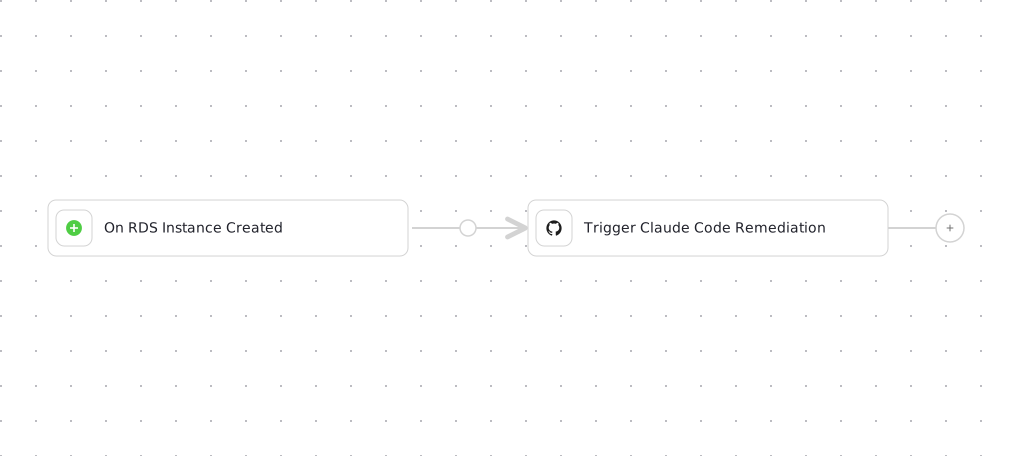
This guide demonstrates how to create an AI-powered workflow that automatically detects insecure cloud resources and generates Terraform patches to remediate security violations.
Common use cases
- Enforce security policies by detecting and fixing unencrypted storage, public access, or missing deletion protection
- Reduce manual security reviews by automating the detection and remediation of common misconfigurations
Common use cases
- Enforce security policies by detecting and fixing unencrypted storage, public access, or missing deletion protection.
- Reduce manual security reviews by automating the detection and remediation of common misconfigurations.
- Maintain compliance by ensuring all cloud resources meet security requirements automatically.
Prerequisites
This guide assumes the following:
- You have access to Port and have completed the onboarding process
- You have access to workflows
- You have installed Port's AWS integration (or GCP/Azure)
- You have deployed the
claude-backend.yamlGitHub Actions workflow described in the Trigger Claude Code from Port guide, along with its secrets (PORT_CLIENT_ID,PORT_CLIENT_SECRET,PORT_GITHUB_TOKEN,ANTHROPIC_API_KEY). The workflow below dispatches it directly, so you only need that GitHub Actions workflow, not theRun Claude Codeself-service action from that guide.
While this guide focuses on AWS RDS instances and uses Claude Code, the same approach can be applied to other cloud providers and resource types by adjusting the blueprint schemas and security policies. You can also use other AI coding agents like GitHub Copilot or Gemini to generate the infrastructure-as-code patches by swapping the dispatched GitHub Actions workflow.
Set up data model
We need to create blueprints to support our cloud resource security workflow. These blueprints will track cloud resources and their security compliance status.
Create RDS Instance blueprint
When installing the AWS integration in Port, the AWS Account blueprint is created by default.
However, the RDS Instance blueprint is not created automatically so we will need to create it manually.
-
Go to the Data model page in Port.
-
Click on
+ Blueprint. -
Click on the
{...} Edit JSONbutton. -
Copy and paste the following JSON configuration:
RDS Instance blueprint (click to expand)
{"identifier": "rdsInstance","description": "This blueprint represents an AWS RDS DBInstance in our context lake","title": "RDS Instance","icon": "AWS","schema": {"properties": {"link": {"type": "string","format": "url","title": "Link"},"dbInstanceClass": {"type": "string","title": "DB Instance Class"},"dbInstanceStatus": {"type": "string","title": "DB Instance Status"},"engine": {"type": "string","title": "Engine"},"storageType": {"type": "string","title": "Storage Type"},"engineVersion": {"type": "string","title": "Engine Version"},"port": {"type": "number","title": "Port"},"allocatedStorage": {"type": "number","title": "Allocated Storage"},"endpoint": {"type": "string","title": "Endpoint"},"multiAZ": {"type": "boolean","title": "Multi-AZ"},"deletionProtection": {"type": "boolean","title": "Deletion Protection"},"availabilityZone": {"type": "string","title": "Availability Zone"},"masterUsername": {"type": "string","title": "Master Username"},"publicAccess": {"type": "boolean","title": "Public Access"},"vpcSecurityGroups": {"type": "array","items": {"type": "string"},"title": "VPC Security Groups"},"arn": {"type": "string","title": "ARN"},"storageEncrypted": {"icon": "DefaultProperty","type": "boolean","title": "Storage Encrypted"}},"required": []},"mirrorProperties": {},"calculationProperties": {},"aggregationProperties": {},"relations": {"account": {"title": "Account","target": "awsAccount","required": true,"many": false}}} -
Click
Createto save the blueprint.
Update integration mapping
-
Go to the data sources page in Port.
-
Select the AWS integration.
-
Add the following YAML block into the editor to ingest storage data from AWS:
AWS integration configuration (click to expand)
deleteDependentEntities: truecreateMissingRelatedEntities: trueenableMergeEntity: trueresources:- kind: AWS::Organizations::Accountselector:query: 'true'port:entity:mappings:identifier: .Idtitle: .Nameblueprint: '"awsAccount"'properties:arn: .Arnemail: .Emailstatus: .Statusjoined_method: .JoinedMethodjoined_timestamp: .JoinedTimestamp | sub(" "; "T")- kind: AWS::RDS::DBInstanceselector:query: 'true'useGetResourceAPI: 'true'port:entity:mappings:identifier: .Identifiertitle: .Properties.DBInstanceIdentifierblueprint: '"rdsInstance"'properties:link: >-'https://console.aws.amazon.com/go/view?arn=' +.Properties.DBInstanceArndbInstanceClass: .Properties.DBInstanceClassdbInstanceStatus: .Properties.DBInstanceStatusengine: .Properties.EnginestorageType: .Properties.StorageTypeengineVersion: .Properties.EngineVersionport: .Properties.Endpoint.PortallocatedStorage: .Properties.AllocatedStorageendpoint: .Properties.Endpoint.AddressmultiAZ: .Properties.MultiAZdeletionProtection: .Properties.DeletionProtectionavailabilityZone: .Properties.AvailabilityZonemasterUsername: .Properties.MasterUsernamepublicAccess: .Properties.PubliclyAccessiblevpcSecurityGroups: .Properties.VpcSecurityGroupsarn: .Properties.DBInstanceArninstance_id: .Properties.InstanceIdrelations:account: .__AccountId -
Click
Save & Resyncto apply the mapping.
Build the workflow
We will build a workflow that triggers automatically when a new RDS instance is added to the catalog and violates security policies, then dispatches Claude Code to remediate it.
-
Go to the workflows page in Port.
-
Click + Workflow.
-
Fill out the Create new workflow form, then click Confirm.
-
Click the
{...}button to open the JSON editor and paste the workflow JSON below:Insecure RDS remediation workflow (click to expand)
Repository configurationReplace
<YOUR_GITHUB_OCEAN_INTEGRATION_ID>with your GitHub Ocean integration's installation ID,<GITHUB_ORG>with your GitHub organization,<YOUR-BACKEND-REPOSITORY>with the repository that hostsclaude-backend.yaml, and<YOUR-IAC-REPOSITORY>with the repository containing your Terraform configuration.{"identifier": "insecure_rds_remediation","title": "Insecure RDS Remediation","icon": "AmazonRDS","description": "Detects insecure RDS instances and triggers Claude Code to generate a Terraform remediation patch","nodes": [{"identifier": "trigger","title": "On RDS Instance Created","icon": "AmazonRDS","config": {"type": "EVENT_TRIGGER","event": {"type": "ENTITY_CREATED","blueprintIdentifier": "rdsInstance"},"condition": {"type": "JQ","expressions": [".diff.after.properties.deletionProtection == false",".diff.after.properties.storageEncrypted == false",".diff.after.properties.publicAccess == true"],"combinator": "or"}}},{"identifier": "trigger_claude_code_remediation","title": "Trigger Claude Code Remediation","icon": "Github","description": "Dispatch the Claude Code backend workflow to generate a Terraform patch and open a PR","config": {"type": "INTEGRATION_ACTION","installationId": "<YOUR_GITHUB_OCEAN_INTEGRATION_ID>","integrationProvider": "github-ocean","integrationInvocationType": "dispatch_workflow","integrationActionExecutionProperties": {"org": "<GITHUB_ORG>","repo": "<YOUR-BACKEND-REPOSITORY>","workflow": "claude-backend.yaml","workflowInputs": {"repo_name": "<YOUR-IAC-REPOSITORY>","command": "Here is the current configuration of the RDS instance: {{ .outputs.trigger.diff.after }}.\n\nGenerate a Terraform patch that remediates the following misconfigurations:\n1. Ensure the RDS instance is not publicly accessible (set publicly_accessible = false).\n2. Enable deletion protection (set deletion_protection = true).\n3. Ensure storage is encrypted (set storage_encrypted = true).\n\nThe Terraform must:\n- Be compatible with the existing AWS provider configuration.\n- Preserve existing identifiers (db_instance_identifier).\n- Only update the relevant security fields.\n- If an existing RDS file (e.g., rds.tf or main.tf) exists, append the fix there\n- If no such file exists, create a new file named rds_remediation.tf\nDo not overwrite unrelated files.\n\nAfter generating the code, open a PR with a description summarizing what was fixed and why."},"reportWorkflowStatus": true}}}],"connections": [{"sourceIdentifier": "trigger","targetIdentifier": "trigger_claude_code_remediation"}]} -
Click Apply changes.
This workflow triggers on any RDS instance creation that violates security policies. You can modify the condition to be more specific or add additional security checks based on your organization's requirements.
Configure the workflow
After publishing, you need to replace placeholder values and adjust the Claude Code backend workflow so it no longer depends on a Port action run.
Configure the GitHub integration action
In the trigger_claude_code_remediation node, set installationId to your GitHub Ocean integration's installation ID. You can find this in the Data sources page in Port. Update org and repo in integrationActionExecutionProperties to point at the repository that hosts claude-backend.yaml, and set workflowInputs.repo_name to the IaC repository Claude Code should check out and patch.
Update the Claude Code backend workflow
The claude-backend.yaml workflow from the Trigger Claude Code from Port guide reports progress back to Port using a self-service action's run_id. Since this guide dispatches the workflow directly and tracks status with reportWorkflowStatus: true on the node, update that file as follows:
-
Remove the "Update Port Action Run Status to Success" and "Update Port Action Run Status to Failed" steps entirely. They patch an action run that no longer exists in this flow.
-
In the "Create Claude Code Execution Entity in Port" step, drop the
if: ${{ inputs.run_id != '' }}condition so the entity is always created, and swap the identifier source from the unusedrun_idinput to GitHub's owngithub.run_idcontext:- name: Create Claude Code Execution Entity in Portuses: port-labs/port-github-action@v1with:clientId: ${{ secrets.PORT_CLIENT_ID }}clientSecret: ${{ secrets.PORT_CLIENT_SECRET }}baseUrl: https://api.port.iooperation: UPSERTidentifier: "claude-exec-${{ github.run_id }}"title: "claude-exec-${{ github.run_id }}"icon: "Code"blueprint: "claudeCodeExecution"properties: |-{"prompt": ${{ toJSON(inputs.command) }},"status": "${{ steps.parse_results.outputs.conclusion == 'success' && 'success' || 'failed' }}","executionTime": ${{ steps.parse_results.outputs.duration_ms }},"claudeResponse": ${{ toJSON(steps.parse_results.outputs.claude_response) }},"inputTokens": ${{ steps.parse_results.outputs.input_tokens }},"outputTokens": ${{ steps.parse_results.outputs.output_tokens }},"totalCost": ${{ steps.parse_results.outputs.total_cost }},"repository": "${{ inputs.repo_name }}"}relations: |{"ai_coding_agent": "Claude","repository": "${{ inputs.repo_name }}"}
The run_id workflow input can stay declared but unused. Leaving it in place is harmless.
Test the workflow
To test the remediation workflow:
- Create (or ingest) a cloud resource such as RDS instance that violates one of the policies (e.g.,
publicAccess = true). - Port triggers the workflow automatically.
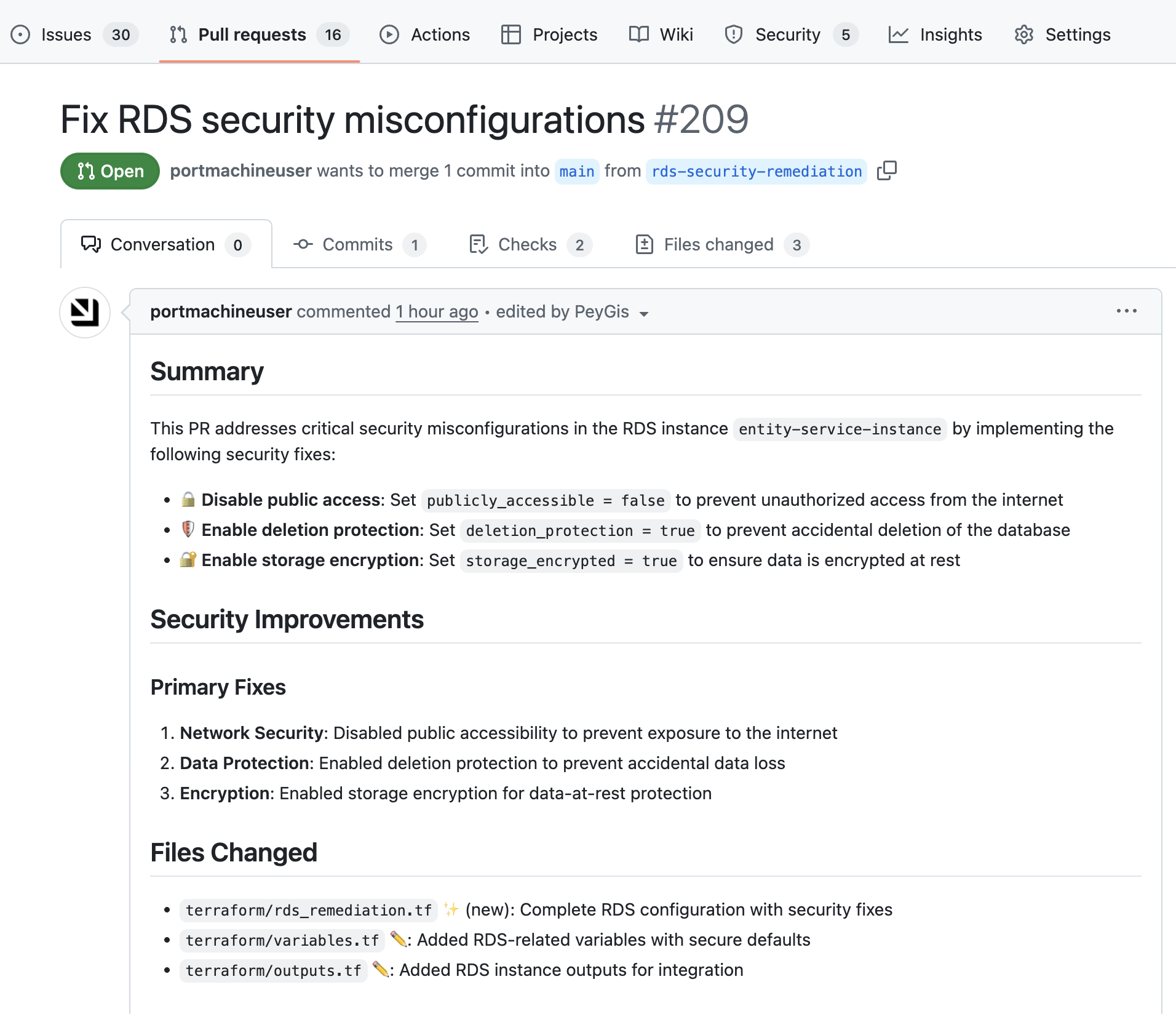
- Claude Code generates a Terraform patch and opens a pull request in your repository.
- Review and merge the PR.
You can follow each run from the Workflow runs tab of your portal.
Extend to other resource types
You can extend this approach to other cloud resources by creating similar blueprints and workflows:
S3 Bucket security
Create an S3 bucket blueprint with properties like:
publicAccessBlockencryptionAtRestversioningEnabled
ElastiCache security
Create an ElastiCache blueprint with properties like:
deletionProtectionencryptionAtRestnetworkType
Security Group rules
Create a security group blueprint to monitor for overly permissive rules:
ingressRulesegressRulescidrBlocks