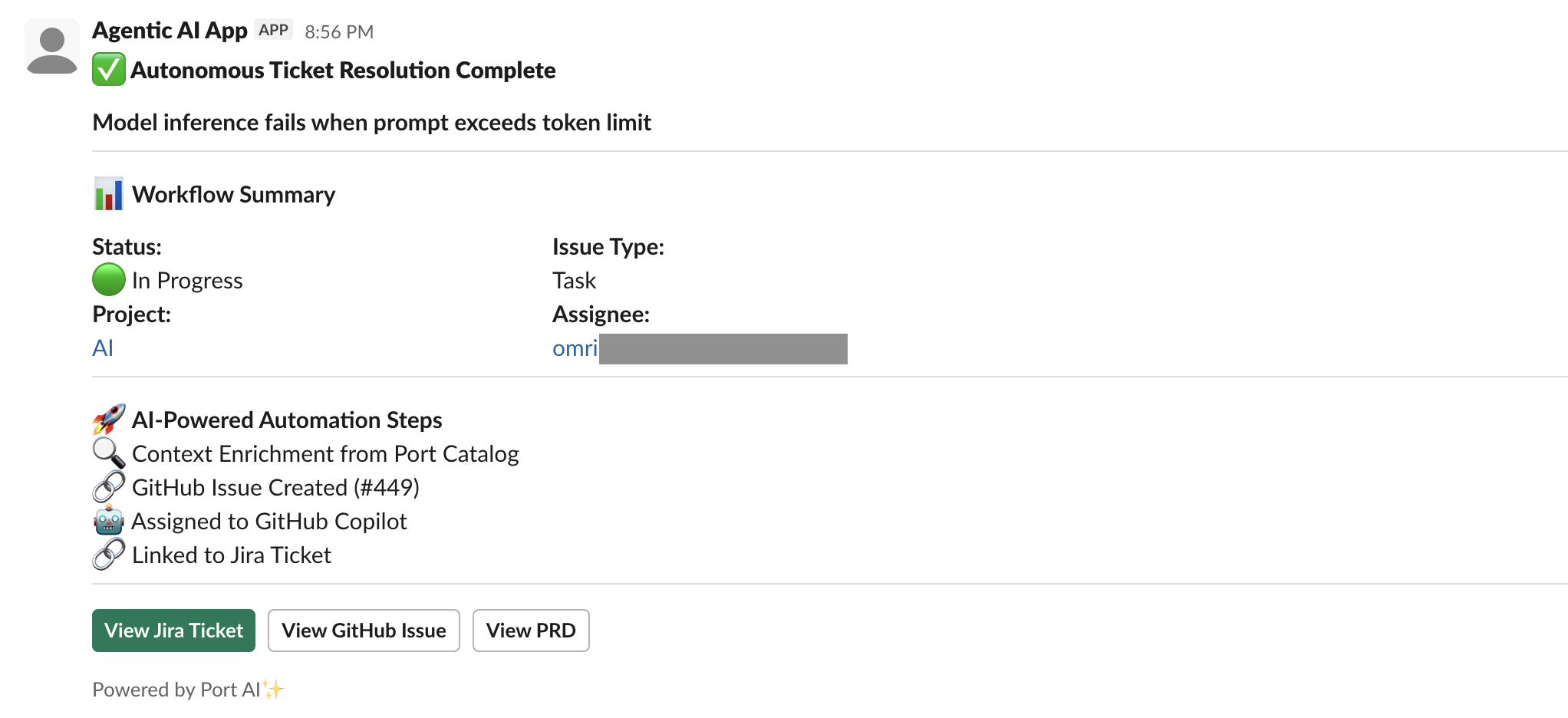
Automatically resolve tickets with coding agents
This guide includes steps that require integration with GitHub:
- GitHub (Ocean) - uses the Ocean framework. We strongly recommend this integration for new and migrated setups.
- GitHub (Sunset) - uses a GitHub app that is in sunset and will be fully deprecated on September 15, 2026.
Coding agents can significantly speed up development, but crucial engineering context often gets lost in the process. This guide shows how to automate the flow from Jira ticket to GitHub issue to coding agent (e.g. GitHub Copilot) and back to Jira.
You can implement this in one of two ways:
-
Workflow — a single Port workflow runs when a Jira ticket moves to In Progress: it enriches the ticket with catalog context, creates a GitHub issue, triggers Copilot, and comments on Jira with the issue link.
-
Actions & Automations — an AI agent creates GitHub issues from Jira tickets (with catalog context), and automations trigger the agent and add the PR link to Jira when Copilot opens a pull request.
Both approaches use the same data model and external setup; only the implementation (workflow vs. actions + automations + AI agent) differs.

Common use cases
- Auto-create PRs for bug fixes to minimize manual work.
- Integrate with Copilot for teams not relying on GitHub Issues.
- Link Jira tickets to PRs to improve cross-platform collaboration.
- Generate GitHub issues from Jira for faster prototyping.
Prerequisites
This guide assumes the following:
- You have a Port account and have completed the onboarding process.
- You have access to a Slack developer account with permissions to create apps
- Port's Jira integration is installed in your account.
- GitHub integration is installed:
- GitHub (Ocean)
- GitHub (Sunset)
- GitHub Ocean integration is installed in your account.
- Port's GitHub app is installed in your account.
- You have completed the setup in the Trigger GitHub Copilot from Port guide, so that Copilot is automatically assigned to GitHub issues created through this guide.
- For the Workflow option: you have access to workflows in Port. Workflows are currently in open beta and available to all users.
While this guide uses GitHub and Jira, you can adapt it for other Git providers (e.g. GitLab, Azure DevOps) and project management tools (e.g. Linear). You can also use other coding agents (e.g. Claude Code, Devin) instead of GitHub Copilot for similar automation.
Set up data model
We will configure the necessary blueprints to support our AI-enhanced coding workflow. This involves updating the Jira issue blueprint with necessary relations.
Update Jira issue blueprint
When you install Port's Jira integration, the Jira project and issue blueprints are created by default. However, we need to update the Jira issue blueprint to add the pull request relation and create a mirror property for the PR link.
-
Go to the builder page of your portal.
-
Find and select your existing Jira issue blueprint (e.g.
jiraIssue). -
Click on
{...} Edit JSON. -
Add the following relation to the
relationssection:Pull request relation (click to expand)
"pull_request": {"target": "githubPullRequest","required": false,"many": false} -
Add the following mirror property to the
mirrorPropertiessection:Pull request link mirror property (click to expand)
"pull_request_link": {"title": "Pull Request Link","path": "pull_request.link"} -
Click
Saveto update the blueprint.
Update GitHub integration mapping
To track pull requests opened by Copilot that are meant to fix Jira issues, we need to update the GitHub integration mapping so that a pull request can be linked to the corresponding Jira issue using the Jira issue key in the PR title.
- GitHub (Ocean)
- GitHub (Sunset)
-
Go to the data sources page of your portal.
-
Find and select your GitHub Ocean integration.
-
Go to the Mapping tab and click
{...} Edit JSON. -
Add the following mapping to the
mappingssection:Pull request mapping (click to expand)
- kind: pull-requestselector:query: ((.title // "") | test("[A-Z]+-[0-9]+")) and (.user.login == "Copilot")port:entity:mappings:identifier: (.title // "") | match("[A-Z]+-[0-9]+").stringblueprint: '"jiraIssue"'properties: {}relations:pull_request: .id|tostring -
Click
Saveto update the integration configuration.
-
Go to the builder page of your portal.
-
Find and select your existing GitHub integration configuration.
-
Click on
{...} Edit JSON. -
Add the following mapping to the
mappingssection:Pull request mapping (click to expand)
- kind: pull-requestselector:query: ((.title // "") | test("[A-Z]+-[0-9]+")) and (.user.login == "Copilot")port:entity:mappings:identifier: (.title // "") | match("[A-Z]+-[0-9]+").stringblueprint: '"jiraIssue"'properties: {}relations:pull_request: .id|tostring -
Click
Saveto update the integration configuration.
Set up external tools
We need Jira API access so that the workflow or automations can add comments to Jira issues.
Set up Jira API access
- Log in to your Jira instance.
- Generate an API token:
- Go to Atlassian Account Settings.
- Click Create API token. Ensure the token has permission to update issues and add comments.
- Copy the generated token (you will need it for the Port secret).
Set up Slack App
-
Create a Slack app and install it on a workspace.
-
Add the following permissions to the Slack app:
- Send messages (Required):
chat:writechat:write.public
- Send messages (Required):
-
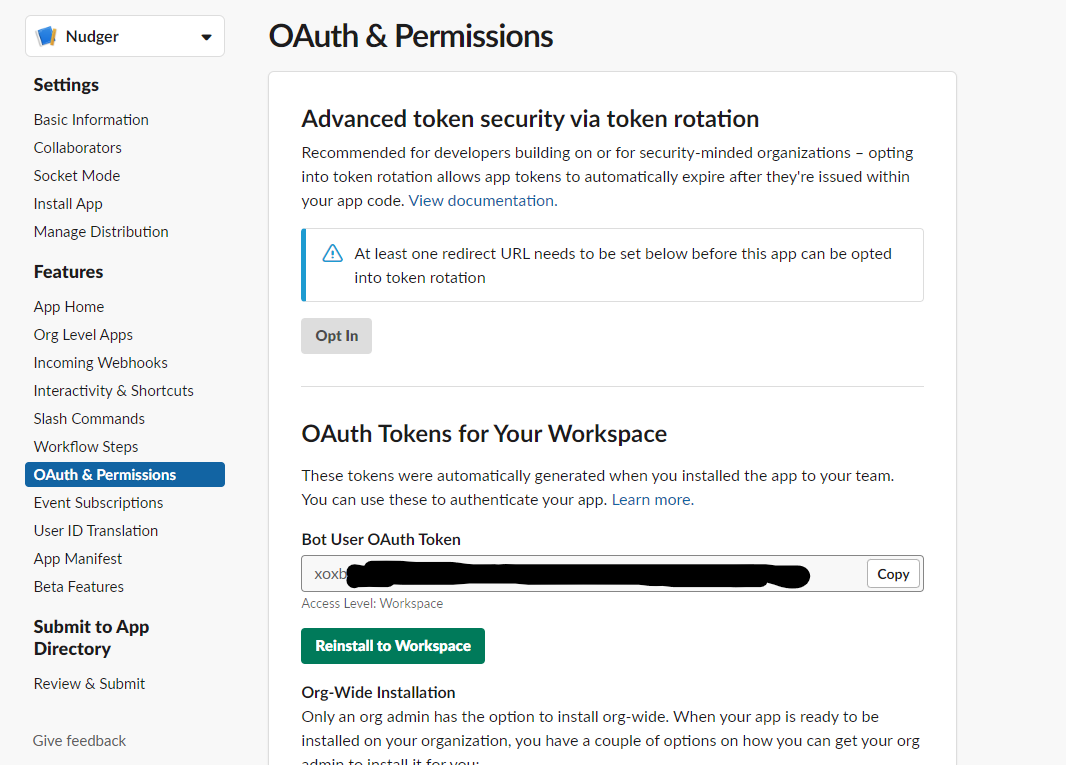
Navigate back to the OAuth & Permissions page. You will see an access token under OAuth Tokens for Your Workspace that you will use in the
SLACK_BOT_TOKENPort secret.
Add Port secrets
To add secrets to your portal:
- Click ... in the top right corner of your Port application.
- Click Credentials.
- Click the Secrets tab.
- Click + Secret and add the following secrets:
GITHUB_TOKEN— A GitHub fine-grained personal access token with read and write permissions for Issues, Metadata, and Pull requests, and Actions (write) for workflow dispatch. Required for the Workflow option; the Actions & Automations option may need it if you use an action that creates GitHub issues via the API.GITHUB_ORG— Your GitHub organization or username. Required for the Actions & Automations option when using thecreate_github_issueaction.SLACK_BOT_TOKEN- Your Slack bot token from the OAuth & Permissions page.
Implementation in Port
Choose one implementation. The data model and external setup above are the same for both.
- Workflow — One workflow runs when a Jira issue moves to In Progress with the required label. It calls Port AI for context, creates a GitHub issue, triggers the Copilot assignment workflow, and comments on the Jira issue with the GitHub link. No separate AI agent; the flow is deterministic and visible in the workflow editor.
- Actions & Automations — You create an AI agent that generates GitHub issues from Jira tickets, and two automations: one that invokes the agent when a Jira ticket moves to In Progress with the copilot label, and one that adds the PR link to the Jira ticket when a related pull request is created.
- Workflow
- Actions & Automations
Build the workflow
Use Port's workflow to run the full sequence: trigger on Jira update → enrich with AI context → create GitHub issue → trigger Copilot → comment on Jira. You can build it with the AI assistant or paste the JSON template.
-
Go to the workflows page of your portal.
-
Click on the + Workflow button in the top-right corner.
-
In the dialog, click Skip to editor to open the workflow editor.
-
Copy and paste this JSON template directly into the editor.
Automatically resolve ticket workflow template (click to expand)
{"title": "Autonomous Ticket Resolution With AI","icon": "Jira","description": "Automatically generate GitHub issues from Jira tickets with rich organizational context when tickets move to In Progress, assign to GitHub Copilot, and link PRs back to Jira","allowAnyoneToViewRuns": true,"nodes": [{"identifier": "trigger","title": "On Jira Ticket Updated","icon": "Jira","description": "Listens for Jira issue updates and triggers the workflow when a ticket transitions from 'To Do' to 'In Progress', is product-approved, and has an assignee.","config": {"type": "EVENT_TRIGGER","event": {"type": "ENTITY_UPDATED","blueprintIdentifier": "jiraIssue"},"condition": {"type": "JQ","expressions": [".diff.before.properties.status == \"To Do\"",".diff.after.properties.status == \"In Progress\"","(.diff.after.properties.labels | index(\"product_approved\")) != null",".diff.after.relations.assignee != null"],"combinator": "and"},"published": true},"variables": {},"links": [],"verbose": true},{"identifier": "extract_context_with_ai","title": "Extract Context with Port AI","icon": "AI","description": "Invokes Port AI to enrich the Jira issue with contextual data from the Port catalog","config": {"type": "AI","userPrompt": "A Jira issue has moved to In Progress.\n\nIssue Details:\n- Key: {{ .outputs.trigger.diff.after.identifier }} \n- Title: {{ .outputs.trigger.diff.after.title }}\n- Type: {{ .outputs.trigger.diff.after.properties.issueType }}\n- Description: {{ .outputs.trigger.diff.after.properties.description }}\n\nRelated Jira Project:\n- Key: {{ .outputs.trigger.diff.after.relations.project }}\n\nYour task:\nQuery the Port catalog using MCP tools to find any related services or repositories connected to this Jira issue.\n\n- Always fetch ALL available properties for each entity\n- Do not limit properties unless explicitly required\n\nExtract ONLY context that actually exists and is directly related via Port relationships.\n\n### Core service context (if available)\n- Service description and tier based on the README\n- Owning team(s)\n- Deployment environments (e.g. prod)\n- Key dependencies (upstream/downstream services)\n\n### Relationship-heavy context (AGGREGATE, DO NOT LIST)\nFor the related service/repository, summarize:\n- PagerDuty incidents:\n - Total number of open incidents\n- Deployments:\n - Number of deployments\n - Environments deployed to\n - Most recent deployment timestamp (if available)\n- Security vulnerabilities:\n - Number of open vulnerabilities\n - Breakdown by severity (e.g. critical / high / medium)\n\nDo NOT include:\n- Raw logs\n- \"None found\" bullet lists\n\nOnly mention a category if at least one related entity exists.\n\nThen prepare:\n1. A GitHub issue title that starts with the Jira key in this exact format: {{ .outputs.trigger.diff.after.identifier }} - <what needs to be done>\n2. A GitHub issue body that:\n- Clearly summarizes the Jira issue in developer-friendly language\n- Adds concise business-relevant Port context (ownership, risk, stability, deploy state)\n- Uses aggregated facts, not exhaustive lists\n- Avoids assumptions or inferred data\n- Is fully self-contained\n\nReturn your response as a JSON object with this exact structure:\n{\n \"title\": \"<GitHub issue title starting with Jira key>\",\n \"body\": \"<GitHub issue body with context>\",\n \"labels\": [\"<Jira key as label>\", \"auto_assign\", \"<additional relevant labels>\"]\n\n\nIMPORTANT OUTPUT CONSTRAINT (HIGHEST PRIORITY)\n- If no relevant Port context exists, use empty strings (\"\") for fields where applicable.\n- You must return ONLY a valid JSON object and nothing else.\n\nOutput format:\nThe response must be parseable by JSON.parse() with no cleanup.\nReturn EXACTLY:\n{\"title\":\"\",\"body\":\"\",\"labels\":[\"\"]}","systemPrompt": "You are a helpful assistant that extracts contextual information from the Port catalogue. You must return ONLY a valid JSON object and nothing else. If you violate this output format, downstream systems will fail.","tools": ["^(list|get|search|load|track|describe)_.*"],"outputSchema": {"type": "object","properties": {"body": {"type": "string"},"title": {"type": "string"},"labels": {"type": "array","items": {"type": "string"}}}}},"variables": {},"links": [],"verbose": false},{"identifier": "has_ai_context","title": "Has AI Response","icon": null,"description": "Checks whether the AI context extraction completed successfully and returned a non-empty response. Prevents downstream actions when AI invocation fails or returns no usable output.","config": {"type": "CONDITION","outlets": [{"identifier": "yes","title": "AI context available","expression": "(.outputs.extract_context_with_ai.response != null)"},{"identifier": "no","title": "AI failed or returned no context","expression": ".outputs.extract_context_with_ai.response == null"}]},"variables": {},"links": [],"verbose": false},{"identifier": "create_github_issue","title": "Create GitHub Issue","icon": "Github","description": "Creates a new GitHub issue using the Jira issue details and AI-generated context","config": {"type": "WEBHOOK","url": "https://api.github.com/repos/<GITHUB_ORG>/<GITHUB_REPO>/issues","agent": false,"synchronized": true,"method": "POST","headers": {"Accept": "application/vnd.github+json","Authorization": "Bearer {{ .secrets.GITHUB_TOKEN }}","X-GitHub-Api-Version": "2022-11-28"},"body": {"body": "{{ .outputs.extract_context_with_ai.response | fromjson | .body }}","title": "{{ .outputs.extract_context_with_ai.response | fromjson | .title }}","labels": "{{ .outputs.extract_context_with_ai.response | fromjson | .labels }}"},"onTimeout": "fail","onFailure": "terminate"},"variables": {},"links": [],"verbose": false},{"identifier": "comment_on_jira_ai_failure","title": "Comment on Jira – AI Context Failed","icon": "Jira","description": "Adds a comment to the Jira issue explaining that automated GitHub issue creation was skipped because AI context extraction failed, and suggests next steps.","config": {"type": "WEBHOOK","url": "https://<YOUR_JIRA_ORGANIZATION_URL>/rest/api/3/issue/{{ .outputs.trigger.jira_key }}/comment","agent": false,"synchronized": true,"method": "POST","headers": {"Accept": "application/json","Content-Type": "application/json","Authorization": "Basic {{ .secrets._JIRA_ATLASSIAN_USER_EMAIL + \":\" + .secrets._JIRA_ATLASSIAN_USER_TOKEN | @base64 }}"},"body": {"body": {"type": "doc","content": [{"type": "paragraph","content": [{"text": "⚠️ Automated GitHub issue creation was skipped because context enrichment failed.","type": "text"}]},{"type": "paragraph","content": [{"text": "What this means:\n• The Jira ticket was detected correctly\n• The AI step did not return usable context\n• No GitHub issue was created to avoid low-quality or incomplete data","type": "text"}]},{"type": "paragraph","content": [{"text": "Next steps:\n• You can retry the automation\n• Or manually create a GitHub issue if work should proceed immediately","type": "text"}]}],"version": 1}},"onTimeout": "fail","onFailure": "terminate"},"variables": {},"links": [],"verbose": false},{"identifier": "trigger_copilot_assignment","title": "Trigger Copilot Assignment Workflow","icon": "Github","description": "Triggers a GitHub Actions workflow that assigns the newly created GitHub issue to GitHub Copilot, enabling AI-assisted implementation.","config": {"type": "WEBHOOK","url": "https://api.github.com/repos/<GITHUB_ORG>/<GITHUB_REPO>/actions/workflows/assign_to_copilot.yml/dispatches","agent": false,"synchronized": true,"method": "POST","headers": {"Accept": "application/vnd.github+json","Authorization": "Bearer {{ .secrets.GITHUB_TOKEN }}","X-GitHub-Api-Version": "2022-11-28"},"body": {"ref": "main","inputs": {"issue_number": "{{.outputs.create_github_issue.response.data.number | tostring}}","repository_name": "<GITHUB_REPO>","repository_owner": "<GITHUB_ORG>"}},"onTimeout": "fail","onFailure": "terminate"},"variables": {},"links": [],"verbose": false},{"identifier": "send_to_slack","title": "Send to Slack","icon": "Slack","description": "Sends a rich, informative Slack notification with workflow summary, automation steps, and quick action buttons","config": {"type": "WEBHOOK","url": "https://slack.com/api/chat.postMessage","agent": false,"synchronized": true,"method": "POST","headers": {"Content-Type": "application/json","Authorization": "Bearer {{ .secrets.SLACK_BOT_TOKEN }}"},"body": {"text": "✅ Autonomous Ticket Resolution Complete - {{ .outputs.trigger.diff.after.identifier }}","blocks": [{"text": {"text": "✅ Autonomous Ticket Resolution Complete","type": "plain_text","emoji": true},"type": "header"},{"text": {"text": "*{{ .outputs.trigger.diff.after.title }}*","type": "mrkdwn"},"type": "section"},{"type": "divider"},{"text": {"text": "📊 *Workflow Summary*","type": "mrkdwn"},"type": "section"},{"type": "section","fields": [{"text": "*Status:*\n🟢 In Progress","type": "mrkdwn"},{"text": "*Issue Type:*\n{{ .outputs.trigger.diff.after.properties.issueType }}","type": "mrkdwn"},{"text": "*Project:*\n<https://app.port.io/jiraProjectEntity?identifier={{ .outputs.trigger.diff.after.relations.project }}|{{ .outputs.trigger.diff.after.relations.project }}>","type": "mrkdwn"},{"text": "*Assignee:*\n{{ .outputs.trigger.diff.after.relations.assignee }}","type": "mrkdwn"}]},{"type": "divider"},{"text": {"text": "🚀 *AI-Powered Automation Steps*\n🔍 Context Enrichment from Port Catalog\n🔗 GitHub Issue Created (#{{.outputs.create_github_issue.response.data.number}})\n🤖 Assigned to GitHub Copilot\n🔗 Linked to Jira Ticket","type": "mrkdwn"},"type": "section"},{"type": "divider"},{"type": "actions","elements": [{"url": "https://app.port.io/jiraIssueEntity?identifier={{ .outputs.trigger.diff.after.identifier }}","text": {"text": "View Jira Ticket","type": "plain_text","emoji": true},"type": "button","style": "primary"},{"url": "{{ .outputs.create_github_issue.response.data.html_url }}","text": {"text": "View GitHub Issue","type": "plain_text","emoji": true},"type": "button"},{"url": "https://app.port.io/jiraIssueEntity?identifier={{ .outputs.trigger.diff.after.identifier }}&activeTab=2","text": {"text": "View PRD","type": "plain_text","emoji": true},"type": "button"}]},{"type": "context","elements": [{"text": "Powered by Port AI✨","type": "mrkdwn"}]}],"channel": "<SLACK_CHANNEL>"},"onTimeout": "fail","onFailure": "terminate"},"variables": {},"links": [],"verbose": false},{"identifier": "update_jira_with_github_link","title": "Add Comment to Jira Issue","icon": "Jira","description": "Adds a comment to the original Jira ticket containing a direct link to the created GitHub issue, ensuring traceability between Jira and GitHub.","config": {"type": "WEBHOOK","url": "https://<YOUR_JIRA_ORGANIZATION_URL>/rest/api/3/issue/{{.outputs.trigger.jira_key}}/comment","agent": false,"synchronized": true,"method": "POST","headers": {"Accept": "application/json","Content-Type": "application/json","Authorization": "Basic {{ .secrets._JIRA_ATLASSIAN_USER_EMAIL + \":\" + .secrets._JIRA_ATLASSIAN_USER_TOKEN | @base64 }}"},"body": {"body": {"type": "doc","content": [{"type": "paragraph","content": [{"text": "✅ GitHub issue created and assigned to Copilot: ","type": "text"},{"text": "{{ .outputs.create_github_issue.response.data.html_url }}","type": "text","marks": [{"type": "link","attrs": {"href": "{{ .outputs.create_github_issue.response.data.html_url }"}}]}]}],"version": 1}},"onTimeout": "fail","onFailure": "terminate"},"variables": {},"links": [],"verbose": false}],"connections": [{"description": "Triggered when a Jira issue meets the workflow criteria and begins AI-based context enrichment.","sourceIdentifier": "trigger","targetIdentifier": "extract_context_with_ai"},{"description": "Routes the AI invocation result into a conditional gate to determine whether downstream actions should proceed.","sourceIdentifier": "extract_context_with_ai","targetIdentifier": "has_ai_context"},{"description": "Continues workflow execution only when AI context extraction succeeds","sourceIdentifier": "has_ai_context","targetIdentifier": "create_github_issue","sourceOutletIdentifier": "yes"},{"description": "Uses the newly created GitHub issue to trigger Copilot assignment.","sourceIdentifier": "create_github_issue","targetIdentifier": "trigger_copilot_assignment"},{"description": "Finalizes the workflow by linking the GitHub issue back to the originating Jira ticket.","sourceIdentifier": "trigger_copilot_assignment","targetIdentifier": "update_jira_with_github_link"},{"description": "Notifies Jira that AI context extraction failed and GitHub issue creation was intentionally skipped.","sourceIdentifier": "has_ai_context","targetIdentifier": "comment_on_jira_ai_failure","sourceOutletIdentifier": "no"},{"description": "Send Slack notification","sourceIdentifier": "update_jira_with_github_link","targetIdentifier": "send_to_slack"}]} -
Click Publish in the top right corner of the editor. If you encounter validation errors, refer to the workflows troubleshooting page.
Configure the workflow
After publishing, replace placeholder values in the workflow nodes.
Specify Jira URL and auth
- In the Comment on Jira – AI Context Failed (
comment_on_jira_ai_failure) and Add Comment to Jira Issue (update_jira_with_github_link) nodes:- Replace
<YOUR_JIRA_ORGANIZATION_URL>in the webhook URL with your Jira organization URL (e.g.example.atlassian.net).
- Replace
Specify Slack channel
- In the Send to Slack (
send_to_slack) node:- Replace
<SLACK_CHANNEL>in the request body with your preferred Slack channel to receive notification about the automation run.
- Replace
Configure the GitHub integration
- In the Create GitHub Issue (
create_github_issue) node:- Replace
<GITHUB_ORG>with your GitHub organization or username. - Replace
<GITHUB_REPO>with your repository name.
- Replace
- In the Trigger Copilot Assignment Workflow (
trigger_copilot_assignment) node:- Replace
<GITHUB_ORG>and<GITHUB_REPO>in the webhook URL with the same values. - Update the
repository_nameandrepository_ownerinputs to match.
- Replace
Create the create_github_issue action
The AI agent uses the create_github_issue action to create GitHub issues from Jira tickets. Create this action first so the agent can invoke it.
- Go to the self-service page of your portal.
- Click on
+ New Action. - Click on the
{...} Edit JSONbutton. - Copy and paste the JSON configuration for your integration type into the editor:
- GitHub (Ocean)
- GitHub (Sunset)
Create GitHub issue action (click to expand)
<GITHUB-ORG>- your GitHub organization or user name.<GITHUB-REPO-NAME>- the repository where the workflow file is stored.<YOUR_GITHUB_OCEAN_INTEGRATION_ID>- your GitHub Ocean integration installation ID.
{
  "identifier": "create_github_issue",
  "title": "Create GitHub Issue",
  "icon": "Github",
  "description": "A self-service action to open a GitHub repository issue with labels",
  "trigger": {
    "type": "self-service",
    "operation": "DAY-2",
    "userInputs": {
      "properties": {
        "title": {
          "icon": "DefaultProperty",
          "type": "string",
          "title": "Issue Title"
        },
        "labels": {
          "type": "array",
          "title": "Label",
          "description": "Issue label",
          "default": ["bug"],
          "items": {
            "enum": [
              "bug",
              "enhancement",
              "documentation",
              "dependencies",
              "question",
              "invalid",
              "duplicate"
            ],
            "enumColors": {
              "bug": "red",
              "enhancement": "turquoise",
              "documentation": "blue",
              "dependencies": "purple",
              "question": "lime",
              "invalid": "yellow",
              "duplicate": "orange"
            },
            "type": "string"
          }
        },
        "content": {
          "type": "string",
          "title": "Content",
          "format": "markdown"
        }
      },
      "required": ["title"],
      "order": ["title", "content", "labels"]
    },
    "blueprintIdentifier": "githubRepository"
  },
  "invocationMethod": {
    "type": "INTEGRATION_ACTION",
    "installationId": "<YOUR_GITHUB_OCEAN_INTEGRATION_ID>",
    "integrationActionType": "dispatch_workflow",
    "integrationActionExecutionProperties": {
      "org": "<GITHUB-ORG>",
      "repo": "<GITHUB-REPO-NAME>",
      "workflow": "create-github-issue.yml",
      "workflowInputs": {
        "title": "{{ .inputs.title }}",
        "content": "{{ .inputs.content }}",
        "labels": "{{ .inputs.labels }}",
        "target_org": "{{ .secrets.GITHUB_ORG }}",
        "target_repo": "{{ .entity.identifier }}",
        "port_context": {
          "blueprint": "{{ .action.blueprint }}",
          "entity": "{{ .entity }}",
          "runId": "{{ .run.id }}",
          "trigger": "{{ .trigger }}"
        }
      },
      "reportWorkflowStatus": true
    }
  },
  "requiredApproval": false
}
Create GitHub issue action (click to expand)
<GITHUB-ORG>- your GitHub organization or user name.<GITHUB-REPO-NAME>- the repository where the workflow file is stored.
{
  "identifier": "create_github_issue",
  "title": "Create GitHub Issue",
  "icon": "Github",
  "description": "A self-service action to open a GitHub repository issue with labels",
  "trigger": {
    "type": "self-service",
    "operation": "DAY-2",
    "userInputs": {
      "properties": {
        "title": {
          "icon": "DefaultProperty",
          "type": "string",
          "title": "Issue Title"
        },
        "labels": {
          "type": "array",
          "title": "Label",
          "description": "Issue label",
          "default": ["bug"],
          "items": {
            "enum": [
              "bug",
              "enhancement",
              "documentation",
              "dependencies",
              "question",
              "invalid",
              "duplicate"
            ],
            "enumColors": {
              "bug": "red",
              "enhancement": "turquoise",
              "documentation": "blue",
              "dependencies": "purple",
              "question": "lime",
              "invalid": "yellow",
              "duplicate": "orange"
            },
            "type": "string"
          }
        },
        "content": {
          "type": "string",
          "title": "Content",
          "format": "markdown"
        }
      },
      "required": ["title"],
      "order": ["title", "content", "labels"]
    },
    "blueprintIdentifier": "githubRepository"
  },
  "invocationMethod": {
    "type": "GITHUB",
    "org": "<GITHUB-ORG>",
    "repo": "<GITHUB-REPO-NAME>",
    "workflow": "create-github-issue.yml",
    "workflowInputs": {
      "title": "{{ .inputs.title }}",
      "content": "{{ .inputs.content }}",
      "labels": "{{ .inputs.labels }}",
      "target_org": "{{ .secrets.GITHUB_ORG }}",
      "target_repo": "{{ .entity.identifier }}",
      "port_context": {
        "blueprint": "{{ .action.blueprint }}",
        "entity": "{{ .entity }}",
        "runId": "{{ .run.id }}",
        "trigger": "{{ .trigger }}"
      }
    },
    "reportWorkflowStatus": true
  },
  "requiredApproval": false
}
- Create the workflow file
.github/workflows/create-github-issue.ymlin your repository. See the Create a GitHub issue guide for the workflow content. - Add the
GITHUB_ORGsecret to Port (see Add Port secrets in the same guide). - Click
Saveto create the action.
Create AI agent
We will create an AI agent that generates GitHub issues from Jira tickets with appropriate context and labels.
Configure the GitHub issue creation AI agent
-
Go to the AI Agents page of your portal.
-
Click on
+ AI Agent. -
Toggle
Json modeon. -
Copy and paste the following JSON schema:
GitHub issue creation AI agent configuration (click to expand)
{"identifier": "work_item_synchronizer","title": "Work Item Synchronizer","icon": "Details","team": [],"properties": {"description": "Ensures seamless workflow continuity across development tools","status": "active","prompt": "Create a GitHub issue that builds on the context of a linked Jira ticket.\n\nThe GitHub issue should:\n1.\tSummarize and clearly explain the task, using the Jira description as a base.\n2.\tAugment the description with relevant insights from the repository — such as the README, setup or contribution instructions, existing issues, or implementation notes — to make the issue fully self-contained.\n3.\tThe **issue title MUST start with the Jira ticket key**, using the format: `<Jira-Ticket-ID> - <what needs to be done>` (e.g., `JIRA-1234 - Add missing lint configuration`). This ensures PRs created by Copilot are linkable back to Jira.\n4.\tAdd GitHub labels, including one with the Jira ticket key (e.g., `JIRA-1234`), and any additional relevant labels (e.g., bug, enhancement, infra).\n5.\tAlso include a label named `auto_assign` in all creations.\n6. The GitHub issue body should end with the following directive:\n🚨 **IMPORTANT NOTE FOR COPILOT**: When creating the pull request to resolve this issue:\n 1. You **must ALWAYS include the Jira ticket ID** (e.g., `JIRA-1234`) in the **PR title**.\n 2. Do **not** rename the PR title or remove the Jira ticket reference.\n 3. Add GitHub labels with the Jira ticket key (e.g., `JIRA-1234`) to the PR.\n\nIf no direct match can be confidently made (e.g., across multiple repos), make a best guess, and clearly state any assumptions in the issue body.","execution_mode": "Automatic","conversation_starters": [],"tools": ["^(list|search|track|describe)_.*","^run_create_github_issue$"]},"relations": {}}MCP enhanced capabilitiesThe AI agent uses MCP (Model Context Protocol) enhanced capabilities to discover relevant blueprint entities via its tools. The
^(list|search|track|describe)_.*pattern lets the agent access and analyze related entities in your software catalog. We also add^run_create_github_issue$so the agent can create GitHub issues from Jira tickets. -
Click
Createto save the agent.
Set up automations
We will create two automations:
- Trigger the AI agent when Jira tickets move to In Progress with the copilot label.
- Comment on the Jira ticket with the related pull request link when a PR is linked.
Automation to trigger AI agent
This automation can be configured to trigger on different criteria (e.g. label, properties, or ownership), such as: automatically fix small bugs, fix security issues with critical SLA, or only tasks in repositories that are onboarded to the AI agents and are considered low-risk.
-
Go to the automations page of your portal.
-
Click on
+ Automation. -
Copy and paste the following JSON schema:
Create GitHub issue from Jira automation (click to expand)
{"identifier": "create_github_issue_from_jira","title": "Create a GitHub issue from Jira ticket","description": "When Jira issue moves to In Progress with Copilot label, create a GitHub issue","icon": "Github","trigger": {"type": "automation","event": {"type": "ENTITY_UPDATED","blueprintIdentifier": "jiraIssue"},"condition": {"type": "JQ","expressions": [".diff.after.properties.status == \"In Progress\"",".diff.before.properties.status == \"To Do\"","(.diff.after.properties.labels | index(\"copilot\")) != null"],"combinator": "and"}},"invocationMethod": {"type": "WEBHOOK","url": "https://api.port.io/v1/agent/work_item_synchronizer/invoke","agent": false,"synchronized": true,"method": "POST","headers": {"RUN_ID": "{{ .run.id }}","Content-Type": "application/json"},"body": {"prompt": "Jira Task title: \"{{.event.diff.after.title}}\"\n. Jira Task identifier: \"{{.event.diff.after.identifier}}\"\n Jira Task description: \"{{.event.diff.after.properties.description}}\"\nRepository:{{.event.diff.after.relations.repository}}.","labels": {"source": "create_github_issue_automation","jira_issue_id": "{{ .event.diff.after.identifier }}"}}},"publish": true} -
Click
Createto save the automation.
Automation to comment on the Jira ticket with the PR link
This automation adds a comment to the Jira ticket when a new pull request is linked (e.g. by the GitHub integration), so the ticket shows the PR link.
-
Go back to the automations page of your portal.
-
Click on
+ Automation. -
Copy and paste the following JSON schema:
Add PR link to Jira issue automation (click to expand)
Atlassian domain replacementReplace
<YOUR_ATLASSIAN_DOMAIN>with your actual Atlassian domain in the webhook URL.{"identifier": "add_pr_link_to_jira_issue","title": "Add PR Link to Jira Issue","description": "An automation that adds the PR link to the Jira issue as a comment","icon": "GitPullRequest","trigger": {"type": "automation","event": {"type": "ENTITY_UPDATED","blueprintIdentifier": "jiraIssue"},"condition": {"type": "JQ","expressions": [".diff.after.relations.pull_request != .diff.before.relations.pull_request"],"combinator": "and"}},"invocationMethod": {"type": "WEBHOOK","url": "https://<YOUR_ATLASSIAN_DOMAIN>.atlassian.net/rest/api/3/issue/{{ .event.diff.before.identifier }}/comment","agent": false,"synchronized": true,"method": "POST","headers": {"RUN_ID": "{{ .run.id }}","Authorization": "Basic {{ .secrets._JIRA_ATLASSIAN_USER_EMAIL + \":\" + .secrets._JIRA_ATLASSIAN_USER_TOKEN | @base64 }}","Content-Type": "application/json"},"body": {"body": {"type": "doc","version": 1,"content": [{"type": "paragraph","content": [{"type": "text","text": "A new pull request identified for this ticket. Find the link below:"}]},{"type": "paragraph","content": [{"type": "text","text": "View Pull Request","marks": [{"type": "link","attrs": {"href": "{{ .event.diff.after.properties.pull_request_link }}"}},{"type": "strong"}]}]}]}}},"publish": true} -
Click
Createto save the automation.
Test the implementation
After you complete either the Workflow or the Actions & Automations setup, use the steps below to verify that ticket resolution runs correctly.
Trigger a test Jira ticket update
- Go to your Jira instance and find a test ticket.
- Add the required label:
- Workflow: add the product_approved label and ensure the ticket has an assignee.
- Actions & Automations: add the copilot label.
- Move the ticket status from To Do to In Progress.
Verify GitHub issue creation
- Go to your GitHub repository.
- Verify that a new issue was created with the appropriate title (starting with the Jira key), description, and labels.
- Check that the issue has the
auto_assignlabel.
Test pull request linking
- Verify that the GitHub issue is automatically assigned to Copilot.
- Confirm that a pull request is created (with the Jira ticket key in the title for the Actions & Automations flow).
- Check the Jira ticket for a comment: Workflow adds the GitHub issue link; Actions & Automations adds the PR link when the PR is linked to the Jira issue.

- Check the Slack channel for the sent notification.