Bundle skills into plugins
A registry full of individually-installable skills still means installing them one at a time, whether it's a developer, a coding agent, or an automated hook doing the installing. A plugin solves that: it's an installable unit that can bundle multiple agentic artifacts together, skills, agents, MCP servers, hooks, and more, so a single install command sets up everything needed for a role, a project, or a domain. Every major provider defines its own version of the shape: see Claude Code's plugin reference, Cursor's plugin docs, and GitHub Copilot's plugin docs. Broadly, a plugin is a directory (skills/, agents/, .mcp.json, hooks/, and so on) with an optional manifest describing what's inside.
This guide adds plugins to the registry you've already built: model every plugin as an entity, get an AI-driven suggestion when a newly certified skill belongs in one, and give reviewers a self-service way to apply or dismiss that suggestion.
We'll build this in three parts:
- Ingest plugins into the registry - model every plugin your org already has as a Port entity, alongside the skills from the first guide.
- Suggest bundling a certified skill into a plugin - extend the Skill Certification Review workflow so it flags when a newly certified skill's purpose overlaps with an existing plugin, instead of leaving plugin membership to whoever remembers to check.
- Apply or dismiss a bundling suggestion - give reviewers self-service workflows that either open a pull request adding the skill into the plugin, or dismiss the suggestion, and surface open suggestions on the Skills Lifecycle Control dashboard.
Common use cases
- Group skills by role, project, or domain so installing "the frontend toolkit" installs every skill a frontend engineer needs in one command, instead of five separate installs.
- Group a skill with the agents and MCP servers it depends on, so installing the plugin gets you everything that skill actually needs to run, not just the skill file on its own.
- Give every team, or every onboarding checklist, one plugin to install instead of walking a new hire through which of dozens of individual skills apply to them.
Prerequisites
This guide assumes you have:
- The skill blueprint from Set up a skills registry, and the Skill Certification Review workflow from Certify skills to meet industry and org standards.
- A GitHub repository with one or more agent plugins, laid out with the symlink convention covered below. This guide uses skills-registry-demo's layout: a top-level
skills/directory of real files, and aplugins/<name>/folder per plugin. Any repo following that convention works, whether or not it's the same repo your skills live in. - A Port account with permissions to create blueprints and edit workflows.
Step 1: Ingest plugins into the registry
Before a plugin can be discovered or bundled into automatically, Port needs to know it exists. We'll model each plugin as an entity, the same way the first guide modeled each skill.
Create the agent plugin blueprint
-
Go to the Data model page in Port.
-
Click on
+ Blueprint. -
Click the
...button then select{...} Edit JSON. -
Copy and paste the following JSON configuration:
Agent plugin blueprint (click to expand)
{"identifier": "agentPlugin","title": "Agent Plugin","icon": "Plug","ownership": {"type": "Direct","title": "Owning Teams"},"schema": {"properties": {"description": {"title": "Description","type": "string"},"version": {"title": "Version","type": "string"},"source": {"title": "Source","type": "string"},"supportsClaudeCode": {"title": "Supports Claude Code","type": "boolean"},"supportsCursor": {"title": "Supports Cursor","type": "boolean"},"folderUrl": {"title": "Plugin Folder URL","type": "string","format": "url","description": "Direct link to the plugin's folder on GitHub"}},"required": ["description"]},"calculationProperties": {"installClaudeCode": {"title": "Claude Code Install Command","type": "string","format": "markdown","description": "Not a shell CLI command - typed inside the interactive claude REPL. Only shown when this plugin supports Claude Code.","calculation": "if .properties.supportsClaudeCode then \"/plugin marketplace add <your-org>/<your-plugins-repo> && /plugin install \" + (.properties.folderUrl | split(\"/\") | last) + \"@<your-plugins-repo>\" else null end"},"installCursor": {"title": "Cursor Install Command","type": "string","format": "markdown","description": "Not a shell CLI command - typed in Cursor's editor/chat. Only shown when this plugin supports Cursor.","calculation": "if .properties.supportsCursor then \"/add-plugin \" + .properties.folderUrl else null end"}},"relations": {"skills": {"title": "Skills","target": "skill","required": false,"many": true}}} -
Click Save to create the blueprint.
A few things are worth calling out:
installClaudeCodeandinstallCursoraren't shell commands. Unlike the skill blueprint'scliInstallfrom Set up a skills registry, which runs in a terminal, both of these are typed into an interactive session: Claude Code's own REPL (/plugin marketplace add ..., then/plugin install <plugin>@<marketplace>), or Cursor's editor/chat (/add-plugin <folder-url>). Replace<your-org>/<your-plugins-repo>with your actual GitHub org and repo, and make sure it matches thenamefield in that repo's.claude-plugin/marketplace.json, since that's what Claude Code's marketplace name has to match.skillsis the relation that makes a plugin's bundle visible in Port, not just on disk. The mapping below can't populate it on its own, we'll backfill it with a small script after.- Group scoping and a production readiness scorecard are optional, and not included above. If you want them, add the same
grouprelation,group_identifiersmirror property, and permission policy from the skill blueprint's Step 2: Assign skills to groups, and the same scorecard shape from Score skill quality with a scorecard, swappingskillforagentPluginin both.
Map plugins from your GitHub repo
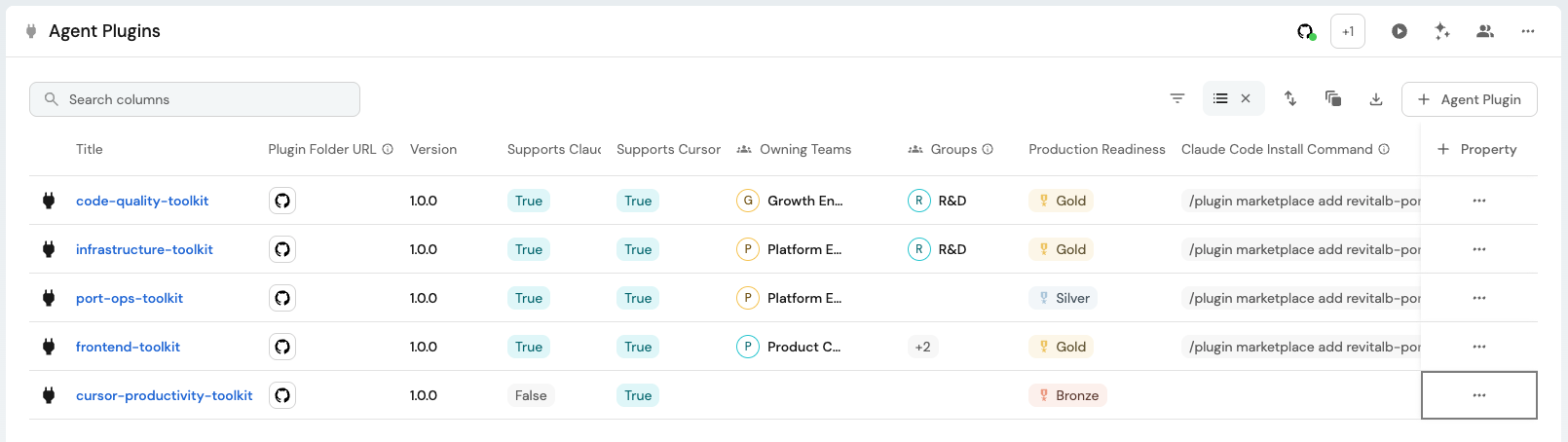
A plugin's manifest, the file describing its name, version, and description, isn't standardized across coding agents yet. Claude Code looks for .claude-plugin/plugin.json, Cursor for .cursor-plugin/plugin.json, and other providers (Codex, OpenCode, and more) each have their own path and format, see the GitHub Ocean integration's provider table for the full list. In practice, that means a plugin meant to work across providers ships more than one manifest side by side, one per provider it supports, for example code-quality-toolkit, which carries both a .claude-plugin/plugin.json and a .cursor-plugin/plugin.json. We modeled that above as a supports<Provider> boolean per provider, map plugin manifests with the GitHub Ocean integration's file kind to populate them, one resource per provider manifest you care about, each contributing that provider's fields onto the same entity:
-
Go to the data sources page in Port.
-
Find your GitHub integration and click Manage.
-
Go to the Mapping tab.
-
Click
{...} Edit YAML. -
Add the following two resources, one per manifest file, both mapping onto the same
agentPluginidentifier so they merge onto one entity per plugin folder:GitHub Ocean plugin manifest mapping (click to expand)
deleteDependentEntities: falseresources:- kind: fileselector:query: 'true'files:- path: plugins/*/.claude-plugin/plugin.jsonorganization: <your-org>repos:- name: <your-plugins-repo>branch: mainport:entity:mappings:identifier: '"<your-org>/<your-plugins-repo>/" + (.path | split("/")[1])'title: .content.nameblueprint: '"agentPlugin"'properties:description: .content.descriptionversion: .content.versionfolderUrl: '"https://github.com/<your-org>/<your-plugins-repo>/tree/main/" + (.path | split("/")[0:2] | join("/"))'source: '"github"'supportsClaudeCode: 'true'- kind: fileselector:query: 'true'files:- path: plugins/*/.cursor-plugin/plugin.jsonorganization: <your-org>repos:- name: <your-plugins-repo>branch: mainport:entity:mappings:identifier: '"<your-org>/<your-plugins-repo>/" + (.path | split("/")[1])'title: .content.nameblueprint: '"agentPlugin"'properties:description: .content.descriptionversion: .content.versionfolderUrl: '"https://github.com/<your-org>/<your-plugins-repo>/tree/main/" + (.path | split("/")[0:2] | join("/"))'source: '"github"'supportsCursor: 'true' -
Click Save & Resync.
The GitHub Ocean integration also has a dedicated plugin kind: it looks for a provider manifest at the repository root and emits one entity per repository. Use it instead of the file kind above if each of your plugins lives in its own repository. It doesn't fit this guide's layout, one repository hosting several plugins under their own plugins/<name>/ subfolder, since its provider paths are fixed at the repository root.
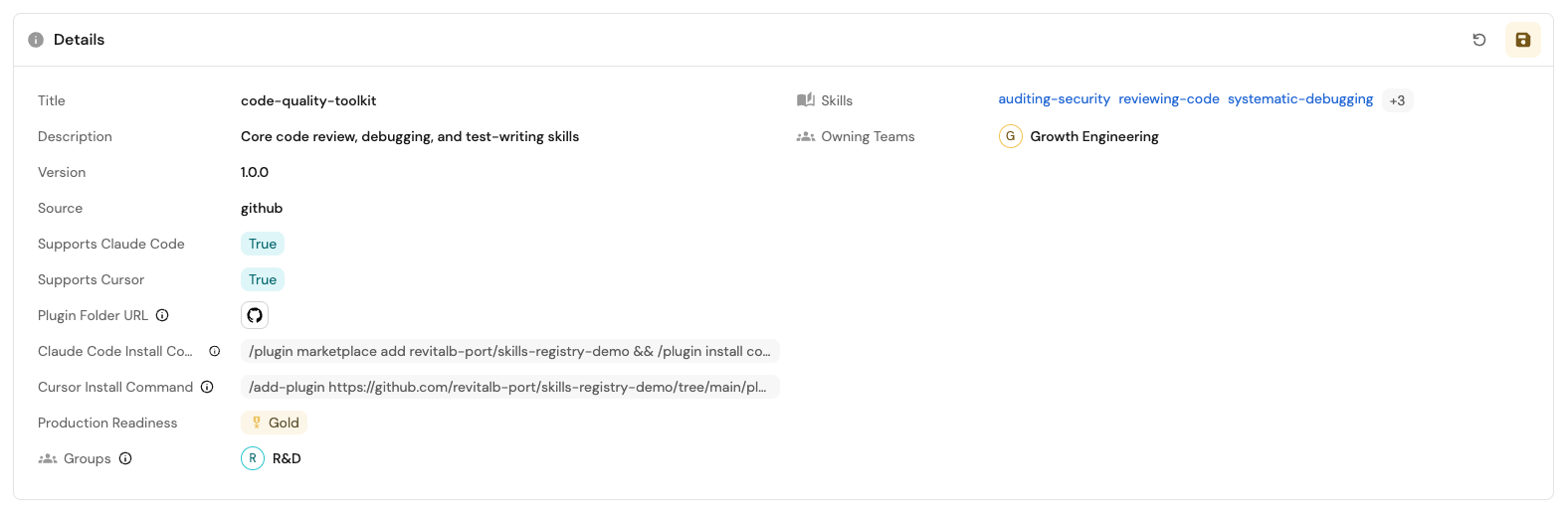
Both resources compute the same identifier from the plugin's folder path (plugins/<name>/...), so a plugin that ships both manifests, like code-quality-toolkit above, ends up as one entity with both supportsClaudeCode and supportsCursor set to true, not two separate entities. If a plugin only ships one manifest, only that resource's boolean gets set. The other stays empty, and its install command calculation correctly returns nothing.
Extend this with one more file resource, and one more supports<Provider>/install<Provider> pair on the blueprint, for every other provider your plugins target, using the provider table linked above for that provider's manifest path.
Backfill the skills relation from symlinks
A plugin doesn't have to duplicate the skills it bundles. If a skill is already tracked in your registry as its own file (the common case, once you've implemented Set up a skills registry), a plugin references it with a symlink instead of a copy, so there's exactly one SKILL.md on disk and every plugin bundling it stays in sync with it automatically. Port's own skills-registry-demo repository uses this layout. Real skill files live under a top-level skills/<category>/<name>/SKILL.md, and each plugin under plugins/<plugin-name>/skills/<name> is a symlink pointing back at the real file, for example plugins/code-quality-toolkit/skills/auditing-security:
plugins/code-quality-toolkit/
├── .claude-plugin/plugin.json
├── .cursor-plugin/plugin.json
└── skills/
    ├── auditing-security -> ../../../skills/code-quality/auditing-security
    ├── reviewing-code -> ../../../skills/code-quality/reviewing-code
    └── writing-tests -> ../../../skills/testing/writing-tests
Keep this convention in mind for Step 3, applying a bundling suggestion means creating one new symlink, not copying a file.
The mapping above never sets skills, and it can't: Port's GitHub integration reads file contents, not a folder's symlink targets, so there's no JQ expression that turns plugins/code-quality-toolkit/skills/ into a list of skill identifiers. A small script closes that gap by resolving the real symlinks itself and writing the relation directly through the Port API.
sync_plugin_metadata.py (click to expand)
#!/usr/bin/env python3
"""
Sync each plugin's skills relation onto its agentPlugin entity, resolved from
the real symlinks under plugins/<name>/skills/. Doesn't touch any property
the GitHub Ocean mapping already owns (description, version, folderUrl, ...).

Required environment variables:
  PORT_CLIENT_ID
  PORT_CLIENT_SECRET
  GITHUB_REPOSITORY   (e.g. "your-org/your-plugins-repo", provided
                       automatically in GitHub Actions)
"""

import glob
import json
import os
import sys
import urllib.error
import urllib.parse
import urllib.request

PORT_API_URL = os.environ.get("PORT_API_URL", "https://api.port.io")


def http_json(method, url, headers=None, body=None):
    data = json.dumps(body).encode() if body is not None else None
    req = urllib.request.Request(url, data=data, method=method)
    for k, v in (headers or {}).items():
        req.add_header(k, v)
    if data is not None:
        req.add_header("Content-Type", "application/json")
    try:
        with urllib.request.urlopen(req) as resp:
            return json.loads(resp.read())
    except urllib.error.HTTPError as e:
        print(f"HTTP {e.code} for {method} {url}: {e.read().decode()}", file=sys.stderr)
        raise


def get_port_token(client_id, client_secret):
    resp = http_json(
        "POST",
        f"{PORT_API_URL}/v1/auth/access_token",
        body={"clientId": client_id, "clientSecret": client_secret},
    )
    return resp["accessToken"]


def upsert_entity(port_token, blueprint, identifier, relations):
    encoded_identifier = urllib.parse.quote(identifier, safe="")
    url = f"{PORT_API_URL}/v1/blueprints/{blueprint}/entities/{encoded_identifier}"
    headers = {"Authorization": f"Bearer {port_token}"}
    http_json("PATCH", url, headers=headers, body={"relations": relations})


def get_plugin_skill_identifiers(repo, plugin_name):
    skills_dir = f"plugins/{plugin_name}/skills"
    if not os.path.isdir(skills_dir):
        return []
    identifiers = []
    for entry in sorted(os.listdir(skills_dir)):
        link_path = os.path.join(skills_dir, entry)
        if not os.path.islink(link_path):
            continue
        target = os.path.realpath(link_path)
        skill_path = os.path.join(os.path.relpath(target, os.getcwd()), "SKILL.md")
        identifiers.append(f"{repo}/{skill_path}")
    return identifiers


def sync_plugins(port_token, repo):
    plugin_dirs = sorted(
        {p.split("/")[1] for p in glob.glob("plugins/*/") if len(p.split("/")) > 1}
    )
    print(f"Found {len(plugin_dirs)} plugin folders")

    for plugin_name in plugin_dirs:
        skill_identifiers = get_plugin_skill_identifiers(repo, plugin_name)
        identifier = f"{repo}/{plugin_name}"
        upsert_entity(port_token, "agentPlugin", identifier, relations={"skills": skill_identifiers})
        print(f"  {identifier}: skills={skill_identifiers}")


def main():
    client_id = os.environ["PORT_CLIENT_ID"]
    client_secret = os.environ["PORT_CLIENT_SECRET"]
    repo = os.environ["GITHUB_REPOSITORY"]

    port_token = get_port_token(client_id, client_secret)
    sync_plugins(port_token, repo)


if __name__ == "__main__":
    sys.exit(main())
sync-plugin-metadata.yml (click to expand)
name: Sync plugin metadata to Port

on:
  push:
    branches: [main]
    paths:
      - "skills/**/SKILL.md"
      - "plugins/**/plugin.json"
      - "plugins/**/skills/**"
  workflow_dispatch: {}

jobs:
  sync:
    runs-on: ubuntu-latest
    steps:
      - uses: actions/checkout@v4

      - uses: actions/setup-python@v5
        with:
          python-version: "3.12"

      - name: Sync plugin metadata to Port
        env:
          PORT_CLIENT_ID: ${{ secrets.PORT_CLIENT_ID }}
          PORT_CLIENT_SECRET: ${{ secrets.PORT_CLIENT_SECRET }}
        run: python scripts/sync_plugin_metadata.py
Add both files to your plugins repo (scripts/sync_plugin_metadata.py and .github/workflows/sync-plugin-metadata.yml), and add PORT_CLIENT_ID/PORT_CLIENT_SECRET as repo secrets the same way you did for publish-skill.yml. It runs on every push that touches a plugin or a skill, and on demand, so skills on each agentPlugin entity stays current without anyone running it by hand.
At this point, every plugin in your repo shows up as an agentPlugin entity, with its supported providers, ready-to-use install commands, and its real bundle of skills, all kept in sync with Git.
Step 2: Suggest bundling a certified skill into a plugin
Ingesting plugins tells you what already exists. It doesn't tell you when a new skill should join one. This step extends the Skill Certification Review workflow so it checks that automatically, the same moment it already checks uniqueness and description quality.
Add the skill bundling suggestion blueprint
-
Go to the Data model page in Port.
-
Click on
+ Blueprint. -
Click on the
{...} Edit JSONbutton. -
Copy and paste the following JSON configuration:
Skill bundling suggestion blueprint (click to expand)
{"identifier": "skill_bundling_suggestion","title": "Skill Bundling Suggestion","icon": "PluginsManager","ownership": {"type": "Direct","title": "Owning Teams"},"schema": {"properties": {"suggestion_type": {"title": "Suggestion Type","type": "string","enum": ["plugin_bundle"],"enumColors": {"plugin_bundle": "purple"}},"reasoning": {"title": "Reasoning","type": "string","format": "markdown"},"status": {"title": "Status","type": "string","enum": ["pending", "accepted", "applied", "dismissed"],"enumColors": {"pending": "yellow","accepted": "blue","applied": "green","dismissed": "lightGray"}},"pr_url": {"title": "PR URL","type": "string","format": "url","description": "Link to the pull request opened to apply this suggestion"},"branch": {"title": "Branch","type": "string","description": "Branch the apply PR was opened from"}},"required": ["suggestion_type", "status"]},"relations": {"skill": {"title": "Skill","target": "skill","required": true,"many": false},"suggested_plugin": {"title": "Suggested Plugin","target": "agentPlugin","required": false,"many": false}}} -
Click Save to create the blueprint.
suggestion_type only has one value so far, plugin_bundle. Possible enhancements below adds a second one on top of this same blueprint, rather than creating a separate one, since "should this skill be bundled with X" is the same shape of question regardless of what X is.
Extend the Skill Certification Review workflow
The workflow gains three nodes, inserted right after Check Description Quality and before Synthesize Recommendation:
- On Skill Created, Run Certification Review, Resolve Skill Entity, Check Uniqueness, and Check Description Quality - unchanged from the previous guide.
- Check Plugin Relation - a new AI node that reads the skill's description and instructions, calls
list_entitieson theskillandagentPluginblueprints, and decides whether an existing plugin is a good fit for this skill. - Needs Plugin Bundle Suggestion? - a new condition node that branches on whether the previous node found a fit.
- Create Plugin Bundling Suggestion - a new upsert entity node that only runs on the "yes" branch, creating a
pendingskill_bundling_suggestionlinked to both the skill and the suggested plugin. - Synthesize Recommendation - now also reads the plugin-bundling check's result, but only as context. A bundling opportunity is never disqualifying on its own.
- Update Skill Entity and Notify Admin Slack - unchanged.
To update the workflow:
-
Go to the Workflows page in Port.
-
Find the Skill Certification Review workflow and click Edit.
-
Click the
{...}button to open the JSON editor. -
Copy and paste the workflow JSON below to replace it:
Skill Certification Review workflow JSON, with plugin bundling (click to expand)
{"identifier": "skill_certification_review","title": "Skill Certification Review","icon": "Award","description": "Review a skill's uniqueness, description quality, and plugin-bundling opportunities, and record a certification recommendation, automatically after it's created or on demand.","allowAnyoneToViewRuns": true,"nodes": [{"identifier": "trigger_event","title": "On Skill Created","config": {"type": "EVENT_TRIGGER","event": {"type": "ENTITY_CREATED","blueprintIdentifier": "skill"}}},{"identifier": "trigger_manual","title": "Run Certification Review","config": {"type": "SELF_SERVE_TRIGGER","userInputs": {"properties": {"skill": {"title": "Skill","type": "string","format": "entity","blueprint": "skill"}},"required": ["skill"]},"contexts": [{ "on": "ENTITY", "userInput": "skill" }]}},{"identifier": "resolve_skill","title": "Resolve Skill Entity","config": {"type": "WEBHOOK","method": "GET","url": "https://api.port.io/v1/blueprints/skill/entities/{{ (.outputs.trigger_event.diff.after.identifier // .outputs.trigger_manual.skill) | @uri }}","onFailure": "terminate"}},{"identifier": "check_uniqueness","title": "Check Uniqueness","config": {"type": "AI","systemPrompt": "You are reviewing a proposed skill for a skills registry certification pipeline. Judge only uniqueness relative to other cataloged skills. Call list_entities on the skill blueprint at most once, then return the structured output immediately. Do not loop. When referencing another skill, you MUST use the exact `identifier` field returned by list_entities, never the `title` field - identifiers in this catalog are full repo-relative paths (e.g. \"org/repo/path/to/SKILL.md\") and are NOT the same as the display title.","userPrompt": "Skill identifier: {{ .outputs.resolve_skill.response.entity.identifier }}\n\nDescription:\n{{ .outputs.resolve_skill.response.entity.properties.description }}\n\nFull SKILL.md content, for context:\n{{ .outputs.resolve_skill.response.entity.properties.instructions }}\n\nCompare this skill's purpose and instructions against every other cataloged skill and determine how much it overlaps with an existing one.","tools": ["list_entities", "list_blueprints"],"outputSchema": {"type": "object","properties": {"uniqueness": { "type": "string", "enum": ["unique", "partial_duplicate", "mostly_duplicate", "complete_duplicate"] },"duplicate_of": { "type": "array", "items": { "type": "string" } },"uniqueness_reasoning": { "type": "string" }},"required": ["uniqueness", "duplicate_of", "uniqueness_reasoning"]}}},{"identifier": "check_description_quality","title": "Check Description Quality","config": {"type": "AI","systemPrompt": "You review a skill's description for a registry where only the skill's name and description are preloaded into an agent's context. The description alone determines whether an agent notices the skill and calls it at the right moments. Judge the description on that standard: \"missing\" if there's no description or it says nothing about when to use the skill; \"too_vague\" if it doesn't say clearly enough when an agent should reach for this skill; \"too_verbose\" if it buries the trigger conditions in more detail than an agent needs preloaded into context; \"good\" if it's concise and makes clear both what the skill does and when to use it. Read the full SKILL.md content for context on whether the description accurately represents the skill, but judge quality by the description alone.","userPrompt": "Skill name: {{ .outputs.resolve_skill.response.entity.title }}\n\nDescription:\n{{ .outputs.resolve_skill.response.entity.properties.description }}\n\nFull SKILL.md content, for context:\n{{ .outputs.resolve_skill.response.entity.properties.instructions }}","tools": [],"outputSchema": {"type": "object","properties": {"description_quality": { "type": "string", "enum": ["good", "too_verbose", "too_vague", "missing"] },"description_quality_reasoning": { "type": "string" }},"required": ["description_quality", "description_quality_reasoning"]}}},{"identifier": "check_plugin_relation","title": "Check Plugin Relation","config": {"type": "AI","systemPrompt": "You are checking whether a skill relates closely enough to an existing cataloged agent plugin to warrant bundling it in. Call list_entities on the skill and agentPlugin blueprints at most once each, then return the structured output immediately. If you suggest a plugin, you MUST return the exact `identifier` field from list_entities, never the `title` field - identifiers in this catalog are full repo-relative paths (e.g. \"org/repo/plugin-name\") and are NOT the same as the display title, even when they look similar. Only set should_suggest_plugin_bundle to true when a specific cataloged agentPlugin is actually a good fit for this skill, and always set suggested_plugin to that plugin's identifier in that case. If no existing plugin is a good fit, set should_suggest_plugin_bundle to false and leave suggested_plugin null - do not flag a gap when there is nothing concrete to bundle into.","userPrompt": "Skill identifier: {{ .outputs.resolve_skill.response.entity.identifier }}\n\nDescription:\n{{ .outputs.resolve_skill.response.entity.properties.description }}\n\nFull SKILL.md content, for context:\n{{ .outputs.resolve_skill.response.entity.properties.instructions }}\n\nIs there an existing cataloged plugin this skill should be bundled into?","tools": ["list_entities", "list_blueprints"],"outputSchema": {"type": "object","properties": {"should_suggest_plugin_bundle": { "type": "boolean" },"suggested_plugin": { "type": ["string", "null"] },"reasoning": { "type": "string" }},"required": ["should_suggest_plugin_bundle", "reasoning"]}}},{"identifier": "cond_plugin_bundle","title": "Needs Plugin Bundle Suggestion?","config": {"type": "CONDITION","outlets": [{"identifier": "yes","title": "Suggest plugin bundle","expression": ".outputs.check_plugin_relation.response | fromjson | .should_suggest_plugin_bundle == true"}]}},{"identifier": "create_plugin_suggestion","title": "Create Plugin Bundling Suggestion","config": {"type": "UPSERT_ENTITY","blueprintIdentifier": "skill_bundling_suggestion","mapping": {"identifier": "{{ .outputs.resolve_skill.response.entity.identifier }}-plugin-bundle","title": "{{ .outputs.resolve_skill.response.entity.title }} - Plugin bundle suggestion","properties": {"status": "pending","suggestion_type": "plugin_bundle","reasoning": "{{ .outputs.check_plugin_relation.response | fromjson | .reasoning }}"},"relations": {"skill": "{{ .outputs.resolve_skill.response.entity.identifier }}","suggested_plugin": "{{ .outputs.check_plugin_relation.response | fromjson | .suggested_plugin }}"}},"onFailure": "continue"}},{"identifier": "synthesize_recommendation","title": "Synthesize Recommendation","config": {"type": "AI","systemPrompt": "You turn certification checks into one recommendation for a human reviewer deciding whether to approve a pending skill. Today there are three checks: uniqueness, description quality, and whether this skill should be bundled into an existing plugin. Recommend \"approve\" when every quality check passed, \"iterate\" when a check found something the author should fix before merging (such as a vague or verbose description, or a partial overlap with another skill), and \"reject\" only when a check found something disqualifying (such as a missing description, or a complete duplicate of an existing skill). A plugin-bundling opportunity is never disqualifying on its own; treat it as informational context for the reviewer, not a reason to reject or iterate. Explain your reasoning in one or two sentences a reviewer can read at a glance.","userPrompt": "Uniqueness check result:\n{{ .outputs.check_uniqueness.response }}\n\nDescription quality check result:\n{{ .outputs.check_description_quality.response }}\n\nPlugin bundling check result:\n{{ .outputs.check_plugin_relation.response }}","tools": [],"outputSchema": {"type": "object","properties": {"certification_recommendation": { "type": "string", "enum": ["approve", "reject", "iterate"] },"certification_recommendation_reasoning": { "type": "string" }},"required": ["certification_recommendation", "certification_recommendation_reasoning"]}}},{"identifier": "update_skill_entity","title": "Update Skill Entity","config": {"type": "UPSERT_ENTITY","blueprintIdentifier": "skill","mapping": {"identifier": "{{ .outputs.trigger_event.diff.after.identifier // .outputs.trigger_manual.skill }}","properties": {"uniqueness": "{{ .outputs.check_uniqueness.response | fromjson | .uniqueness }}","uniqueness_reasoning": "{{ .outputs.check_uniqueness.response | fromjson | .uniqueness_reasoning }}","description_quality": "{{ .outputs.check_description_quality.response | fromjson | .description_quality }}","description_quality_reasoning": "{{ .outputs.check_description_quality.response | fromjson | .description_quality_reasoning }}","last_certification_check_at": "{{ now | todateiso8601 }}","certification_recommendation": "{{ .outputs.synthesize_recommendation.response | fromjson | .certification_recommendation }}","certification_recommendation_reasoning": "{{ .outputs.synthesize_recommendation.response | fromjson | .certification_recommendation_reasoning }}"},"relations": {"similar_skills": "{{ .outputs.check_uniqueness.response | fromjson | .duplicate_of }}"}},"onFailure": "terminate"}},{"identifier": "notify_admin_slack","title": "Notify Admin Slack","config": {"type": "WEBHOOK","url": "https://slack.com/api/chat.postMessage","method": "POST","headers": {"Content-Type": "application/json; charset=utf-8","Authorization": "Bearer {{ .secrets[\"__SLACK_APP_BOT_TOKEN_<team_id>\"] }}"},"body": {"channel": "<your-reviewers-channel-id>","blocks": [{"type": "section","text": {"type": "mrkdwn","text": "*{{ .outputs.resolve_skill.response.entity.title }}* certification review: *{{ .outputs.synthesize_recommendation.response | fromjson | .certification_recommendation }}*\n{{ .outputs.synthesize_recommendation.response | fromjson | .certification_recommendation_reasoning }}"}}]},"onTimeout": "continue","onFailure": "continue"}}],"connections": [{ "sourceIdentifier": "trigger_event", "targetIdentifier": "resolve_skill" },{ "sourceIdentifier": "trigger_manual", "targetIdentifier": "resolve_skill" },{ "sourceIdentifier": "resolve_skill", "targetIdentifier": "check_uniqueness" },{ "sourceIdentifier": "check_uniqueness", "targetIdentifier": "check_description_quality" },{ "sourceIdentifier": "check_description_quality", "targetIdentifier": "check_plugin_relation" },{ "sourceIdentifier": "check_plugin_relation", "targetIdentifier": "cond_plugin_bundle" },{ "sourceIdentifier": "cond_plugin_bundle", "targetIdentifier": "create_plugin_suggestion", "sourceOutletIdentifier": "yes" },{ "sourceIdentifier": "cond_plugin_bundle", "targetIdentifier": "synthesize_recommendation", "fallback": true },{ "sourceIdentifier": "create_plugin_suggestion", "targetIdentifier": "synthesize_recommendation" },{ "sourceIdentifier": "synthesize_recommendation", "targetIdentifier": "update_skill_entity" },{ "sourceIdentifier": "update_skill_entity", "targetIdentifier": "notify_admin_slack" }]} -
Replace
<your-reviewers-channel-id>and__SLACK_APP_BOT_TOKEN_<team_id>the same way you did in the previous guide, if you haven't already. -
Click Apply changes.
create_plugin_suggestion uses onFailure: "continue", unlike most other nodes in this workflow: a bad or empty AI response here shouldn't take down the whole certification run, since worst case a bundling opportunity just goes unflagged for this run.
Step 3: Apply or dismiss a bundling suggestion
A pending suggestion is only useful if a reviewer can act on it without leaving Port. Two self-service workflows close that loop: one opens a pull request adding the skill's symlink into the suggested plugin, the other just records that the suggestion was dismissed.
Add a GitHub Actions workflow to apply the bundle
Add this workflow to your plugins repo, alongside publish-skill.yml from the golden path guide:
apply-bundling-suggestion.yml (click to expand)
name: Apply bundling suggestion (from Port)

on:
  workflow_dispatch:
    inputs:
      suggestion_identifier:
        description: "skill_bundling_suggestion entity identifier to update"
        required: true
        type: string
      skill_path:
        description: "Repo-relative path to the existing skill's SKILL.md"
        required: true
        type: string
      plugin_folder:
        description: "Repo-relative folder name of the existing plugin under plugins/"
        required: true
        type: string
      node_run_id:
        description: "Port workflow node-run id to report the result back to"
        required: true
        type: string

jobs:
  apply:
    runs-on: ubuntu-latest
    permissions:
      contents: write
      pull-requests: write
    steps:
      - uses: actions/checkout@v4

      - name: Validate inputs
        id: validate
        env:
          SKILL_PATH: ${{ inputs.skill_path }}
          PLUGIN_FOLDER: ${{ inputs.plugin_folder }}
        run: |
          set -euo pipefail
          if [ -z "$SKILL_PATH" ] || [ -z "$PLUGIN_FOLDER" ]; then
            echo "::error::skill_path and plugin_folder must both be non-empty"
            exit 1
          fi
          if [ ! -d "plugins/$PLUGIN_FOLDER" ]; then
            echo "::error::plugins/$PLUGIN_FOLDER does not exist in this repo"
            exit 1
          fi
          if [ ! -f "$SKILL_PATH" ]; then
            echo "::error::$SKILL_PATH does not exist in this repo"
            exit 1
          fi
          skill_slug="$(basename "$(dirname "$SKILL_PATH")")"
          if [ -e "plugins/$PLUGIN_FOLDER/skills/$skill_slug" ]; then
            echo "::error::plugins/$PLUGIN_FOLDER/skills/$skill_slug already exists - already bundled"
            exit 1
          fi

      - name: Symlink skill into plugin and open PR
        id: open_pr
        env:
          GH_TOKEN: ${{ secrets.GH_PAT }}
          SKILL_PATH: ${{ inputs.skill_path }}
          PLUGIN_FOLDER: ${{ inputs.plugin_folder }}
        run: |
          set -euo pipefail
          skill_slug="$(basename "$(dirname "$SKILL_PATH")")"
          branch="bundle/${PLUGIN_FOLDER}-${skill_slug}"
          git checkout -b "$branch"
          # Plugins bundle skills via a symlink under plugins/<plugin>/skills/<slug>
          # pointing back at the real skills/<category>/<slug> directory, not a copy.
          target="plugins/${PLUGIN_FOLDER}/skills/${skill_slug}"
          ln -s "../../../$(dirname "$SKILL_PATH")" "$target"
          git config user.name "port-skills-bot"
          git config user.email "port-skills-bot@users.noreply.github.com"
          git add "$target"
          git commit -m "Bundle ${skill_slug} into ${PLUGIN_FOLDER}"
          git push origin "$branch"
          pr_url="$(gh pr create \
            --title "Bundle ${skill_slug} into ${PLUGIN_FOLDER}" \
            --body "Applied via Port's apply_bundling_suggestion workflow." \
            --head "$branch" \
            --base main)"
          echo "branch=${branch}" >> "$GITHUB_OUTPUT"
          echo "pr_url=${pr_url}" >> "$GITHUB_OUTPUT"
          echo "pr_number=$(echo "$pr_url" | grep -o '[0-9]*$')" >> "$GITHUB_OUTPUT"

      - name: Get Port access token
        id: port_auth
        if: always() && steps.open_pr.outcome == 'success'
        env:
          PORT_CLIENT_ID: ${{ secrets.PORT_CLIENT_ID }}
          PORT_CLIENT_SECRET: ${{ secrets.PORT_CLIENT_SECRET }}
        run: |
          set -euo pipefail
          token="$(curl -sS -X POST "https://api.port.io/v1/auth/access_token" \
            -H "Content-Type: application/json" \
            -d "{\"clientId\":\"${PORT_CLIENT_ID}\",\"clientSecret\":\"${PORT_CLIENT_SECRET}\"}" \
            | python3 -c 'import json,sys; print(json.load(sys.stdin)["accessToken"])')"
          echo "::add-mask::${token}"
          echo "token=${token}" >> "$GITHUB_OUTPUT"

      - name: Report accepted
        if: always() && steps.open_pr.outcome == 'success'
        env:
          PORT_TOKEN: ${{ steps.port_auth.outputs.token }}
          SUGGESTION_ID: ${{ inputs.suggestion_identifier }}
          PR_URL: ${{ steps.open_pr.outputs.pr_url }}
          BRANCH: ${{ steps.open_pr.outputs.branch }}
        run: |
          set -euo pipefail
          encoded_id="$(python3 -c 'import urllib.parse,os; print(urllib.parse.quote(os.environ["SUGGESTION_ID"], safe=""))')"
          body="$(python3 -c 'import json,os; print(json.dumps({"properties":{"status":"accepted","pr_url":os.environ["PR_URL"],"branch":os.environ["BRANCH"]}}))')"
          curl -sS -f -X PATCH "https://api.port.io/v1/blueprints/skill_bundling_suggestion/entities/${encoded_id}" \
            -H "Authorization: Bearer ${PORT_TOKEN}" \
            -H "Content-Type: application/json" \
            -d "${body}"

      - name: Wait for checks
        id: wait_checks
        if: always() && steps.open_pr.outcome == 'success'
        env:
          GH_TOKEN: ${{ secrets.GH_PAT }}
          PR_NUMBER: ${{ steps.open_pr.outputs.pr_number }}
        run: |
          set +e
          output="$(gh pr checks "$PR_NUMBER" --watch --fail-fast 2>&1)"
          status=$?
          set -e
          echo "$output"
          if [ $status -eq 0 ] || echo "$output" | grep -qi "no checks reported"; then
            exit 0
          fi
          exit "$status"

      - name: Merge and report applied
        if: always() && steps.open_pr.outcome == 'success' && steps.wait_checks.outcome == 'success'
        env:
          GH_TOKEN: ${{ secrets.GH_PAT }}
          PORT_TOKEN: ${{ steps.port_auth.outputs.token }}
          SUGGESTION_ID: ${{ inputs.suggestion_identifier }}
          PR_NUMBER: ${{ steps.open_pr.outputs.pr_number }}
        run: |
          set -euo pipefail
          gh pr merge "$PR_NUMBER" --merge --delete-branch
          encoded_id="$(python3 -c 'import urllib.parse,os; print(urllib.parse.quote(os.environ["SUGGESTION_ID"], safe=""))')"
          curl -sS -f -X PATCH "https://api.port.io/v1/blueprints/skill_bundling_suggestion/entities/${encoded_id}" \
            -H "Authorization: Bearer ${PORT_TOKEN}" \
            -H "Content-Type: application/json" \
            -d '{"properties":{"status":"applied"}}'

      - name: Report result back to Port
        if: always()
        env:
          PORT_CLIENT_ID: ${{ secrets.PORT_CLIENT_ID }}
          PORT_CLIENT_SECRET: ${{ secrets.PORT_CLIENT_SECRET }}
          NODE_RUN_ID: ${{ inputs.node_run_id }}
          VALIDATE_STATUS: ${{ steps.validate.outcome }}
          OPEN_PR_STATUS: ${{ steps.open_pr.outcome }}
        run: |
          set -euo pipefail
          token="$(curl -sS -X POST "https://api.port.io/v1/auth/access_token" \
            -H "Content-Type: application/json" \
            -d "{\"clientId\":\"${PORT_CLIENT_ID}\",\"clientSecret\":\"${PORT_CLIENT_SECRET}\"}" \
            | python3 -c 'import json,sys; print(json.load(sys.stdin)["accessToken"])')"
          if [ "$VALIDATE_STATUS" = "success" ] && [ "$OPEN_PR_STATUS" = "success" ]; then
            body='{"status":"COMPLETED","result":"SUCCESS"}'
          else
            body='{"status":"COMPLETED","result":"FAILED"}'
          fi
          curl -sS -X PATCH "https://api.port.io/v1/workflows/nodes/runs/${NODE_RUN_ID}" \
            -H "Authorization: Bearer ${token}" \
            -H "Content-Type: application/json" \
            -d "${body}"
Reuse the same PORT_CLIENT_ID/PORT_CLIENT_SECRET and GH_PAT secrets from the earlier guides in this series. GH_PAT needs a token with permission to merge pull requests (the default GITHUB_TOKEN can open one but is commonly restricted from merging its own PRs, depending on your repo settings).
apply-bundling-suggestion.yml doesn't just open the pull request, it also merges it automatically once checks pass (the Wait for checks and Merge and report applied steps). That's intentional here: triggering Apply Bundling Suggestion in Port is itself the human-in-the-loop approval, so there's no second gate left to wait on. If you want another human to review the PR's actual diff before it merges, remove those two steps. The workflow will stop after opening the PR and reporting accepted, leaving the merge to whoever reviews it on GitHub.
Create the Apply Bundling Suggestion workflow
This workflow resolves the suggestion, its related skill and suggested plugin, and dispatches the GitHub Actions workflow above.
Apply Bundling Suggestion workflow JSON (click to expand)
{
  "identifier": "apply_bundling_suggestion",
  "title": "Apply Bundling Suggestion",
  "icon": "Rocket",
  "description": "Applies a pending plugin_bundle skill_bundling_suggestion by opening a PR that adds the skill into its suggested existing plugin.",
  "allowAnyoneToViewRuns": true,
  "nodes": [
    {
      "identifier": "trigger",
      "config": {
        "type": "SELF_SERVE_TRIGGER",
        "userInputs": {
          "properties": {
            "suggestion": {
              "title": "Bundling Suggestion",
              "type": "string",
              "format": "entity",
              "blueprint": "skill_bundling_suggestion"
            }
          },
          "required": ["suggestion"]
        },
        "permissions": {
          "policy": {
            "combinator": "and",
            "rules": [
              { "property": { "context": "form", "property": "suggestion.suggestion_type" }, "operator": "=", "value": "plugin_bundle" },
              { "property": { "context": "form", "property": "suggestion.status" }, "operator": "=", "value": "pending" }
            ]
          }
        },
        "contexts": [{ "on": "ENTITY", "userInput": "suggestion" }]
      }
    },
    {
      "identifier": "resolve_suggestion",
      "title": "Resolve Suggestion Entity",
      "config": {
        "type": "WEBHOOK",
        "url": "https://api.port.io/v1/blueprints/skill_bundling_suggestion/entities/{{ .outputs.trigger.suggestion | @uri }}",
        "method": "GET",
        "onFailure": "terminate"
      }
    },
    {
      "identifier": "resolve_skill",
      "title": "Resolve Related Skill",
      "config": {
        "type": "WEBHOOK",
        "url": "https://api.port.io/v1/blueprints/skill/entities/{{ .outputs.resolve_suggestion.response.entity.relations.skill | @uri }}",
        "method": "GET",
        "onFailure": "terminate"
      }
    },
    {
      "identifier": "resolve_plugin",
      "title": "Resolve Suggested Plugin",
      "config": {
        "type": "WEBHOOK",
        "url": "https://api.port.io/v1/blueprints/agentPlugin/entities/{{ .outputs.resolve_suggestion.response.entity.relations.suggested_plugin | @uri }}",
        "method": "GET",
        "onFailure": "terminate"
      }
    },
    {
      "identifier": "dispatch_apply_pr",
      "title": "Dispatch Apply Bundling PR",
      "config": {
        "type": "INTEGRATION_ACTION",
        "installationId": "<your-github-integration-installation-id>",
        "integrationProvider": "github-ocean",
        "integrationInvocationType": "dispatch_workflow",
        "integrationActionExecutionProperties": {
          "org": "<your-org>",
          "repo": "<your-plugins-repo>",
          "workflow": "apply-bundling-suggestion.yml",
          "workflowInputs": {
            "suggestion_identifier": "{{ .outputs.resolve_suggestion.response.entity.identifier }}",
            "skill_path": "{{ .outputs.resolve_skill.response.entity.properties.path }}",
            "plugin_folder": "{{ .outputs.resolve_plugin.response.entity.properties.folderUrl | split(\"/\") | last }}",
            "node_run_id": "{{ .workflowNodeRun.identifier }}"
          },
          "reportWorkflowStatus": true
        },
        "onFailure": "terminate"
      }
    }
  ],
  "connections": [
    { "sourceIdentifier": "trigger", "targetIdentifier": "resolve_suggestion" },
    { "sourceIdentifier": "resolve_suggestion", "targetIdentifier": "resolve_skill" },
    { "sourceIdentifier": "resolve_skill", "targetIdentifier": "resolve_plugin" },
    { "sourceIdentifier": "resolve_plugin", "targetIdentifier": "dispatch_apply_pr" }
  ]
}
The trigger's permissions.policy scopes this workflow to plugin_bundle suggestions specifically that are still pending, so it can't be run twice on the same suggestion, and (until the enhancement below extends it) can't accidentally be pointed at an mcp_bundle suggestion it doesn't know how to apply.
Replace <your-github-integration-installation-id>, <your-org>, and <your-plugins-repo> with your own values, then click Apply changes.
Create the Dismiss Bundling Suggestion workflow
Not every suggestion should be applied. This workflow just records that a reviewer looked at it and chose not to.
Dismiss Bundling Suggestion workflow JSON (click to expand)
{
  "identifier": "dismiss_bundling_suggestion",
  "title": "Dismiss Bundling Suggestion",
  "icon": "PlugOff",
  "description": "Dismisses a pending skill_bundling_suggestion without taking any further action.",
  "allowAnyoneToViewRuns": true,
  "nodes": [
    {
      "identifier": "trigger",
      "config": {
        "type": "SELF_SERVE_TRIGGER",
        "userInputs": {
          "properties": {
            "suggestion": {
              "title": "Bundling Suggestion",
              "type": "string",
              "format": "entity",
              "blueprint": "skill_bundling_suggestion"
            }
          },
          "required": ["suggestion"]
        },
        "permissions": {
          "policy": {
            "combinator": "and",
            "rules": [
              { "property": { "context": "form", "property": "suggestion.status" }, "operator": "=", "value": "pending" }
            ]
          }
        },
        "variant": "ALERT",
        "contexts": [{ "on": "ENTITY", "userInput": "suggestion" }]
      }
    },
    {
      "identifier": "update_status",
      "title": "Mark Dismissed",
      "config": {
        "type": "UPSERT_ENTITY",
        "blueprintIdentifier": "skill_bundling_suggestion",
        "mapping": {
          "identifier": "{{ .outputs.trigger.suggestion }}",
          "properties": {
            "status": "dismissed"
          }
        },
        "onFailure": "terminate"
      }
    }
  ],
  "connections": [
    { "sourceIdentifier": "trigger", "targetIdentifier": "update_status" }
  ]
}
Unlike Apply, this workflow's permission policy only checks status = pending, not suggestion_type, so it already works for both suggestion types once the enhancement below adds the second one. Click Apply changes.
Add pending suggestions to the Skills Lifecycle Control dashboard
- Open the Skills Lifecycle Control dashboard you created in Ship new skills through one golden path.
- Add a table widget:
- Title:
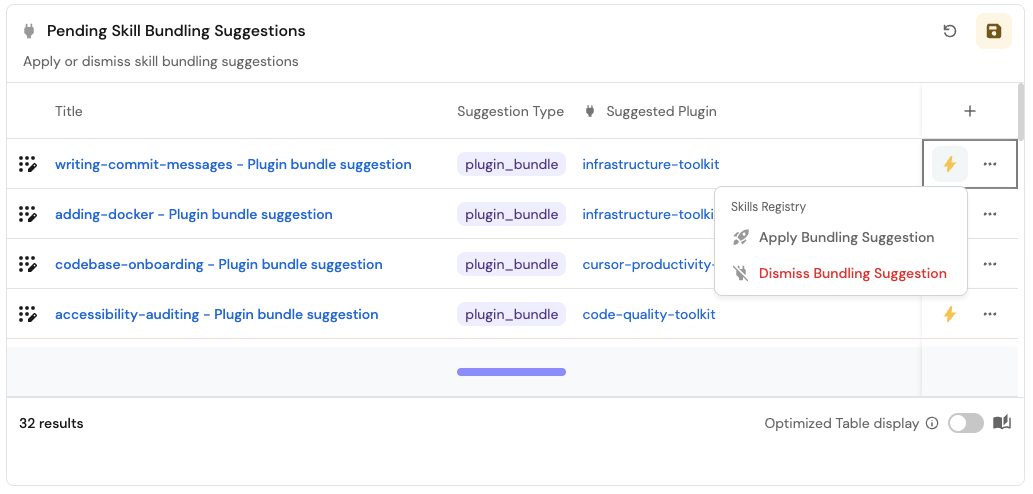
Pending Skill Bundling Suggestions. - Description:
Apply or dismiss skill bundling suggestions. - Blueprint:
skill_bundling_suggestion. - Filter:
statusequalspending. - Shown columns: title, suggestion type, reasoning, suggested plugin.
- Title:
Reviewers can now trigger Apply Bundling Suggestion or Dismiss Bundling Suggestion straight from a row in that table, the same way they already act on pending publish requests.
Possible enhancements
Measure skill composability with a scorecard
open_bundling_suggestions is a natural aggregation property to add to the skill blueprint: it counts skill_bundling_suggestion entities related to a skill where status = pending. Once it exists, a scorecard on skill can turn "how connected is this skill to the rest of the AI registry" into a visible bar the same way Set up a skills registry did for production readiness, Bronze once the certification workflow has actually run at least once, Silver once every bundling gap it found has been triaged (accepted, applied, or dismissed, not left pending), Gold once there are no open gaps at all. Add it to the Skills Registry Health dashboard from the certification guide, alongside Production Readiness and Discoverability, so a platform team sees composability trending the same way they already see everything else.
Suggest bundling a skill with the MCP servers it needs
A skill whose instructions call named tools from a specific MCP server, browser-automation tools, Port's own list_entities/run_action, or any other branded tool API, only actually works if whoever installs it also has that MCP server connected. Extend this guide's pattern to catch that gap too:
- Extend
skill_bundling_suggestion: addmcp_bundletosuggestion_type's enum, and add asuggested_mcp_serverrelation targeting_mcp_server, Port's own blueprint for MCP servers actually connected under Data sources. - Add three more nodes to the Skill Certification Review workflow, mirroring Step 2's shape exactly: a Check Tool Bundling AI node (reads the skill's instructions, calls
list_entitieson_mcp_server, and is careful to flag only genuine branded/MCP-style tool dependencies, never generic shell commands likenpm,git, or ordinary file reads that every agent already has natively), a Needs MCP Bundle Suggestion? condition node, and a Create MCP Bundling Suggestion node that upserts askill_bundling_suggestionwithsuggestion_type: "mcp_bundle". - Extend Apply Bundling Suggestion to branch on
suggestion_type: theplugin_bundlepath stays exactly as built above, while anmcp_bundlepath needs its own logic for actually wiring an MCP server into a plugin's.mcp.json, since there's no symlink equivalent for that. Dismiss Bundling Suggestion needs no changes either way, its permission policy already covers both types.
Generate a brand-new plugin instead of just suggesting one
This guide only ever checks a skill against plugins that already exist. Sometimes the right answer is a plugin that doesn't exist yet, five skills across your registry all covering the same domain with nothing bundling them together. Extend this guide's pattern to catch that gap too:
- Extend
skill_bundling_suggestion: addnew_plugintosuggestion_type's enum. A suggestion of this type won't have asuggested_pluginto relate to, since the plugin doesn't exist yet. Add aproposed_plugin_nameproperty instead. - Update the Check Plugin Relation node so it can also offer a new plugin, not just an existing one: when nothing cataloged fits but a pattern across several skills suggests one should exist, have it return
should_suggest_new_pluginand aproposed_plugin_namealongside its existing output. - Extend Apply Bundling Suggestion to the new type: a
new_pluginpath needs its own workflow that generates aplugins/<name>/folder with the right manifests and symlinks, and opens a pull request the same wayapply-bundling-suggestion.ymldoes, rather than dispatching directly to that same file.
Continue building your skills registry
This guide groups related skills into installable plugins. From here, measure the ROI of skills in your org registry: connect real Claude usage and spend data to the registry, and catch skills that pass every check but still aren't worth their cost.
Related pages
- Set up a skills registry - the skill blueprint and GitOps mapping this guide builds on.
- Certify skills to meet industry and org standards - the Skill Certification Review workflow this guide extends in Step 2.
- Ship new skills through one golden path - the Skills Lifecycle Control dashboard this guide extends in Step 3, and the GitHub Actions pattern
apply-bundling-suggestion.ymlfollows. - Claude Code plugins reference - the plugin directory structure and manifest fields referenced throughout this guide.
- GitHub Ocean: Ingest agent plugins - the dedicated
pluginkind, for a one-plugin-per-repository layout. - GitHub Ocean: Ingest MCP servers - a GitHub-discovered MCP server inventory, distinct from the
_mcp_serverconnector blueprint this guide's enhancement targets. - AI node - configuring
systemPrompt,tools, andoutputSchema. - Condition node - branching a workflow on an expression.