Certify skills to meet industry and org standards
A registry only helps if what's in it is actually good. Some of that is deterministic: Set up a skills registry already scored skills against a production-readiness scorecard, a rule an entity either satisfies or doesn't. Not every standard works that way. Whether a skill's description is any good is a judgment call, and it's an unusually important one: a skill's name and description are the only things preloaded into an agent's context, so they're what decides whether the skill gets noticed and called at the right time at all. It's also one of the first things Anthropic's own guidance on writing skills calls out.
This guide builds a certification process for exactly that kind of standard: an AI node judges description quality, records its verdict and reasoning on the entity, and rolls it up into a recommendation a reviewer can act on.
We'll build this in three parts:
- Prepare the skill blueprint - add the properties a certification review needs to record, and a scorecard that turns them into a visible bar.
- Create the Skill Certification Review workflow - reviews a skill's description automatically once it's created, or on demand.
- Extend your dashboards - surface certification recommendations next to publish requests, and add an org-wide view of registry health.
Common use cases
- Catch a vague or missing description before a skill reaches the registry, since no scorecard rule can tell a merely-adequate description from a genuinely useful one.
- Give reviewers an AI-generated second opinion on every submission, on top of the deterministic checks a scorecard can express.
- Track certification coverage across the whole registry, so gaps show up on a dashboard instead of being discovered one bad agent run at a time.
Prerequisites
This guide assumes you have:
- The skill blueprint, GitOps mapping, and production-readiness scorecard from Set up a skills registry.
- (Optional) The Publish Skill workflow from Ship new skills through one golden path. If you've implemented it, the certification workflow below runs automatically right after
publish_skillcreates a new,pendingskill entity. It isn't required, though certification reacts to any skill entity being created, however it got there. - A Port account with permissions to edit blueprints, create workflows, and build dashboards.
- The Port Slack app installed. This is optional, but recommended: it's what lets the certification workflow notify reviewers directly instead of leaving them to poll a dashboard.
Step 1: Prepare the skill blueprint
-
Go to the Data model page in Port.
-
Expand the
skillblueprint, click the...button, and select Edit blueprint. -
Click on the
{...} Edit JSONbutton. -
Add the following properties under
schema.properties:New skill blueprint properties (click to expand)
{"description_quality": {"title": "Description Quality","type": "string","description": "How well the description would let an agent decide when to call this skill","enum": ["good", "too_verbose", "too_vague", "missing"],"enumColors": {"good": "green","too_verbose": "orange","too_vague": "orange","missing": "red"}},"description_quality_reasoning": {"title": "Description Quality Reasoning","type": "string","format": "markdown","description": "Why the certification review scored the description the way it did"},"last_certification_check_at": {"title": "Last Certification Check At","type": "string","format": "date-time","description": "When this skill last went through certification review"},"certification_recommendation": {"title": "Certification Recommendation","type": "string","description": "The certification review's overall recommendation, for a reviewer to act on","enum": ["approve", "reject", "iterate"],"enumColors": {"approve": "green","reject": "red","iterate": "yellow"}},"certification_recommendation_reasoning": {"title": "Certification Recommendation Reasoning","type": "string","format": "markdown","description": "Why the certification review made this recommendation"}} -
Click Save.
Add a discoverability scorecard
description_quality is exactly the kind of property a scorecard can turn into a visible bar, the same way the previous guide's production-readiness scorecard did for version, $team, and group_identifiers.
-
Still on the
skillblueprint, click on the Scorecards tab. -
Click + Scorecard.
-
Click on the
{...} Edit JSONbutton in the top right corner. -
Paste the following JSON configuration:
Skill discoverability scorecard (click to expand)
{"identifier": "skill_discoverability","title": "Skill discoverability","blueprint": "skill","levels": [{ "title": "Basic", "color": "lightGray" },{ "title": "Bronze", "color": "bronze" },{ "title": "Silver", "color": "silver" },{ "title": "Gold", "color": "gold" }],"rules": [{"identifier": "description_not_missing","title": "Description isn't missing","level": "Bronze","query": {"combinator": "and","conditions": [{ "operator": "!=", "property": "description_quality", "value": "missing" }]}},{"identifier": "description_not_too_vague","title": "Description isn't too vague","level": "Silver","query": {"combinator": "and","conditions": [{ "operator": "!=", "property": "description_quality", "value": "too_vague" }]}},{"identifier": "description_not_too_verbose","title": "Description isn't too verbose","level": "Gold","query": {"combinator": "and","conditions": [{ "operator": "!=", "property": "description_quality", "value": "too_verbose" }]}}]} -
Click Save.
A skill reaches Gold here only once it clears all three bars: it has a description, the description isn't too vague, and it isn't too verbose either.
Step 2: Create the Skill Certification Review workflow
This workflow resolves a skill entity, has an AI node judge its description quality, synthesizes that into a certification recommendation, and writes both back to the entity.
The workflow has two triggers and five processing nodes:
- On Skill Created - an event trigger that fires automatically whenever a new
skillentity is created. If you've built the Publish Skill workflow from the previous guide, this is what makes certification run immediately after it, with no extra wiring. - Run Certification Review - a self-service trigger scoped to the skill entity page, for re-running certification on demand, for example after an author edits a description.
- Resolve Skill Entity - fetches the full entity, regardless of which trigger fired.
- Check Description Quality - the non-deterministic check. An AI node reads the skill's name, description, and full
instructionscontent, and judges the description on its own. - Synthesize Recommendation - another AI node that turns check results into one
approve/reject/iteraterecommendation. Today it only has one check to synthesize. See Possible enhancements for how it grows. - Update Skill Entity - writes
description_quality,description_quality_reasoning,last_certification_check_at,certification_recommendation, andcertification_recommendation_reasoningback to the entity. - Notify Admin Slack - posts the recommendation to a reviewers' channel. Skip this node (and its connection from Update Skill Entity) if you didn't install the Slack app. If you implemented the approve and reject workflows from the previous guide's enhancements, extend this message with buttons that deep-link straight to them, plus a link to the pull request, instead of posting plain text a reviewer still has to act on elsewhere.
This workflow reads the SKILL.md content straight off the resolved entity's instructions property, set by the previous guide's GitOps mapping. If your skill blueprint doesn't map the file's content onto the entity, add a webhook node after Resolve Skill Entity that fetches it from your source of truth instead, for example the raw file from GitHub, and have Check Description Quality read from that node's output instead.
To create the workflow:
-
Go to the Workflows page in Port.
-
Click + Workflow, name it
Skill Certification Review, then click Confirm. -
Click the
{...}button to open the JSON editor. -
Copy and paste the workflow JSON below to replace the example workflow:
Skill Certification Review workflow JSON (click to expand)
{"identifier": "skill_certification_review","title": "Skill Certification Review","icon": "Award","description": "Review a skill's description quality and record a certification recommendation, automatically after it's created or on demand.","allowAnyoneToViewRuns": true,"nodes": [{"identifier": "trigger_event","title": "On Skill Created","config": {"type": "EVENT_TRIGGER","event": {"type": "ENTITY_CREATED","blueprintIdentifier": "skill"}}},{"identifier": "trigger_manual","title": "Run Certification Review","config": {"type": "SELF_SERVE_TRIGGER","userInputs": {"properties": {"skill": {"title": "Skill","type": "string","format": "entity","blueprint": "skill"}},"required": ["skill"]},"contexts": [{ "on": "ENTITY", "userInput": "skill" }]}},{"identifier": "resolve_skill","title": "Resolve Skill Entity","config": {"type": "WEBHOOK","method": "GET","url": "https://api.port.io/v1/blueprints/skill/entities/{{ (.outputs.trigger_event.diff.after.identifier // .outputs.trigger_manual.skill) | @uri }}","onFailure": "terminate"}},{"identifier": "check_description_quality","title": "Check Description Quality","config": {"type": "AI","systemPrompt": "You review a skill's description for a registry where only the skill's name and description are preloaded into an agent's context. The description alone determines whether an agent notices the skill and calls it at the right moments. Judge the description on that standard: \"missing\" if there's no description or it says nothing about when to use the skill; \"too_vague\" if it doesn't say clearly enough when an agent should reach for this skill; \"too_verbose\" if it buries the trigger conditions in more detail than an agent needs preloaded into context; \"good\" if it's concise and makes clear both what the skill does and when to use it. Read the full SKILL.md content for context on whether the description accurately represents the skill, but judge quality by the description alone.","userPrompt": "Skill name: {{ .outputs.resolve_skill.response.data.entity.title }}\n\nDescription:\n{{ .outputs.resolve_skill.response.data.entity.properties.description }}\n\nFull SKILL.md content, for context:\n{{ .outputs.resolve_skill.response.data.entity.properties.instructions }}","tools": [],"outputSchema": {"type": "object","properties": {"description_quality": { "type": "string", "enum": ["good", "too_verbose", "too_vague", "missing"] },"description_quality_reasoning": { "type": "string" }},"required": ["description_quality", "description_quality_reasoning"]}}},{"identifier": "synthesize_recommendation","title": "Synthesize Recommendation","config": {"type": "AI","systemPrompt": "You turn certification checks into one recommendation for a human reviewer deciding whether to approve a pending skill. Today the only check is description quality, but this node is designed to combine more checks as your registry adds them. Recommend \"approve\" when every check passed, \"iterate\" when a check found something the author should fix before merging (such as a vague or verbose description), and \"reject\" only when a check found something disqualifying (such as a missing description). Explain your reasoning in one or two sentences a reviewer can read at a glance.","userPrompt": "Description quality check result:\n{{ .outputs.check_description_quality.response }}","tools": [],"outputSchema": {"type": "object","properties": {"certification_recommendation": { "type": "string", "enum": ["approve", "reject", "iterate"] },"certification_recommendation_reasoning": { "type": "string" }},"required": ["certification_recommendation", "certification_recommendation_reasoning"]}}},{"identifier": "update_skill_entity","title": "Update Skill Entity","config": {"type": "UPSERT_ENTITY","blueprintIdentifier": "skill","mapping": {"identifier": "{{ .outputs.trigger_event.diff.after.identifier // .outputs.trigger_manual.skill }}","properties": {"description_quality": "{{ .outputs.check_description_quality.response | fromjson | .description_quality }}","description_quality_reasoning": "{{ .outputs.check_description_quality.response | fromjson | .description_quality_reasoning }}","last_certification_check_at": "{{ now | todateiso8601 }}","certification_recommendation": "{{ .outputs.synthesize_recommendation.response | fromjson | .certification_recommendation }}","certification_recommendation_reasoning": "{{ .outputs.synthesize_recommendation.response | fromjson | .certification_recommendation_reasoning }}"}},"onFailure": "terminate"}},{"identifier": "notify_admin_slack","title": "Notify Admin Slack","config": {"type": "WEBHOOK","url": "https://slack.com/api/chat.postMessage","method": "POST","headers": {"Content-Type": "application/json; charset=utf-8","Authorization": "Bearer {{ .secrets[\"__SLACK_APP_BOT_TOKEN_<team_id>\"] }}"},"body": {"channel": "<your-reviewers-channel-id>","blocks": [{"type": "section","text": {"type": "mrkdwn","text": "*{{ .outputs.resolve_skill.response.data.entity.title }}* certification review: *{{ .outputs.synthesize_recommendation.response | fromjson | .certification_recommendation }}*\n{{ .outputs.synthesize_recommendation.response | fromjson | .certification_recommendation_reasoning }}"}}]},"onTimeout": "continue","onFailure": "continue"}}],"connections": [{ "sourceIdentifier": "trigger_event", "targetIdentifier": "resolve_skill" },{ "sourceIdentifier": "trigger_manual", "targetIdentifier": "resolve_skill" },{ "sourceIdentifier": "resolve_skill", "targetIdentifier": "check_description_quality" },{ "sourceIdentifier": "check_description_quality", "targetIdentifier": "synthesize_recommendation" },{ "sourceIdentifier": "synthesize_recommendation", "targetIdentifier": "update_skill_entity" },{ "sourceIdentifier": "update_skill_entity", "targetIdentifier": "notify_admin_slack" }]} -
Replace
<your-reviewers-channel-id>and__SLACK_APP_BOT_TOKEN_<team_id>with your own channel and Port Slack app bot token secret, or remove thenotify_admin_slacknode entirely if you skipped that prerequisite. -
Click Save.
Step 3: Extend your dashboards
Add certification to the Skills Lifecycle Control dashboard
If you don't already have a Skills Lifecycle Control dashboard, create one: go to the Catalog page, click the + button in the left sidebar, select New dashboard, and name it Skills Lifecycle Control.
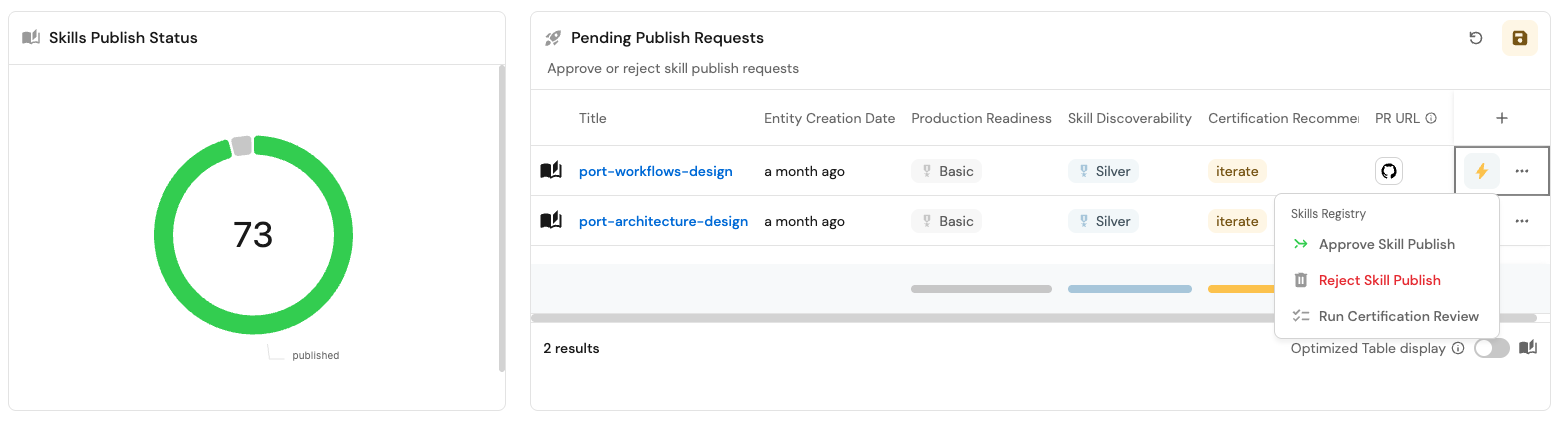
If you already have the Pending Publish Requests table from the previous guide, extend it:
- Open the table widget and edit it.
- Add these columns: the Production readiness scorecard, the Skill discoverability scorecard, and Certification Recommendation.
- Click Save.
Reviewers now see a skill's certification recommendation and both scorecards without leaving the table.
Add two more widgets to the dashboard: a Skills Certification Review pie chart, and a Published Skills With No Certification table.
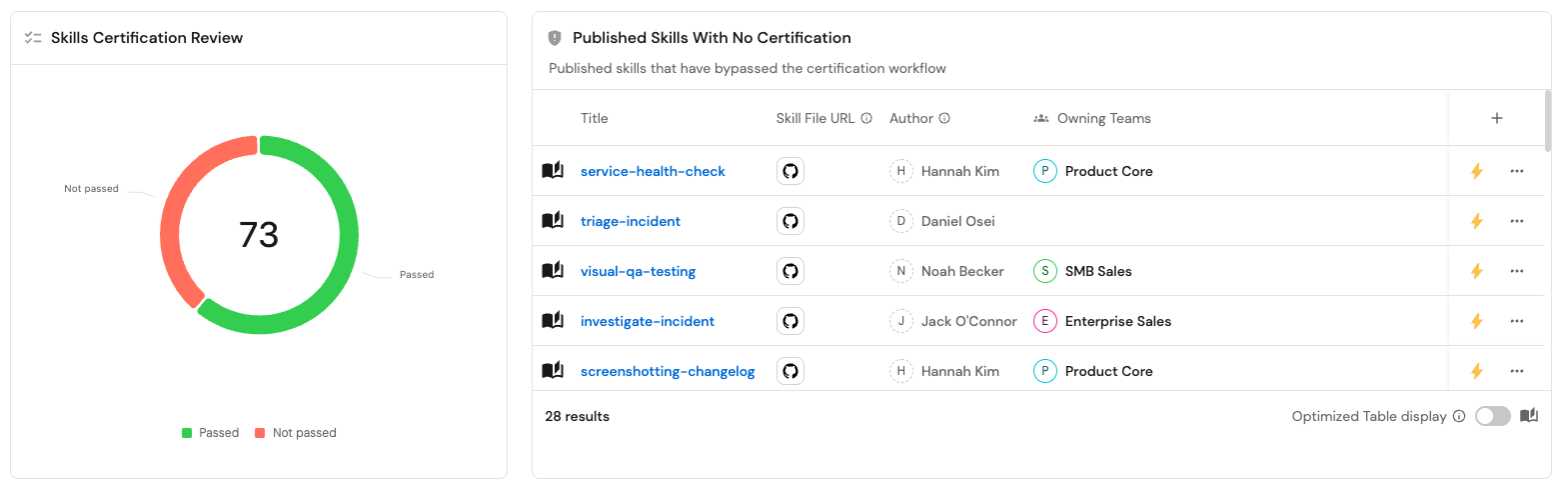
Skills Certification Review pie chart (click to expand)
- Click + Widget and select Pie Chart.
- Title:
Skills Certification Review. - Choose the
skillblueprint. - Under Breakdown by property, select the Skill discoverability scorecard's Description isn't missing rule. This buckets skills into Passed (has a reviewed, non-missing description) and Not passed.
- Click Save.
Published Skills With No Certification table (click to expand)
-
Click + Widget and select Table.
-
Title:
Published Skills With No Certification. -
Description:
Published skills that have bypassed the certification workflow. -
Choose the
skillblueprint. -
Add this filter to the Initial filters editor:
{"combinator": "and","rules": [{ "operator": "=", "property": "publish_status", "value": "published" },{ "operator": "isEmpty", "property": "last_certification_check_at" }]}- Shown columns: title, skill file URL, author, and owning teams.
-
Click Save.
Build a Skills Registry Health dashboard
This one is org-wide: instead of tracking individual pending requests, it shows how the whole registry is doing against your quality bar.
- Go to the catalog page, click the
+button in the left sidebar, and select New dashboard. - Name it
Skills Registry Health, and add a description such asAnalyze quality and governance gaps in your skills registry.
Add three widgets: Skills Production Readiness, Published Skills, Not Certified, and Discoverability.
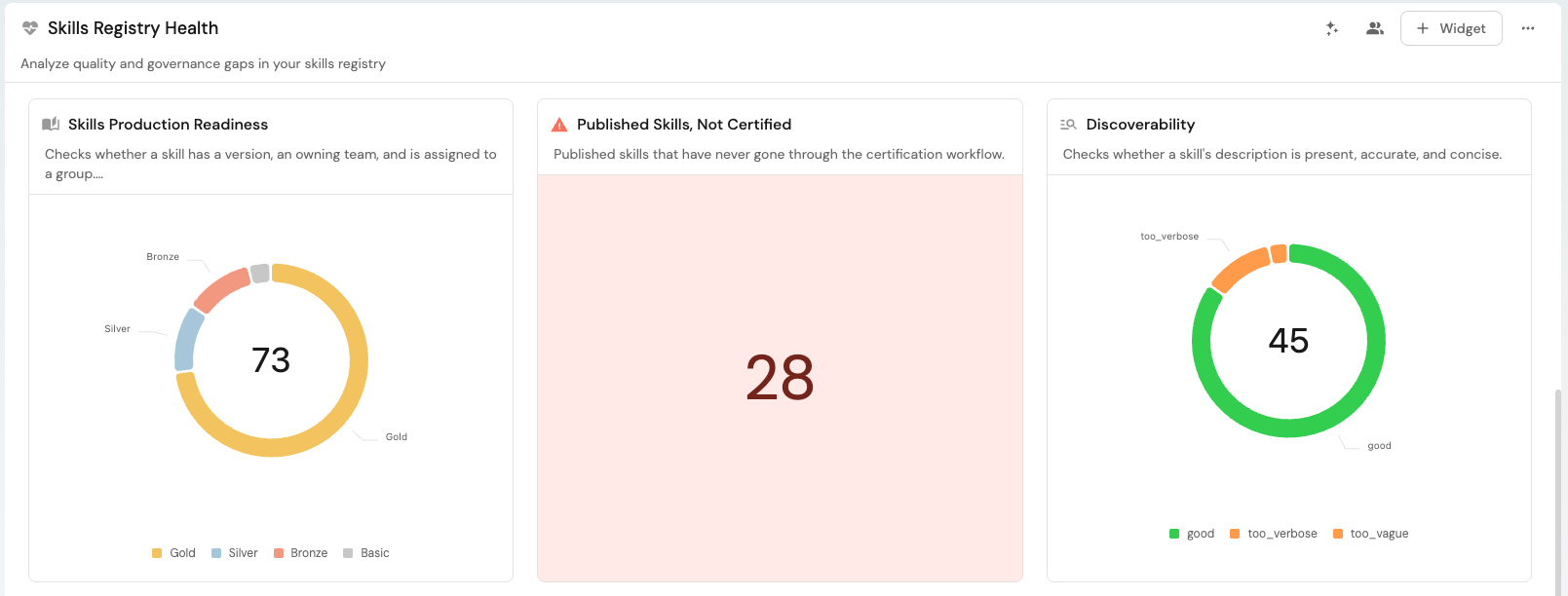
Skills Production Readiness pie chart (click to expand)
- Click + Widget and select Pie Chart.
- Title:
Skills Production Readiness. - Description:
Checks whether a skill has a version, an owning team, and is assigned to a group. - Choose the
skillblueprint. - Under Breakdown by property, select the Production readiness scorecard.
- Click Save.
Published Skills, Not Certified number chart (click to expand)
- Click + Widget and select Number Chart.
- Title:
Published Skills, Not Certified. - Description:
Published skills that have never gone through the certification workflow.
- Title:
- Select the
Count Entitieschart type and choose theskillblueprint. - Add the same filter as the table above (
publish_statusequalspublishedandlast_certification_check_atis empty). - Set a color threshold so any count above
0shows red. - Click Save.
Discoverability pie chart (click to expand)
-
Click + Widget and select Pie Chart.
- Title:
Discoverability. - Description:
Checks whether a skill's description is present, accurate, and concise.
- Title:
-
Choose the
skillblueprint. -
Under Breakdown by property, select Description Quality.
-
Add this filter to the Initial filters editor, so the chart only counts skills that have actually been reviewed:
{"combinator": "and","rules": [{ "operator": "isNotEmpty", "property": "last_certification_check_at" }]} -
Click Save.
Between the two dashboards, reviewers get a per-request view of what's pending and why, while platform teams get a standing view of how the registry as a whole is trending.
Possible enhancements
Run evals, not just reviews
Everything in this guide is a review: an AI node reads a skill's static content, static in the sense that nothing gets executed, and judges it against a standard. That's what makes it practical to run on every skill, automatically, the moment it's created. But a review alone can't tell you whether a skill actually works, whether it's safe to run, or whether it behaves the same way on every model your org supports. That needs an eval: actually executing the skill, typically in a sandboxed environment, and checking the result.
If you've set up sandbox infrastructure for running skill evals, security scans, or model-compatibility checks, whether self-hosted or through a vendor, trigger it from the certification workflow the same way dispatch_publish_pr triggers a GitHub Actions pipeline in the previous guide. The results get ingested back into Port, saved on the skill entity alongside the description-quality check, and taken into account by the certification recommendation.
Add more checks based on industry standards
check_description_quality is one check among many you could run. Anthropic's skill-authoring best practices and agentskills.io's best practices both describe patterns worth checking for automatically, for example flagging skills that hardcode time-sensitive information (specific dates, "current" versions, anything that goes stale) instead of describing how to look it up.
Add each as its own AI node between resolve_skill and synthesize_recommendation, alongside check_description_quality, with a systemPrompt describing the standard to check for and an outputSchema capturing the verdict and reasoning, the same shape as check_description_quality itself. For the time-sensitivity example, that means a node like check_time_sensitivity, reading the same instructions content, flagging hardcoded dates, "current" model names or versions, or other facts likely to go stale, while leaving deliberate version pins alone. Extend synthesize_recommendation's userPrompt to include its output alongside the description-quality result.
Add your own organizational standards
Beyond industry guidance, think about what's specific to how your org uses skills. A backend platform team might not want backend-oriented skills referencing internal frontend feature names; a data team might want to flag customer names appearing in instructions meant to be reusable across accounts. These are the same shape of check as check_description_quality, an AI node with a system prompt describing the standard and an outputSchema capturing the verdict, just pointed at a rule only your org would know to write.
Continue building your skills registry
This guide adds a non-deterministic quality check alongside the deterministic production-readiness scorecard. From here:
- Avoid duplicate skills in your org registry - extend both the Publish Skill and Skill Certification Review workflows built so far with similarity and uniqueness checks.
- Bundle skills into plugins - group certified skills into installable plugins with an AI-driven bundling suggestion.
- Measure the ROI of skills in your org registry - certification checks quality; this guide adds the economic check on top of it.
Related pages
- Set up a skills registry - the skill blueprint, GitOps mapping, and production-readiness scorecard this guide builds on.
- Ship new skills through one golden path - the Publish Skill workflow that this guide's event trigger reacts to.
- Anthropic: Agent Skills best practices - the source for why description quality matters most, and other authoring standards worth checking for.
- agentskills.io: Skill creation best practices - another source of checks worth automating.
- AI node - configuring
systemPrompt,tools, andoutputSchema. - Event trigger - triggering a workflow automatically when an entity is created.
- Webhook - calling external APIs, including Slack and Port's own API.