Ingest dependencies from a package.json file and relate them to a service
This guide includes steps that require integration with GitHub:
- GitHub (Ocean) - uses the Ocean framework. We strongly recommend this integration for new and migrated setups.
- GitHub (Sunset) - uses a GitHub app that is in sunset and will be fully deprecated on September 15, 2026.
Overview
This guide will demonstrate how to ingest dependencies from a package.json file and relate them to the corresponding service entities in Port.
Prerequisites
- This guide assumes you have a Port account and that you have finished the onboarding process.
- GitHub (Ocean)
- GitHub (Sunset)
- Install GitHub Ocean.
- Install Port's GitHub app.
Set up data model
Add a dependency blueprint
-
Go to the Builder in your Port portal.
-
Click on "+ Blueprint".
-
Click on the
{...}button in the top right corner, and choose "Edit JSON" -
Add this JSON schema:
Dependency blueprint (click to expand)
{"identifier": "dependency","title": "Dependency","icon": "Package","schema": {"properties": {"package_name": {"icon": "DefaultProperty","type": "string","title": "Package name"},"semver_requirement": {"type": "string","title": "Semver requirement"},"type": {"type": "string","title": "Type","enum": ["Production","Development"]},"url": {"type": "string","title": "URL","format": "url"}},"required": ["package_name","semver_requirement"]},"mirrorProperties": {},"calculationProperties": {},"aggregationProperties": {},"relations": {}}
Ingest dependencies from package.json
To ingest dependencies listed in package.json files, follow these steps:
-
Go to the data sources page in your Port portal, and select your GitHub integration.
-
Modify the mapping to include the
filekind with the configuration provided below:- GitHub (Ocean)
- GitHub (Sunset)
Port configuration (click to expand)
- kind: fileselector:query: 'true'files:- path: '**/package.json'organization: my-org # Optional if githubOrganization is set (required if not set)repos:- name: MyRepobranch: mainport:itemsToParse: .content.dependencies | to_entriesentity:mappings:identifier: >-.item.key + "_" + (.item.value | gsub("\\^"; "caret_") |gsub("~"; "tilde_") | gsub(">="; "gte_") | gsub("<="; "lte_") |gsub(">"; "gt_") | gsub("<"; "lt_") | gsub("@"; "at_") |gsub("\\*"; "star") | gsub(" "; "_"))title: .item.key + "@" + .item.valueblueprint: '"dependency"'properties:package_name: .item.keysemver_requirement: .item.valuePort configuration (click to expand)
- kind: fileselector:query: 'true'files:- path: '**/package.json'port:itemsToParse: .file.content.dependencies | to_entriesentity:mappings:identifier: >-.item.key + "_" + (.item.value | gsub("\\^"; "caret_") |gsub("~"; "tilde_") | gsub(">="; "gte_") | gsub("<="; "lte_") |gsub(">"; "gt_") | gsub("<"; "lt_") | gsub("@"; "at_") |gsub("\\*"; "star") | gsub(" "; "_"))title: .item.key + "@" + .item.valueblueprint: '"dependency"'properties:package_name: .item.keysemver_requirement: .item.valueConfiguration details-
kind: filespecifies that the source is a file, in this case,package.json. -
files:defines the path pattern to locatepackage.jsonfiles within your repositories. -
itemsToParse:identifies the specific array within thepackage.json(i.e.,dependencies) that you want to parse into individualdependencyentities. For GitHub Ocean, use.contentinstead of.file.content. -
identifier:constructs a unique identifier for each dependency, accounting for special characters in the version string. -
properties:captures essential details like the package name and version.
Relate the dependencies to the service
Once the dependencies have been ingested, the next step is to establish relationships between these dependency entities and the corresponding service entities.
-
Go to the Builder in your Port portal, select the
Serviceblueprint, and click onNew relationto create a relation between theserviceanddependencyblueprints. -
Click on the
...button in the top right corner of theServiceblueprint and selectEdit JSON. -
Add this JSON to establish the relationship:
"dependencies": {"title": "Dependencies","target": "dependency","required": false,"many": true} -
Head back to the data sources page and add one of the following mapping approaches:
- Direct mapping
- Search query
The most straightforward way to set a relation's value is to explicitly specify the related entity's identifier:
- GitHub (Ocean)
- GitHub (Sunset)
- kind: fileselector:query: 'true'files:- path: '**/package.json'organization: my-org # Optional if githubOrganization is set (required if not set)repos:- name: MyRepobranch: mainport:entity:mappings:identifier: .repository.nameblueprint: '"service"'properties: {}relations:dependencies: >-[.content.dependencies | to_entries | map( .key + "_" +(.value |gsub("\\^"; "caret_") |gsub("~"; "tilde_") |gsub(">="; "gte_") |gsub("<="; "lte_") |gsub(">"; "gt_") |gsub("<"; "lt_") |gsub("@"; "at_") |gsub("\\*"; "star") |gsub(" "; "_")) ) | .[]]- kind: fileselector:query: 'true'files:- path: '**/package.json'port:entity:mappings:identifier: .repo.nameblueprint: '"service"'properties: {}relations:dependencies: >-[.file.content.dependencies | to_entries | map( .key + "_" +(.value |gsub("\\^"; "caret_") |gsub("~"; "tilde_") |gsub(">="; "gte_") |gsub("<="; "lte_") |gsub(">"; "gt_") |gsub("<"; "lt_") |gsub("@"; "at_") |gsub("\\*"; "star") |gsub(" "; "_")) ) | .[]]Mapping detailsThis would establish a relation between the
serviceanddependencyentities based on the dependencies listed in thepackage.jsonfile.You can also use a search query to dynamically match services with their dependencies based on package information.
This approach is particularly useful when you don't know the entity's identifier, but you do know the value of one of its properties.
Add the snippet below to your mapping configuration to match services with dependencies based on the first package in dependencies/devDependencies. You can adjust the rules to match your organization's needs:
- GitHub (Ocean)
- GitHub (Sunset)
- kind: fileselector:query: 'true'files:- path: '**/package.json'organization: my-org # Optional if githubOrganization is set (required if not set)repos:- name: MyRepobranch: mainport:entity:mappings:identifier: .repository.nameblueprint: '"service"'properties: {}relations:dependencies:combinator: '"or"'rules:- property: '"package_name"'operator: '"="'value: .content.dependencies | to_entries[0].key- property: '"package_name"'operator: '"="'value: >-(.content.devDependencies // {}) | to_entries[0].key //null- kind: fileselector:query: 'true'files:- path: '**/package.json'port:entity:mappings:identifier: .repo.nameblueprint: '"service"'properties: {}relations:dependencies:combinator: '"or"'rules:- property: '"package_name"'operator: '"="'value: .file.content.dependencies | to_entries[0].key- property: '"package_name"'operator: '"="'value: >-(.file.content.devDependencies // {}) | to_entries[0].key //null -
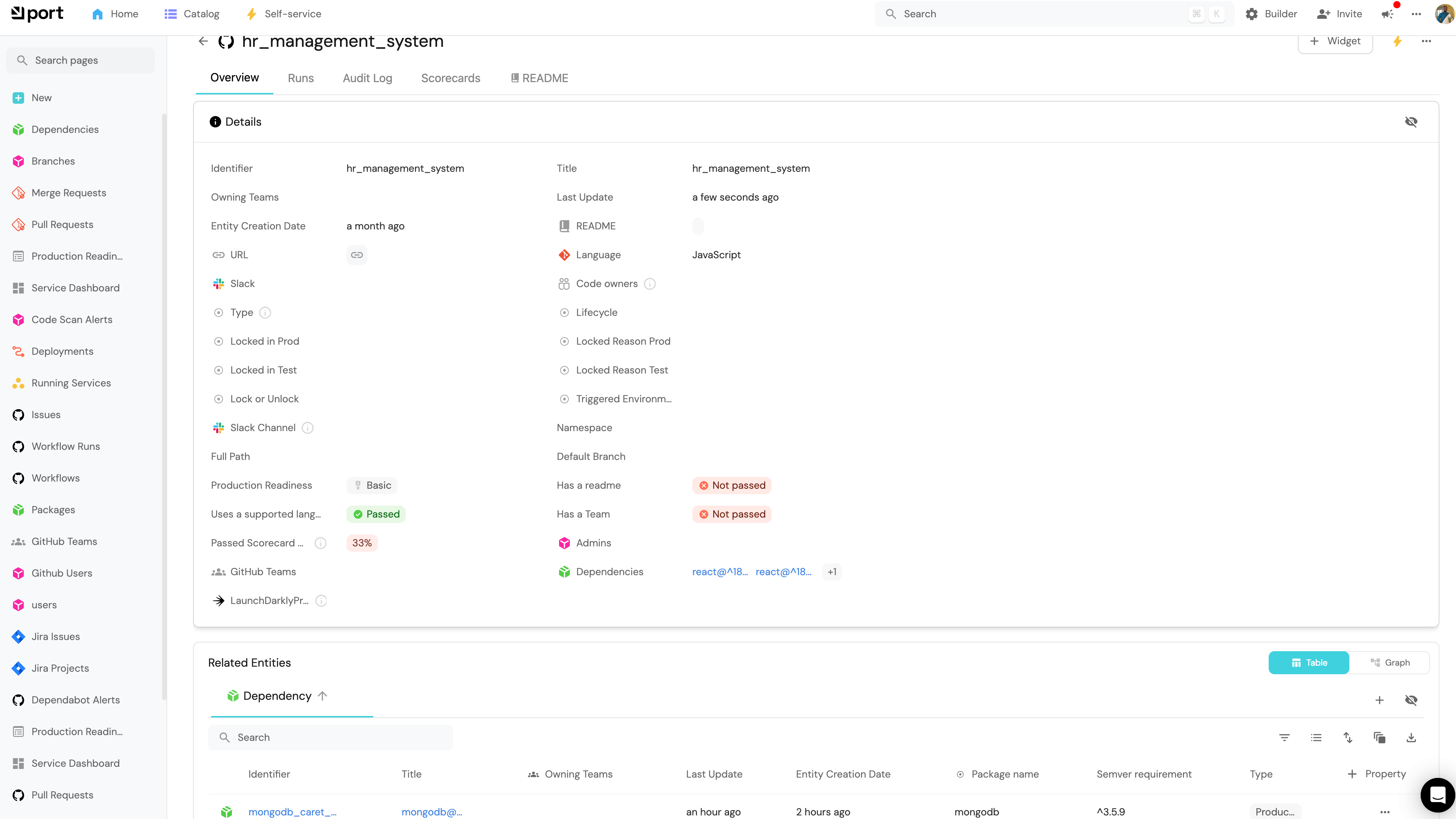
After you add the mapping, click on the resync button and watch your repositories being mapped to their dependencies as shown below in this example:
Conclusion
By following these steps, you can effectively ingest dependencies from package.json files and relate them to the corresponding repository entities in Port 🎉.
More relevant guides and examples: