Interact with PagerDuty incidents
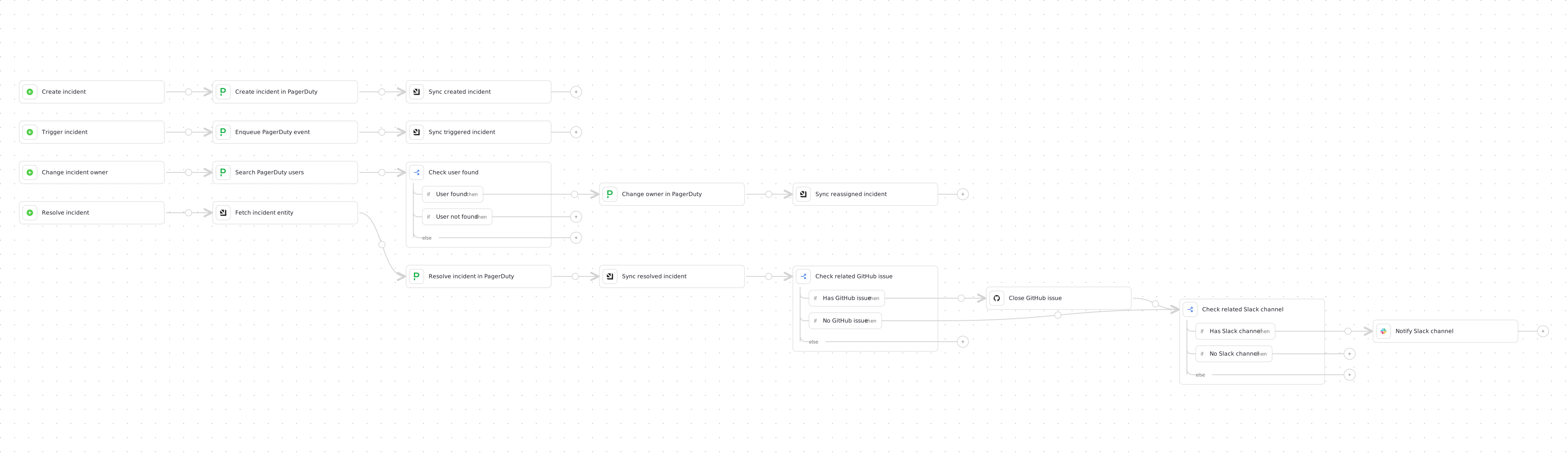
This guide demonstrates how to create, trigger, reassign, and resolve PagerDuty incidents directly from Port using a single Port workflow. Every operation calls PagerDuty's API natively from webhook nodes, so no GitHub Actions or other CI backend is required.
Common use cases
- Create PagerDuty incidents from Port with a title, urgency, and description.
- Trigger incidents against PagerDuty services with a chosen severity and event action.
- Reassign PagerDuty incidents to a new owner from Port.
- Resolve PagerDuty incidents and optionally clean up related GitHub and Slack resources.
- Keep your Port catalog in sync by upserting the incident after each operation.
Prerequisites
-
Complete the onboarding process.
-
Access to your PagerDuty organization with permissions to manage incidents.
-
A PagerDuty routing key for the service you want to trigger incidents for.
Finding your PagerDuty routing keyTo find your PagerDuty routing key (also called integration key):
- Log in to your PagerDuty account.
- Navigate to Services in the main menu.
- Select the service you want to trigger incidents for.
- Click on the Integrations tab.
- Look for an existing "Events API V2" integration, or click Add integration and select "Events API V2".
- The Integration Key displayed is your routing key.
-
Optional - Install Port's PagerDuty integration, learn more.
PagerDuty integrationThis step is not required for this example, but it creates all the blueprint boilerplate for you, and also ingests and updates the catalog in real time with your PagerDuty incidents.
Set up data model
If you haven't installed the PagerDuty integration, you'll need to create blueprints for PagerDuty incidents and PagerDuty services. However, we highly recommend you install the PagerDuty integration to have these automatically set up for you.
Create the PagerDuty service blueprint
-
Go to the Data model page in Port.
-
Click on
+ Blueprint. -
Click on the
{...} Edit JSONbutton. -
Copy and paste the following JSON configuration:
PagerDuty service blueprint (click to expand)
{"identifier": "pagerdutyService","description": "This blueprint represents a PagerDuty service in our context lake","title": "PagerDuty Service","icon": "pagerduty","schema": {"properties": {"description": {"type": "string","title": "Description"},"status": {"type": "string","title": "Status","enum": ["active", "warning", "critical", "maintenance", "disabled"]},"url": {"type": "string","format": "url","title": "Service URL"},"created_at": {"type": "string","format": "date-time","title": "Created At"},"updated_at": {"type": "string","format": "date-time","title": "Updated At"}},"required": []},"mirrorProperties": {},"calculationProperties": {},"relations": {}} -
Click "Save" to create the blueprint.
Create the PagerDuty incident blueprint
-
Go to the Data model page in Port.
-
Click on
+ Blueprint. -
Click on the
{...} Edit JSONbutton. -
Copy and paste the following JSON configuration:
PagerDuty Incident Blueprint (click to expand)
{"identifier": "pagerdutyIncident","description": "This blueprint represents a PagerDuty incident in our context lake","title": "PagerDuty Incident","icon": "pagerduty","schema": {"properties": {"status": {"type": "string","title": "Incident Status","enum": ["triggered","annotated","acknowledged","reassigned","escalated","reopened","resolved"]},"url": {"type": "string","format": "url","title": "Incident URL"},"urgency": {"type": "string","title": "Incident Urgency","enum": ["high", "low"]},"responder": {"type": "string","title": "Assignee"},"escalation_policy": {"type": "string","title": "Escalation Policy"},"created_at": {"title": "Create At","type": "string","format": "date-time"},"updated_at": {"title": "Updated At","type": "string","format": "date-time"}},"required": []},"mirrorProperties": {},"calculationProperties": {},"relations": {"pagerdutyService": {"title": "PagerDuty Service","target": "pagerdutyService","required": false,"many": true}}} -
Click "Save" to create the blueprint.
Add Port secrets
If you have already installed Port's PagerDuty integration, these secrets should already exist in Port. To view your existing secrets:
- Open the Credentials modal.
- Click on the
Secretstab.
To add these secrets to your portal:
-
Open the Credentials modal.
-
Click on the
Secretstab. -
Click on
+ Secretand add the following secrets:PAGERDUTY_API_TOKEN- Your PagerDuty API token.PAGERDUTY_USER_EMAIL- The email of the PagerDuty user that owns the API token.PAGERDUTY_ROUTING_KEY- Your PagerDuty routing key for the service.SLACK_BOT_TOKEN- Optional. A Slack bot token, used only by the resolve flow to notify a related Slack channel.GITHUB_TOKEN- Optional. A GitHub token withissueswrite access, used only by the resolve flow to close a related GitHub issue.
Secrets are referenced only inside the webhook nodes that call each external API, for example {{ .secrets["PAGERDUTY_API_TOKEN"] }}. Keep credentials in Port secrets rather than hardcoding them in the workflow.
Build the workflow
We will build a single workflow with four self-service triggers, one for each operation (create, trigger, change owner, and resolve). Each trigger connects to its own branch of webhook, condition, and upsert nodes, so all four flows live in one workflow.
Follow the steps below to build the workflow:
-
Go to the workflows page in Port.
-
Click + Workflow.
-
Fill out the Create new workflow form, then click Confirm.
-
Click the
{...}button to open the JSON editor and paste the workflow JSON below:Interact with PagerDuty incidents workflow JSON (click to expand)
{"identifier": "pagerduty_incident_operations","title": "Interact with PagerDuty incidents","icon": "pagerduty","description": "Create, trigger, reassign, and resolve PagerDuty incidents natively from Port","allowAnyoneToViewRuns": true,"nodes": [{"identifier": "create_trigger","title": "Create incident","icon": "pagerduty","description": "Create a new PagerDuty incident for a service","config": {"type": "SELF_SERVE_TRIGGER","published": true,"userInputs": {"properties": {"service": {"title": "PagerDuty service","description": "Select the PagerDuty service to create the incident for","type": "string","format": "entity","blueprint": "pagerdutyService"},"title": {"title": "Title","type": "string"},"extra_details": {"title": "Extra details","type": "string"},"urgency": {"title": "Urgency","type": "string","default": "high","enum": ["high", "low"],"enumColors": {"high": "yellow","low": "green"}}},"required": ["service", "title", "urgency"],"order": ["service", "title", "urgency", "extra_details"]}},"variables": {}},{"identifier": "create_incident","title": "Create incident in PagerDuty","icon": "pagerduty","description": "Call the PagerDuty incidents API","config": {"type": "WEBHOOK","url": "https://api.pagerduty.com/incidents","agent": false,"synchronized": true,"method": "POST","headers": {"Authorization": "Token token={{ .secrets[\"PAGERDUTY_API_TOKEN\"] }}","Accept": "application/vnd.pagerduty+json;version=2","From": "{{ .secrets[\"PAGERDUTY_USER_EMAIL\"] }}","Content-Type": "application/json"},"body": {"incident": {"type": "incident","title": "{{ .outputs.trigger.title }}","service": {"id": "{{ .outputs.trigger.service }}","type": "service_reference"},"urgency": "{{ .outputs.trigger.urgency }}","body": {"type": "incident_body","details": "{{ .outputs.trigger.extra_details }}"}}}},"variables": {}},{"identifier": "sync_created_incident","title": "Sync created incident","icon": "Port","description": "Upsert the created incident into Port","config": {"type": "UPSERT_ENTITY","blueprintIdentifier": "pagerdutyIncident","mapping": {"identifier": "{{ .outputs.create_incident.response.data.incident.id }}","title": "{{ .outputs.create_incident.response.data.incident.title }}","properties": {"status": "{{ .outputs.create_incident.response.data.incident.status }}","url": "{{ .outputs.create_incident.response.data.incident.self }}","urgency": "{{ .outputs.create_incident.response.data.incident.urgency }}","responder": "{{ .outputs.create_incident.response.data.incident.assignments[0].assignee.summary }}","escalation_policy": "{{ .outputs.create_incident.response.data.incident.escalation_policy.summary }}","created_at": "{{ .outputs.create_incident.response.data.incident.created_at }}","updated_at": "{{ .outputs.create_incident.response.data.incident.updated_at }}"},"relations": {"pagerdutyService": ["{{ .outputs.create_incident.response.data.incident.service.id }}"]}}},"variables": {}},{"identifier": "trigger_incident_trigger","title": "Trigger incident","icon": "pagerduty","description": "Trigger an incident through the PagerDuty Events API","config": {"type": "SELF_SERVE_TRIGGER","published": true,"userInputs": {"properties": {"summary": {"title": "Summary","type": "string"},"source": {"title": "Source","type": "string","default": "Port"},"severity": {"title": "Severity","type": "string","default": "critical","enum": ["critical", "error", "warning", "info"],"enumColors": {"critical": "red","error": "red","warning": "yellow","info": "blue"}},"event_action": {"title": "Event action","type": "string","default": "trigger","enum": ["trigger", "acknowledge", "resolve"]}},"required": ["summary", "source", "severity", "event_action"],"order": ["summary", "source", "severity", "event_action"]}},"variables": {}},{"identifier": "enqueue_event","title": "Enqueue PagerDuty event","icon": "pagerduty","description": "Send an event to the PagerDuty Events API","config": {"type": "WEBHOOK","url": "https://events.pagerduty.com/v2/enqueue","agent": false,"synchronized": true,"method": "POST","headers": {"Content-Type": "application/json"},"body": {"payload": {"summary": "{{ .outputs.trigger.summary }}","source": "{{ .outputs.trigger.source }}","severity": "{{ .outputs.trigger.severity }}"},"routing_key": "{{ .secrets[\"PAGERDUTY_ROUTING_KEY\"] }}","event_action": "{{ .outputs.trigger.event_action }}"}},"variables": {}},{"identifier": "sync_triggered_incident","title": "Sync triggered incident","icon": "Port","description": "Upsert the triggered incident into Port","config": {"type": "UPSERT_ENTITY","blueprintIdentifier": "pagerdutyIncident","mapping": {"identifier": "{{ .outputs.enqueue_event.response.data.dedup_key }}","title": "{{ .outputs.trigger.summary }}","properties": {"status": "triggered","urgency": "high","created_at": "{{ .workflowRun.createdAt }}"}}},"variables": {}},{"identifier": "change_owner_trigger","title": "Change incident owner","icon": "pagerduty","description": "Reassign a PagerDuty incident to a new owner","config": {"type": "SELF_SERVE_TRIGGER","published": true,"userInputs": {"properties": {"incident": {"title": "Incident","description": "Select the PagerDuty incident to reassign","type": "string","format": "entity","blueprint": "pagerdutyIncident"},"from": {"title": "From","description": "The email of a valid PagerDuty user making the request","type": "string","format": "user"},"new_owner": {"title": "New owner","description": "The email of the new incident owner","type": "string","format": "user"}},"required": ["incident", "new_owner", "from"],"order": ["incident", "new_owner", "from"]}},"variables": {}},{"identifier": "search_pd_user","title": "Search PagerDuty users","icon": "pagerduty","description": "Look up the new owner in PagerDuty","config": {"type": "WEBHOOK","url": "https://api.pagerduty.com/users?query={{ .outputs.trigger.new_owner }}","agent": false,"synchronized": true,"method": "GET","headers": {"Authorization": "Token token={{ .secrets[\"PAGERDUTY_API_TOKEN\"] }}","Accept": "application/vnd.pagerduty+json;version=2","Content-Type": "application/json"}},"variables": {}},{"identifier": "check_user_found","title": "Check user found","icon": "DefaultProperty","description": "Only reassign when the new owner exists","config": {"type": "CONDITION","outlets": [{"identifier": "user_found","title": "User found","expression": "(.outputs[\"search_pd_user\"].response.data.users | length) > 0"},{"identifier": "user_not_found","title": "User not found","expression": "(.outputs[\"search_pd_user\"].response.data.users | length) == 0"}]},"variables": {}},{"identifier": "change_owner","title": "Change owner in PagerDuty","icon": "pagerduty","description": "Assign the incident to the new owner","config": {"type": "WEBHOOK","url": "https://api.pagerduty.com/incidents/{{ .outputs.trigger.incident }}","agent": false,"synchronized": true,"method": "PUT","headers": {"Authorization": "Token token={{ .secrets[\"PAGERDUTY_API_TOKEN\"] }}","Accept": "application/vnd.pagerduty+json;version=2","From": "{{ .outputs.trigger.from }}","Content-Type": "application/json"},"body": {"incident": {"type": "incident_reference","assignments": [{"assignee": {"id": "{{ .outputs.search_pd_user.response.data.users[0].id }}","type": "user_reference"}}]}}},"variables": {}},{"identifier": "sync_owner_change","title": "Sync reassigned incident","icon": "Port","description": "Upsert the reassigned incident into Port","config": {"type": "UPSERT_ENTITY","blueprintIdentifier": "pagerdutyIncident","mapping": {"identifier": "{{ .outputs.change_owner.response.data.incident.id }}","title": "{{ .outputs.change_owner.response.data.incident.title }}","properties": {"status": "{{ .outputs.change_owner.response.data.incident.status }}","url": "{{ .outputs.change_owner.response.data.incident.self }}","urgency": "{{ .outputs.change_owner.response.data.incident.urgency }}","responder": "{{ .outputs.change_owner.response.data.incident.assignments[0].assignee.summary }}","escalation_policy": "{{ .outputs.change_owner.response.data.incident.escalation_policy.summary }}","created_at": "{{ .outputs.change_owner.response.data.incident.created_at }}","updated_at": "{{ .outputs.change_owner.response.data.incident.updated_at }}"}}},"variables": {}},{"identifier": "resolve_trigger","title": "Resolve incident","icon": "pagerduty","description": "Resolve a PagerDuty incident and clean up related resources","config": {"type": "SELF_SERVE_TRIGGER","published": true,"userInputs": {"properties": {"incident": {"title": "Incident","description": "Select the PagerDuty incident to resolve","type": "string","format": "entity","blueprint": "pagerdutyIncident"}},"required": ["incident"],"order": ["incident"]}},"variables": {}},{"identifier": "fetch_incident","title": "Fetch incident entity","icon": "Port","description": "Load the incident properties and relations from Port","config": {"type": "WEBHOOK","url": "https://api.port.io/v1/blueprints/pagerdutyIncident/entities/search","agent": false,"synchronized": true,"method": "POST","headers": {"Content-Type": "application/json"},"body": {"query": {"rules": [{"property": "$identifier","operator": "=","value": "{{ .outputs.trigger.incident }}"}],"combinator": "and"}}},"variables": {"entity": "{{ .result.response.data.entities[0] }}"}},{"identifier": "resolve_incident_in_pagerduty","title": "Resolve incident in PagerDuty","icon": "pagerduty","description": "Set the incident status to resolved","config": {"type": "WEBHOOK","url": "https://api.pagerduty.com/incidents","agent": false,"synchronized": true,"method": "PUT","headers": {"Authorization": "Token token={{ .secrets[\"PAGERDUTY_API_TOKEN\"] }}","Accept": "application/vnd.pagerduty+json;version=2","From": "{{ .secrets[\"PAGERDUTY_USER_EMAIL\"] }}","Content-Type": "application/json"},"body": {"incidents": [{"id": "{{ .outputs.trigger.incident }}","type": "incident_reference","status": "resolved"}]}},"variables": {}},{"identifier": "sync_resolved_incident","title": "Sync resolved incident","icon": "Port","description": "Upsert the resolved incident into Port","config": {"type": "UPSERT_ENTITY","blueprintIdentifier": "pagerdutyIncident","mapping": {"identifier": "{{ .outputs.resolve_incident_in_pagerduty.response.data.incidents[0].id }}","title": "{{ .outputs.resolve_incident_in_pagerduty.response.data.incidents[0].title }}","properties": {"status": "{{ .outputs.resolve_incident_in_pagerduty.response.data.incidents[0].status }}","url": "{{ .outputs.resolve_incident_in_pagerduty.response.data.incidents[0].self }}","urgency": "{{ .outputs.resolve_incident_in_pagerduty.response.data.incidents[0].urgency }}","responder": "{{ .outputs.resolve_incident_in_pagerduty.response.data.incidents[0].assignments[0].assignee.summary }}","escalation_policy": "{{ .outputs.resolve_incident_in_pagerduty.response.data.incidents[0].escalation_policy.summary }}","created_at": "{{ .outputs.resolve_incident_in_pagerduty.response.data.incidents[0].created_at }}","updated_at": "{{ .outputs.resolve_incident_in_pagerduty.response.data.incidents[0].updated_at }}"}}},"variables": {}},{"identifier": "check_github_issue","title": "Check related GitHub issue","icon": "DefaultProperty","description": "Close a related GitHub issue when one exists","config": {"type": "CONDITION","outlets": [{"identifier": "has_issue","title": "Has GitHub issue","expression": "(.outputs[\"fetch_incident\"].entity.relations.githubIssue // \"\") != \"\""},{"identifier": "no_issue","title": "No GitHub issue","expression": "(.outputs[\"fetch_incident\"].entity.relations.githubIssue // \"\") == \"\""}]},"variables": {}},{"identifier": "close_github_issue","title": "Close GitHub issue","icon": "Github","description": "Close the related GitHub issue","config": {"type": "WEBHOOK","url": "https://api.github.com/repos/<GITHUB_ORG>/<GITHUB_REPO>/issues/{{ .outputs[\"fetch_incident\"].entity.relations.githubIssue | split(\"-\") | last }}","agent": false,"synchronized": true,"method": "PATCH","onFailure": "continue","headers": {"Accept": "application/vnd.github+json","Authorization": "Bearer {{ .secrets[\"GITHUB_TOKEN\"] }}","Content-Type": "application/json"},"body": {"state": "closed","state_reason": "completed"}},"variables": {}},{"identifier": "check_slack_channel","title": "Check related Slack channel","icon": "DefaultProperty","description": "Notify a related Slack channel when one exists","config": {"type": "CONDITION","outlets": [{"identifier": "has_channel","title": "Has Slack channel","expression": "(.outputs[\"fetch_incident\"].entity.properties.slack_channel // \"\") != \"\""},{"identifier": "no_channel","title": "No Slack channel","expression": "(.outputs[\"fetch_incident\"].entity.properties.slack_channel // \"\") == \"\""}]},"variables": {}},{"identifier": "notify_slack","title": "Notify Slack channel","icon": "Slack","description": "Send a resolution message to the related Slack channel","config": {"type": "WEBHOOK","url": "https://slack.com/api/chat.postMessage","agent": false,"synchronized": true,"method": "POST","onFailure": "continue","headers": {"Authorization": "Bearer {{ .secrets[\"SLACK_BOT_TOKEN\"] }}","Content-Type": "application/json"},"body": {"channel": "{{ .outputs[\"fetch_incident\"].entity.properties.slack_channel | split(\"=\") | last }}","text": "PagerDuty incident {{ .outputs[\"fetch_incident\"].entity.title }} was resolved."}},"variables": {}}],"connections": [{"sourceIdentifier": "create_trigger","targetIdentifier": "create_incident"},{"sourceIdentifier": "create_incident","targetIdentifier": "sync_created_incident"},{"sourceIdentifier": "trigger_incident_trigger","targetIdentifier": "enqueue_event"},{"sourceIdentifier": "enqueue_event","targetIdentifier": "sync_triggered_incident"},{"sourceIdentifier": "change_owner_trigger","targetIdentifier": "search_pd_user"},{"sourceIdentifier": "search_pd_user","targetIdentifier": "check_user_found"},{"sourceIdentifier": "check_user_found","targetIdentifier": "change_owner","sourceOutletIdentifier": "user_found"},{"sourceIdentifier": "change_owner","targetIdentifier": "sync_owner_change"},{"sourceIdentifier": "resolve_trigger","targetIdentifier": "fetch_incident"},{"sourceIdentifier": "fetch_incident","targetIdentifier": "resolve_incident_in_pagerduty"},{"sourceIdentifier": "resolve_incident_in_pagerduty","targetIdentifier": "sync_resolved_incident"},{"sourceIdentifier": "sync_resolved_incident","targetIdentifier": "check_github_issue"},{"sourceIdentifier": "check_github_issue","targetIdentifier": "close_github_issue","sourceOutletIdentifier": "has_issue"},{"sourceIdentifier": "check_github_issue","targetIdentifier": "check_slack_channel","sourceOutletIdentifier": "no_issue"},{"sourceIdentifier": "close_github_issue","targetIdentifier": "check_slack_channel"},{"sourceIdentifier": "check_slack_channel","targetIdentifier": "notify_slack","sourceOutletIdentifier": "has_channel"}]} -
Click Apply changes.
Configure the workflow
After saving, review the following placeholders and settings:
-
Confirm the
PAGERDUTY_API_TOKEN,PAGERDUTY_USER_EMAIL, andPAGERDUTY_ROUTING_KEYsecrets exist in your portal. -
In the sync_created_incident node, the
pagerdutyServicerelation key must match the relation defined on yourpagerdutyIncidentblueprint. If you renamed it, update the key accordingly. -
The check_github_issue and check_slack_channel branches are optional. They only run when the resolved incident has a
githubIssuerelation or aslack_channelproperty, which are created by the Slack channel incident automation guide. If you do not use that flow, you can leave these branches in place (they will be skipped) or remove them. -
If you keep the resolve clean-up branches, replace
<GITHUB_ORG>and<GITHUB_REPO>in the close_github_issue node with the repository that holds the related issues, and confirm theGITHUB_TOKENandSLACK_BOT_TOKENsecrets exist.
Self-service triggers pass the selected incident's identifier, not its full properties and relations. The fetch_incident node loads the entity from Port's API so the resolve branch can read slack_channel and githubIssue. Port authenticates calls to api.port.io automatically, so no token is needed there.
Let's test it!
-
Head to the self-service page of your portal.
-
Choose one of the actions exposed by the workflow:
Create incident,Trigger incident,Change incident owner, orResolve incident. -
For
Create incident, select a PagerDuty service. ForChange incident ownerandResolve incident, select an existing PagerDuty incident entity. -
Fill in the incident details as prompted.
-
Click Execute and wait for PagerDuty to complete the action.
-
Go to the Workflow runs tab to follow the run and inspect each node's output.