Measure the ROI of skills in your org registry
A skill can pass every check in your registry, a clean description, a unique purpose, a green production-readiness scorecard, and still not be worth running. Picture a skill that opens a pull request: certified, well documented, used every day, and it costs $10 every time it runs. Certification tells you the skill is good. It says nothing about whether the skill is worth its cost.
Skill ROI answers that second question directly:
Skill ROI = cost of manually doing what the skill does ÷ cost of running the skill
A few points on that ratio worth mentioning:
- Below 1: the skill costs more per run than the manual work it replaces. That $10 pull-request skill lands here if opening the PR by hand would only take a couple of minutes.
- Exactly 1: breakeven. The skill costs exactly what the manual alternative would, so there's no cost-based reason to prefer the automation.
- Above 1: the skill is cheaper than doing the task by hand, and the higher the number, the better. We'll use specific thresholds for this later, when we build the scorecard.
It's worth pausing on why this is a ratio and not a subtraction. A tempting simpler metric is manual effort cost − skill cost, the raw dollars saved. The problem is that raw dollars don't compare across skills of different cost scales. The ratio normalizes for scale, so any two skills, cheap or expensive, land on the same bar and can be ranked and tiered consistently. Raw dollar savings still matter, they're the "how much have we saved in total" number leadership wants, and they are calculated separately.
We'll build this in three parts
- Extend the
skillblueprint with cost, effort, and ROI calculation properties. - Connect real Claude skill-usage data to your registered skills.
- Build a Skill ROI scorecard and dashboard to track and communicate impact.
Common use cases
- Catch skills that pass governance but aren't worth their cost.
- Decide which skills to invest in, standardize, or retire.
- Give leadership a defensible, evidence-based number for the registry's effectiveness.
Prerequisites
- Completed Set up a skills registry: the
skillblueprint exists in your data model. - Port's Claude integration installed and ingesting: the
claude_ai_skill_usageblueprint exists. - Your organization is on a Claude Enterprise plan, and the API key used by the integration has the
read:analyticsscope. Skill usage analytics, including spend data, are unavailable otherwise.
Cursor's skill-usage kind (cursor-team-skill-usage) reports usage but has no cost or spend field yet, so the dollar-based ROI in this guide can't be computed for Cursor skills today. If Cursor's analytics API adds cost data later, the same aggregation-and-calculation pattern here applies to it directly.
Step 1: Extend your data model
Add cost and effort properties to the skill blueprint
There's no integration that can tell you how long a task would take by hand, so manual_effort_hours and hourly_rate are properties you set yourself, per skill.
-
Navigate to your Data model page in Port.
-
Find and expand the
skillblueprint. -
Click the
...button, then select{...} Edit JSON. -
Merge the following into the blueprint's
schema.propertiesobject, then click Save.Additional skill properties (click to expand)
{"manual_effort_hours": {"title": "Manual Effort (Hours)","icon": "DefaultProperty","type": "number","description": "Estimated hours to complete the same task manually instead of running this skill."},"hourly_rate": {"title": "Hourly Rate ($)","icon": "DefaultProperty","type": "number","default": 75,"description": "Blended hourly rate used to price out manual effort."}}
As your registry grows, editing every skill by hand doesn't scale. A few ways to automate it could be:
- Add
manual_effort_hoursandhourly_rateas required inputs on the "Publish Skill" self-service workflow from Ship new skills through one golden path, so the estimate is captured once, at publish time, from whoever knows the skill best. - Add an AI node to the certification workflow from Certify skills to meet industry and org standards that reads a skill's instructions and estimates
manual_effort_hoursitself, the same way that workflow already judges description quality. - Put
hourly_rateon the owning_teamentity instead of on each skill, and mirror it ontoskillas a default, only overriding it per skill when a particular skill genuinely costs a different rate to replace by hand.
Relate Claude skill usage to your registered skills
The claude_ai_skill_usage blueprint the Claude integration creates has no relation to skill out of the box, so we need to add one before we can aggregate real usage and spend onto a skill.
There's a wrinkle here: the skill blueprint's $identifier is a full path (<repo_full_name>/<skillMdPath>, set by the GitHub Ocean mapping in Set up a skills registry), but claude_ai_skill_usage.skill_name is just the bare skill name. A direct identifier reference won't match anything, so we'll relate them with a search query instead, matching on the skill's $title, which is just the bare name.
A search query matches against every entity of the target blueprint. If two registered skills share the same name across different repositories, the match below is ambiguous. Keep skill names unique across your registry, or add extra rules to the search query to disambiguate.
First, add the relation itself to the claude_ai_skill_usage blueprint:
-
Navigate to your Data model page in Port.
-
Find and expand the Claude AI Skill Usage (
claude_ai_skill_usage) blueprint. -
Click the
...button, then select{...} Edit JSON. -
Merge the following into the blueprint's
relationsobject, then click Save.Skill relation (click to expand)
{"skill": {"title": "Skill","target": "skill","required": false,"many": false}}
Then populate that relation on every synced record, by editing the Claude integration's mapping:
-
Go to the data sources page in Port.
-
Find your Claude integration and click Manage.
-
Go to the Mapping tab.
-
Find the
claude-ai-skill-usageresource, and merge the following into itsport.entity.mappingsobject, then click Save & Resync.Skill relation mapping (click to expand)
relations:skill:combinator: '"and"'rules:- property: '"$title"'operator: '"="'value: .skill_name- property: '"$blueprint"'operator: '"="'value: '"skill"'
We deliberately don't set createMissingRelatedEntities here. Usage of a skill that was never registered, or a private skill whose name Anthropic doesn't disclose, should stay unrelated. Only registered skills get an ROI number, which is the point.
Add aggregation properties
With the relation in place, skill can pull real usage and spend up from claude_ai_skill_usage. Merge the following into the skill blueprint's aggregationProperties object the same way you edited its schema.properties above.
Usage and spend aggregations (click to expand)
{
  "usage_last_30_days": {
    "title": "Usage (Last 30 Days)",
    "icon": "DefaultProperty",
    "description": "Sum of invocation_count from related Claude skill-usage records over the last 30 days.",
    "target": "claude_ai_skill_usage",
    "query": {
      "combinator": "and",
      "rules": [
        { "property": "record_date", "operator": "between", "value": { "preset": "lastMonth" } }
      ]
    },
    "calculationSpec": {
      "func": "sum",
      "property": "invocation_count",
      "calculationBy": "property"
    }
  },
  "total_spend_30d": {
    "title": "Total Spend (Last 30 Days, $)",
    "icon": "DefaultProperty",
    "description": "Sum of attributed_list_price from related Claude skill-usage records over the last 30 days.",
    "target": "claude_ai_skill_usage",
    "query": {
      "combinator": "and",
      "rules": [
        { "property": "record_date", "operator": "between", "value": { "preset": "lastMonth" } }
      ]
    },
    "calculationSpec": {
      "func": "sum",
      "property": "attributed_list_price",
      "calculationBy": "property"
    }
  }
}
Add ROI calculation properties
Finally, the ROI math itself. cost_per_run divides the 30-day spend by 30-day usage to get the skill's real, current average cost per invocation, replacing what would otherwise be a manually guessed number. Every property below is guarded against missing or zero denominators, so a skill with no usage yet, or no effort estimate yet, resolves to null rather than a misleading 0 or a divide-by-zero error.
Merge the following into the skill blueprint's calculationProperties object.
ROI calculation properties (click to expand)
{
  "cost_per_run": {
    "title": "Cost Per Run ($)",
    "icon": "DefaultProperty",
    "description": "Average attributed cost per invocation over the last 30 days: total spend divided by usage.",
    "calculation": "if (.properties.total_spend_30d == null) or (.properties.usage_last_30_days == null) or (.properties.usage_last_30_days == 0) then null else (.properties.total_spend_30d / .properties.usage_last_30_days) end",
    "type": "number"
  },
  "manual_effort_cost": {
    "title": "Manual Effort Cost ($)",
    "icon": "DefaultProperty",
    "description": "What it would cost to do this task manually instead of running the skill.",
    "calculation": "if (.properties.manual_effort_hours == null) or (.properties.hourly_rate == null) then null else (.properties.manual_effort_hours * .properties.hourly_rate) end",
    "type": "number"
  },
  "skill_roi": {
    "title": "Skill ROI",
    "icon": "DefaultProperty",
    "description": "Manual effort cost divided by the skill's cost per run. Above 1 means the skill is cheaper than doing the task by hand.",
    "calculation": "if (.properties.total_spend_30d == null) or (.properties.usage_last_30_days == null) or (.properties.usage_last_30_days == 0) or (.properties.manual_effort_hours == null) or (.properties.hourly_rate == null) then null else ((.properties.manual_effort_hours * .properties.hourly_rate) / (.properties.total_spend_30d / .properties.usage_last_30_days)) end",
    "type": "number"
  },
  "skill_savings": {
    "title": "Skill Savings Per Run ($)",
    "icon": "DefaultProperty",
    "description": "Manual effort cost minus cost per run. How much cheaper (or more expensive) one automated run is than doing it by hand.",
    "calculation": "if (.properties.total_spend_30d == null) or (.properties.usage_last_30_days == null) or (.properties.usage_last_30_days == 0) or (.properties.manual_effort_hours == null) or (.properties.hourly_rate == null) then null else ((.properties.manual_effort_hours * .properties.hourly_rate) - (.properties.total_spend_30d / .properties.usage_last_30_days)) end",
    "type": "number"
  },
  "skill_savings_total": {
    "title": "Total Skill Savings (30d, $)",
    "icon": "DefaultProperty",
    "description": "Skill savings per run, multiplied by usage over the last 30 days.",
    "calculation": "if (.properties.total_spend_30d == null) or (.properties.usage_last_30_days == null) or (.properties.manual_effort_hours == null) or (.properties.hourly_rate == null) then null else ((.properties.manual_effort_hours * .properties.hourly_rate * .properties.usage_last_30_days) - .properties.total_spend_30d) end",
    "type": "number"
  }
}
Step 2: Add a skill ROI scorecard
A scorecard turns skill_roi into a visible, org-wide bar, the same way Set up a skills registry's production-readiness scorecard did for version, $team, and group_identifiers.
-
Go to the Data model page in Port.
-
Click on
+ Scorecard. -
Click on the
{...} Edit JSONbutton. -
Copy and paste the following JSON configuration:
Skill ROI scorecard (click to expand)
{"identifier": "skill_roi_scorecard","title": "Skill ROI","blueprint": "skill","levels": [{ "title": "Missing or negative", "color": "red" },{ "title": "Bronze", "color": "bronze" },{ "title": "Silver", "color": "silver" },{ "title": "Gold", "color": "gold" }],"rules": [{"identifier": "roi_at_least_1x","title": "ROI is at least 1x","level": "Bronze","query": {"combinator": "and","conditions": [{ "operator": ">=", "property": "skill_roi", "value": 1 }]}},{"identifier": "roi_at_least_2x","title": "ROI is at least 2x","level": "Silver","query": {"combinator": "and","conditions": [{ "operator": ">=", "property": "skill_roi", "value": 2 }]}},{"identifier": "roi_at_least_3x","title": "ROI is at least 3x","level": "Gold","query": {"combinator": "and","conditions": [{ "operator": ">=", "property": "skill_roi", "value": 3 }]}}]} -
Click Create.
A skill with no usage yet, or no manual effort estimate yet, has a null skill_roi and lands in Missing or negative alongside skills that are genuinely losing money, since neither has demonstrated it's worth its cost yet.
Step 3: Build your Skill ROI dashboards
Add Skill ROI widgets to the Skills Registry Health dashboard
If you completed Certify skills to meet industry and org standards, you already have a Skills Registry Health dashboard tracking quality and governance gaps. Let's extend it with the ROI numbers this guide adds. If you don't have that dashboard yet, create one first: go to the Catalog page, click the + button in the left sidebar, select New dashboard, and name it Skills Registry Health.
Add three widgets: Total $ Saved (Last 30 Days), Average Skill ROI, and Skill ROI.
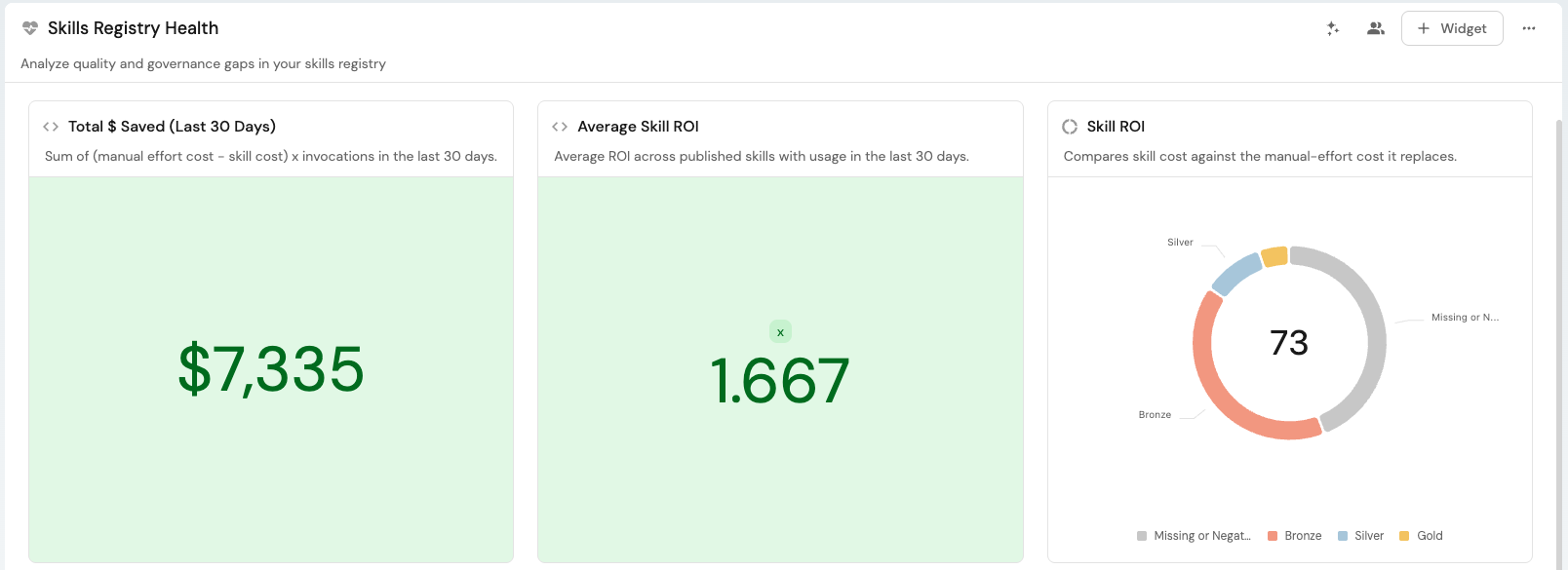
Total $ Saved (Last 30 Days) number chart (click to expand)
- Click + Widget and select Number Chart.
- Title:
Total $ Saved (Last 30 Days). - Description:
Sum of (manual effort cost − cost per run) × invocations in the last 30 days. - Select
Aggregated by propertyChart type and choose theskillblueprint. - Add this filter to the Initial filters editor:
{ "combinator": "and", "rules": [{ "property": "publish_status", "operator": "=", "value": "published" }] }. - Select
Total Skill Savings (30d, $)(skill_savings_total) as the Property, andsumfor the Function. - Set Unit to
$. - Click Save.
Average Skill ROI number chart (click to expand)
- Click + Widget and select Number Chart.
- Title:
Average Skill ROI. - Description:
Average ROI across published skills with usage in the last 30 days. - Select
Aggregated by propertyChart type and choose theskillblueprint. - Add the same Initial filters as above.
- Select
Skill ROI(skill_roi) as the Property, andaveragefor the Function. - Set Average of to
total, and Unit tocustomwithxas the Custom unit. - Click Save.
Skill ROI pie chart (click to expand)
- Click + Widget and select Pie Chart.
- Title:
Skill ROI. - Description:
Compares skill cost against the manual-effort cost it replaces. - Choose the
skillblueprint. - Under Breakdown by property, select the Skill ROI scorecard.
- Click Save.
Surface unused and negative-ROI skills on the Skills Lifecycle Control dashboard
Extend the Skills Lifecycle Control dashboard with two more tables: skills nobody has used in the last 30 days, and published skills whose ROI has actually gone negative.
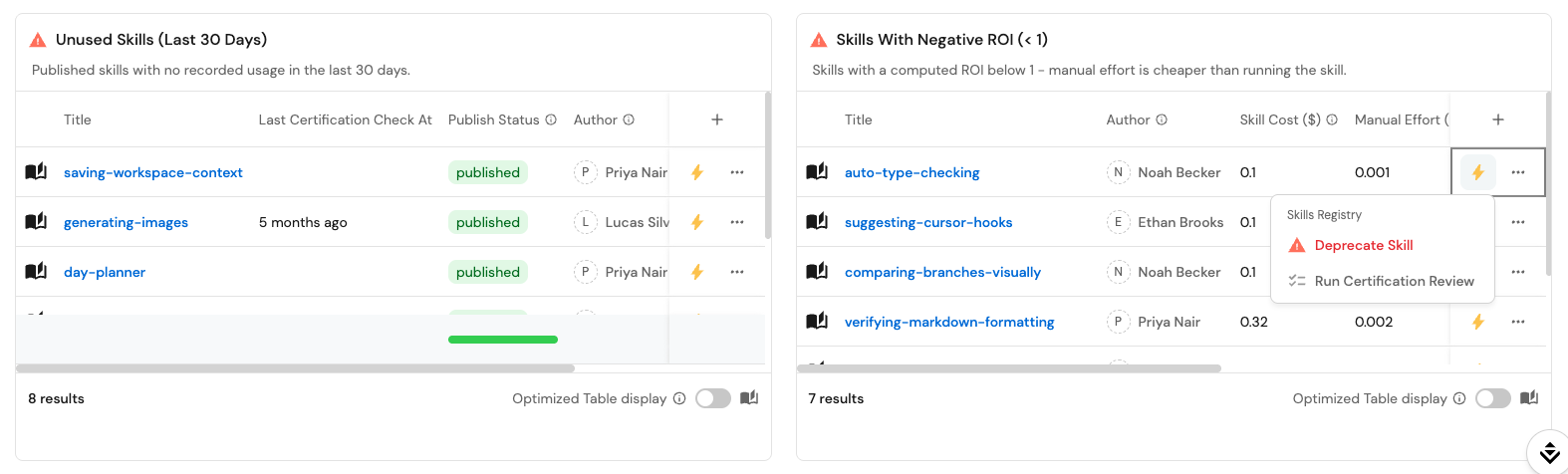
Unused Skills (Last 30 Days) table (click to expand)
-
Click + Widget and select Table.
-
Title:
Unused Skills (Last 30 Days). -
Description:
Published skills with no recorded usage in the last 30 days. -
Choose the
skillblueprint. -
Add this filter to the Initial filters editor:
{"combinator": "and","rules": [{ "property": "publish_status", "operator": "=", "value": "published" },{"combinator": "or","rules": [{ "property": "usage_last_30_days", "operator": "isEmpty" },{ "property": "usage_last_30_days", "operator": "=", "value": 0 }]}]} -
Click Save.
Skills With Negative ROI (< 1) table (click to expand)
-
Click + Widget and select Table.
-
Title:
Skills With Negative ROI (< 1). -
Description:
Published skills with a computed ROI below 1, meaning manual effort is cheaper than running the skill. -
Choose the
skillblueprint. -
Add this filter to the Initial filters editor:
{"combinator": "and","rules": [{ "property": "publish_status", "operator": "=", "value": "published" },{ "property": "skill_roi", "operator": "isNotEmpty" },{ "property": "skill_roi", "operator": "<", "value": 1 }]} -
Click Save.
Both tables show the skill's owner alongside the numbers behind the call, so whoever reviews the queue can go straight to the right person.
Possible enhancements
Deprecate skills automatically from these tables
To act on a flagged skill without leaving the dashboard, add a Deprecate Skill workflow scoped to the skill blueprint, setting publish_status to deprecated. Give it the same contexts setup as approve_skill_publish from Ship new skills through one golden path, and it appears automatically in every row's action menu on the two tables above, right next to Run Certification Review.
Fold ROI into production readiness
Rather than keeping the Skill ROI scorecard separate, add a rule to the skill_production_readiness scorecard from Set up a skills registry requiring at least a Bronze ROI tier for a skill to reach Gold overall, so economic value becomes part of what "production ready" means.
Related pages
- Set up a skills registry - the skill blueprint and production-readiness scorecard this guide extends.
- Ship new skills through one golden path - the Skills Lifecycle Control dashboard this guide extends in Step 3, and the Publish Skill workflow referenced for automating manual-effort input.
- Certify skills to meet industry and org standards - the Skills Registry Health dashboard this guide extends in Step 3, and the certification workflow referenced for automating manual-effort estimation.
- Visualize Claude Skills adoption and usage - the calculation properties and adoption dashboard this guide's
claude_ai_skill_usagerelation builds on. - Skills usage analytics - the concept doc on ingesting skill usage and spend metrics from Claude and Cursor.
- Mapping relations using search queries - the technique used to relate Claude skill usage to registered skills by name.