Scaffold repositories using Cookiecutter
This guide demonstrates how to scaffold GitHub, Bitbucket, and Azure DevOps repositories from Port self-service actions using Cookiecutter templates.
Cookiecutter is an open-source project template engine. You can use the examples in this guide as a starting point, then replace the template URL with your own Cookiecutter template.
Common use cases
- Give developers a self-service action for creating repositories from approved templates.
- Standardize new repository structure across Git providers.
- Register each scaffolded repository back into the Port context lake.
Prerequisites
- Complete the Port onboarding process.
- Install Cookiecutter on the runner or agent that executes the scaffold workflow.
- Configure a Git provider account with permissions to create repositories and push code.
- Configure Port API credentials. See the Port API token documentation.
Set up data model
The GitHub and Bitbucket examples use a microservice blueprint. The Azure DevOps example uses project and service blueprints.
If you already have matching blueprints from your Git provider integration, you can skip the relevant blueprint setup and adapt the action JSON to your existing blueprint identifiers.
Create the microservice blueprint
-
Go to the Data model page in Port.
-
Click + Blueprint.
-
Click Edit JSON.
-
Copy and paste the following JSON configuration into the editor:
Microservice blueprint (click to expand)
{"identifier": "microservice","title": "Microservice","icon": "Microservice","schema": {"properties": {"description": {"title": "Description","type": "string"},"url": {"title": "URL","format": "url","type": "string"}},"required": []},"mirrorProperties": {},"calculationProperties": {},"relations": {}} -
Click Save.
Create the Azure DevOps project blueprint
-
Go to the Data model page in Port.
-
Click + Blueprint.
-
Click Edit JSON.
-
Copy and paste the following JSON configuration into the editor:
Azure DevOps project blueprint (click to expand)
{"identifier": "project","title": "Project","icon": "AzureDevops","schema": {"properties": {"state": {"title": "State","type": "string","icon": "AzureDevops","description": "The current lifecycle state of the project."},"revision": {"title": "Revision","type": "string","icon": "AzureDevops","description": "The revision number, indicating how many times the project configuration has been updated."},"visibility": {"title": "Visibility","type": "string","icon": "AzureDevops","description": "Indicates whether the project is private or public"},"defaultTeam": {"title": "Default Team","type": "string","icon": "Team","description": "Default team of the project"},"link": {"title": "Link","type": "string","format": "url","icon": "AzureDevops","description": "Link to the Azure DevOps project"}},"required": []},"mirrorProperties": {},"calculationProperties": {},"aggregationProperties": {},"relations": {}} -
Click Save.
This guide requires the service blueprint to be created however it is a system blueprint provided by default in every Port organization. No setup is required.
Scaffold GitHub repositories
Set up Jenkins backend
-
Create the following Jenkins credentials:
GITHUB_USERNAME- A GitHub user with access to the target organization.GITHUB_TOKEN- A fine-grained personal access token with permissions to create repositories and push code.PORT_CLIENT_ID- Your Port client ID.PORT_CLIENT_SECRET- Your Port client secret.
-
Use the
Secret textcredential type for each credential. -
Make sure the Jenkins agent can run
git,curl, andcookiecutter.
Set up self-service action
Follow the steps below to create a self-service action that triggers the Jenkins pipeline.
-
Go to the Self-service page in Port.
-
Click on the + New Action button.
-
Click on the
{...} Edit JSONbutton. -
Copy and paste the following JSON configuration into the editor:
Scaffold GitHub repository action (click to expand)
{"identifier": "microservice_scaffold","title": "Scaffold Golang Microservice","icon": "Go","description": "Scaffold a new microservice from a Cookiecutter template","trigger": {"type": "self-service","operation": "CREATE","userInputs": {"properties": {"repo_name": {"icon": "Microservice","title": "Repo Name","type": "string"},"github_org_name": {"icon": "Github","title": "GitHub Org Name","type": "string"}},"required": ["repo_name","github_org_name"]},"blueprintIdentifier": "microservice"},"invocationMethod": {"type": "WEBHOOK","url": "https://<JENKINS_URL>/generic-webhook-trigger/invoke?token=<JOB_TOKEN>","agent": false,"synchronized": false,"method": "POST","body": {"action": "{{ .action.identifier[(\"microservice_\" | length):] }}","resourceType": "run","status": "TRIGGERED","trigger": "{{ .trigger | {by, origin, at} }}","context": {"entity": "{{.entity.identifier}}","blueprint": "{{.action.blueprint}}","runId": "{{.run.id}}"},"payload": {"entity": "{{ (if .entity == {} then null else .entity end) }}","action": {"invocationMethod": {"type": "WEBHOOK","agent": false,"url": "https://<JENKINS_URL>/generic-webhook-trigger/invoke?token=<JOB_TOKEN>","synchronized": false,"method": "POST"},"trigger": "{{.trigger.operation}}"},"properties": {"{{if (.inputs | has(\"repo_name\")) then \"repo_name\" else null end}}": "{{.inputs.\"repo_name\"}}","{{if (.inputs | has(\"github_org_name\")) then \"github_org_name\" else null end}}": "{{.inputs.\"github_org_name\"}}"},"censoredProperties": "{{.action.encryptedProperties}}"}}}} -
Click Save to create the action.
Create Jenkins pipeline
-
Create a Jenkins pipeline.
-
Define pipeline variables named
REPO_NAME,GITHUB_ORG_NAME, andRUN_ID.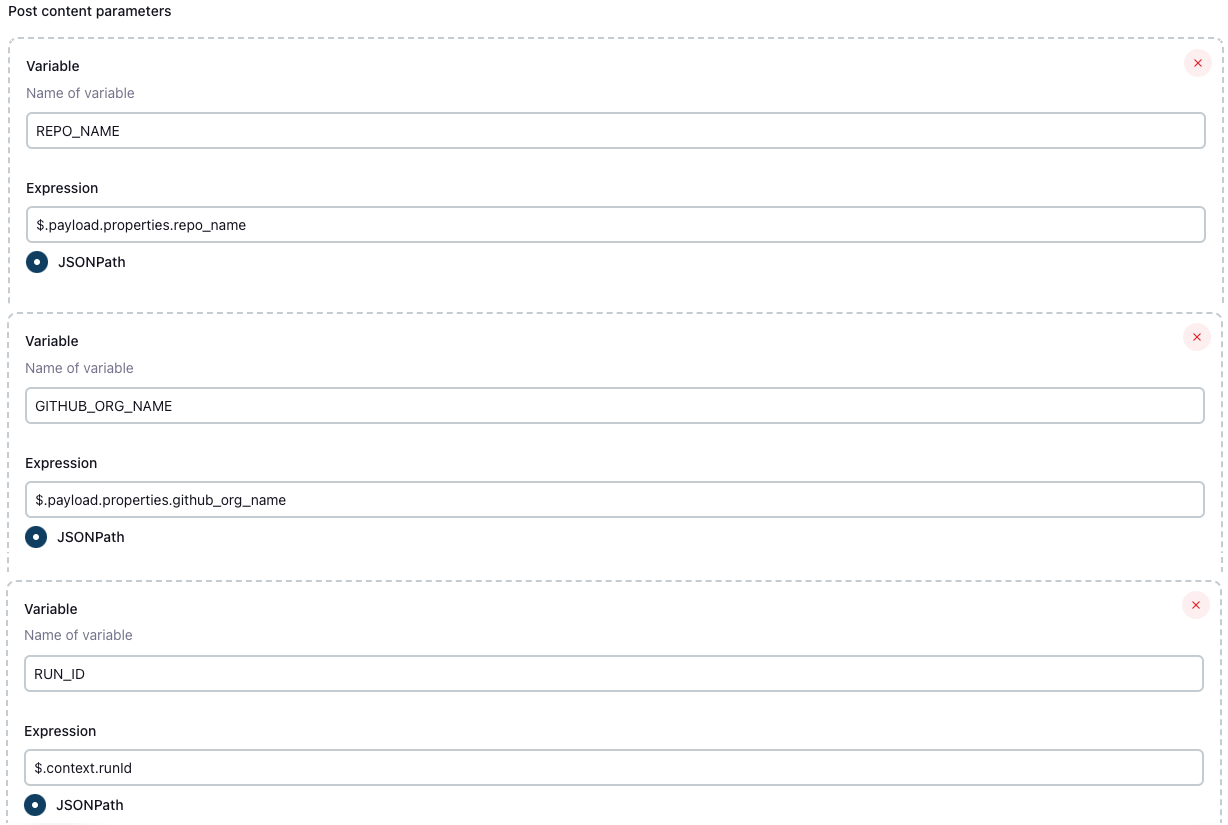
-
Configure the Jenkins token to match the
JOB_TOKENvalue in your Port action. -
Add the following content to the pipeline:
GitHub Jenkins pipeline script (click to expand)
import groovy.json.JsonSlurperpipeline {agent anyenvironment {COOKIECUTTER_TEMPLATE = 'https://github.com/lacion/cookiecutter-golang'REPO_NAME = "${REPO_NAME}"GITHUB_ORG_NAME = "${GITHUB_ORG_NAME}"SCAFFOLD_DIR = "scaffold_${REPO_NAME}"PORT_ACCESS_TOKEN = ""PORT_BLUEPRINT_ID = "microservice"PORT_RUN_ID = "${RUN_ID}"}stages {stage('Get access token') {steps {script {withCredentials([string(credentialsId: 'PORT_CLIENT_ID', variable: 'PORT_CLIENT_ID'),string(credentialsId: 'PORT_CLIENT_SECRET', variable: 'PORT_CLIENT_SECRET')]) {def result = sh(returnStdout: true, script: """accessTokenPayload=\$(curl -X POST \-H "Content-Type: application/json" \-d '{"clientId": "${PORT_CLIENT_ID}", "clientSecret": "${PORT_CLIENT_SECRET}"}' \-s "https://api.port.io/v1/auth/access_token")echo \$accessTokenPayload""")def jsonSlurper = new JsonSlurper()def payloadJson = jsonSlurper.parseText(result.trim())PORT_ACCESS_TOKEN = payloadJson.accessToken}}}}stage('Create GitHub repository') {steps {script {def logs_report_response = sh(script: """curl -X POST \-H "Content-Type: application/json" \-H "Authorization: Bearer ${PORT_ACCESS_TOKEN}" \-d '{"message": "Creating GitHub repository: ${REPO_NAME} in GitHub org: ${GITHUB_ORG_NAME}..."}' \"https://api.port.io/v1/actions/runs/${PORT_RUN_ID}/logs"""", returnStdout: true)println(logs_report_response)}script {withCredentials([string(credentialsId: 'GITHUB_TOKEN', variable: 'GITHUB_TOKEN')]) {sh """curl -i -H 'Authorization: token ${GITHUB_TOKEN}' \-d '{"name": "${REPO_NAME}", "private": true}' \https://api.github.com/orgs/${GITHUB_ORG_NAME}/repos"""}}}}stage('Scaffold Cookiecutter template') {steps {script {def logs_report_response = sh(script: """curl -X POST \-H "Content-Type: application/json" \-H "Authorization: Bearer ${PORT_ACCESS_TOKEN}" \-d '{"message": "Scaffolding ${REPO_NAME}..."}' \"https://api.port.io/v1/actions/runs/${PORT_RUN_ID}/logs"""", returnStdout: true)println(logs_report_response)}script {withCredentials([string(credentialsId: 'GITHUB_USERNAME', variable: 'GITHUB_USERNAME'),string(credentialsId: 'GITHUB_TOKEN', variable: 'GITHUB_TOKEN')]) {def yamlContent = """default_context:full_name: "Full Name"github_username: "githubuser"app_name: "${REPO_NAME}"project_short_description: "A Golang project."docker_hub_username: "dockerhubuser"docker_image: "dockerhubuser/alpine-base-image:latest"docker_build_image: "dockerhubuser/alpine-golang-buildimage""""writeFile(file: 'cookiecutter.yaml', text: yamlContent)sh("""rm -rf ${SCAFFOLD_DIR} ${REPO_NAME}git clone https://${GITHUB_USERNAME}:${GITHUB_TOKEN}@github.com/${GITHUB_ORG_NAME}/${REPO_NAME}cookiecutter ${COOKIECUTTER_TEMPLATE} --output-dir ${SCAFFOLD_DIR} --no-input --config-file cookiecutter.yaml -frm -rf ${SCAFFOLD_DIR}/${REPO_NAME}/.git*cp -r ${SCAFFOLD_DIR}/${REPO_NAME}/* "${REPO_NAME}/"cd ${REPO_NAME}git config user.name "Jenkins Pipeline Bot"git config user.email "jenkins-pipeline[bot]@users.noreply.jenkins.com"git add .git commit -m "Scaffolded project ${REPO_NAME}"git push -u origin maincd ..rm -rf ${SCAFFOLD_DIR} ${REPO_NAME}""")}}}}stage('Create microservice entity') {steps {script {def logs_report_response = sh(script: """curl -X POST \-H "Content-Type: application/json" \-H "Authorization: Bearer ${PORT_ACCESS_TOKEN}" \-d '{"message": "Creating ${REPO_NAME} microservice Port entity..."}' \"https://api.port.io/v1/actions/runs/${PORT_RUN_ID}/logs"""", returnStdout: true)println(logs_report_response)}script {def status_report_response = sh(script: """curl --location --request POST "https://api.port.io/v1/blueprints/$PORT_BLUEPRINT_ID/entities?upsert=true&run_id=$PORT_RUN_ID&create_missing_related_entities=true" \--header "Authorization: Bearer $PORT_ACCESS_TOKEN" \--header "Content-Type: application/json" \--data-raw '{"identifier": "${REPO_NAME}","title": "${REPO_NAME}","properties": {"description": "${REPO_NAME} Golang project","url": "https://github.com/${GITHUB_ORG_NAME}/${REPO_NAME}"},"relations": {}}'""", returnStdout: true)println(status_report_response)}}}stage('Update Port run status') {steps {script {def status_report_response = sh(script: """curl -X PATCH \-H "Content-Type: application/json" \-H "Authorization: Bearer ${PORT_ACCESS_TOKEN}" \-d '{"status":"SUCCESS", "message": {"run_status": "Scaffold Jenkins pipeline completed successfully!"}}' \"https://api.port.io/v1/actions/runs/${PORT_RUN_ID}"""", returnStdout: true)println(status_report_response)}}}}post {failure {script {def status_report_response = sh(script: """curl -X PATCH \-H "Content-Type: application/json" \-H "Authorization: Bearer ${PORT_ACCESS_TOKEN}" \-d '{"status":"FAILURE", "message": {"run_status": "Failed to scaffold ${REPO_NAME}"}}' \"https://api.port.io/v1/actions/runs/${PORT_RUN_ID}"""", returnStdout: true)println(status_report_response)}}always {cleanWs(cleanWhenNotBuilt: false,deleteDirs: true,disableDeferredWipeout: false,notFailBuild: true,patterns: [[pattern: '.gitignore', type: 'INCLUDE'],[pattern: '.propsfile', type: 'EXCLUDE']])}}}
Test the flow
-
Go to the Self-service page in Port.
-
Click the Scaffold Golang Microservice action.
-
Enter the repository name and GitHub organization name.
-
Click Execute.
-
Wait for Jenkins to create the GitHub repository, scaffold the Cookiecutter template, and create the Port entity.
Scaffold Bitbucket repositories
Set up Jenkins backend
-
Create the following Jenkins credentials:
BITBUCKET_USERNAME- A Bitbucket user with access to the target workspace and project.BITBUCKET_APP_PASSWORD- A Bitbucket app password withRepositories:ReadandRepositories:Writepermissions.PORT_CLIENT_ID- Your Port client ID.PORT_CLIENT_SECRET- Your Port client secret.
-
Use the
Secret textcredential type for each credential. -
Make sure the Jenkins agent can run
git,curl, andcookiecutter.
Set up self-service action
Follow the steps below to create a self-service action that triggers the Jenkins pipeline.
-
Go to the Self-service page in Port.
-
Click on the + New Action button.
-
Click on the
{...} Edit JSONbutton. -
Copy and paste the following JSON configuration into the editor:
Scaffold Bitbucket repository action (click to expand)
{"identifier": "microservice_scaffold_bitbucket","title": "Scaffold Golang Microservice - Bitbucket","icon": "Go","description": "Create a repository for a new Golang microservice on Bitbucket","trigger": {"type": "self-service","operation": "CREATE","userInputs": {"properties": {"repo_name": {"icon": "Microservice","title": "Repo Name","type": "string"},"bitbucket_workspace_name": {"icon": "BitBucket","title": "Bitbucket Workspace Name","type": "string"},"bitbucket_project_key": {"title": "Bitbucket Project Key","icon": "BitBucket","description": "Bitbucket project key symbol","type": "string"}},"required": ["repo_name","bitbucket_workspace_name","bitbucket_project_key"]},"blueprintIdentifier": "microservice"},"invocationMethod": {"type": "WEBHOOK","url": "https://<JENKINS_URL>/generic-webhook-trigger/invoke?token=<JOB_TOKEN>","agent": false,"synchronized": false,"method": "POST","body": {"action": "{{ .action.identifier[(\"microservice_\" | length):] }}","resourceType": "run","status": "TRIGGERED","trigger": "{{ .trigger | {by, origin, at} }}","context": {"entity": "{{.entity.identifier}}","blueprint": "{{.action.blueprint}}","runId": "{{.run.id}}"},"payload": {"entity": "{{ (if .entity == {} then null else .entity end) }}","action": {"invocationMethod": {"type": "WEBHOOK","agent": false,"url": "https://<JENKINS_URL>/generic-webhook-trigger/invoke?token=<JOB_TOKEN>","synchronized": false,"method": "POST"},"trigger": "{{.trigger.operation}}"},"properties": {"{{if (.inputs | has(\"repo_name\")) then \"repo_name\" else null end}}": "{{.inputs.\"repo_name\"}}","{{if (.inputs | has(\"bitbucket_workspace_name\")) then \"bitbucket_workspace_name\" else null end}}": "{{.inputs.\"bitbucket_workspace_name\"}}","{{if (.inputs | has(\"bitbucket_project_key\")) then \"bitbucket_project_key\" else null end}}": "{{.inputs.\"bitbucket_project_key\"}}"},"censoredProperties": "{{.action.encryptedProperties}}"}}}} -
Click Save to create the action.
Create Jenkins pipeline
-
Create a Jenkins pipeline.
-
Define pipeline variables named
REPO_NAME,BITBUCKET_WORKSPACE_NAME,BITBUCKET_PROJECT_KEY, andRUN_ID.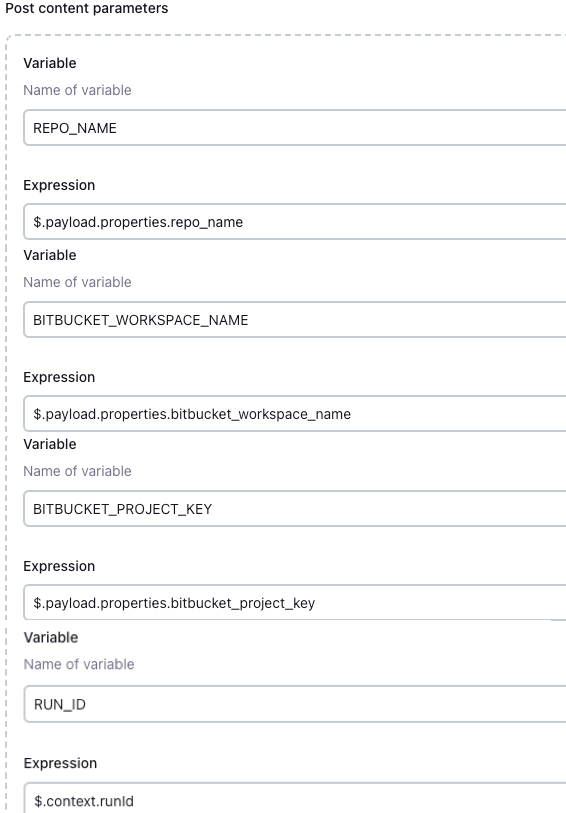
-
Configure the Jenkins token to match the
JOB_TOKENvalue in your Port action. -
Add the following content to the pipeline:
Bitbucket Jenkins pipeline script (click to expand)
import groovy.json.JsonSlurperpipeline {agent anyenvironment {COOKIECUTTER_TEMPLATE = 'https://github.com/lacion/cookiecutter-golang'REPO_NAME = "${REPO_NAME}"BITBUCKET_WORKSPACE_NAME = "${BITBUCKET_WORKSPACE_NAME}"BITBUCKET_PROJECT_KEY = "${BITBUCKET_PROJECT_KEY}"SCAFFOLD_DIR = "scaffold_${REPO_NAME}"PORT_ACCESS_TOKEN = ""PORT_BLUEPRINT_ID = "microservice"PORT_RUN_ID = "${RUN_ID}"}stages {stage('Get access token') {steps {script {withCredentials([string(credentialsId: 'PORT_CLIENT_ID', variable: 'PORT_CLIENT_ID'),string(credentialsId: 'PORT_CLIENT_SECRET', variable: 'PORT_CLIENT_SECRET')]) {def result = sh(returnStdout: true, script: """accessTokenPayload=\$(curl -X POST \-H "Content-Type: application/json" \-d '{"clientId": "${PORT_CLIENT_ID}", "clientSecret": "${PORT_CLIENT_SECRET}"}' \-s "https://api.port.io/v1/auth/access_token")echo \$accessTokenPayload""")def jsonSlurper = new JsonSlurper()def payloadJson = jsonSlurper.parseText(result.trim())PORT_ACCESS_TOKEN = payloadJson.accessToken}}}}stage('Create Bitbucket repository') {steps {script {def logs_report_response = sh(script: """curl -X POST \-H "Content-Type: application/json" \-H "Authorization: Bearer ${PORT_ACCESS_TOKEN}" \-d '{"message": "Creating Bitbucket repository: ${REPO_NAME} in workspace: ${BITBUCKET_WORKSPACE_NAME}, project: ${BITBUCKET_PROJECT_KEY}..."}' \"https://api.port.io/v1/actions/runs/${PORT_RUN_ID}/logs"""", returnStdout: true)println(logs_report_response)}script {withCredentials([string(credentialsId: 'BITBUCKET_USERNAME', variable: 'BITBUCKET_USERNAME'),string(credentialsId: 'BITBUCKET_APP_PASSWORD', variable: 'BITBUCKET_APP_PASSWORD')]) {sh """curl -i -u ${BITBUCKET_USERNAME}:${BITBUCKET_APP_PASSWORD} \-d '{"is_private": true, "scm": "git", "project": {"key": "${BITBUCKET_PROJECT_KEY}"}}' \https://api.bitbucket.org/2.0/repositories/${BITBUCKET_WORKSPACE_NAME}/${REPO_NAME}"""}}}}stage('Scaffold Cookiecutter template') {steps {script {def logs_report_response = sh(script: """curl -X POST \-H "Content-Type: application/json" \-H "Authorization: Bearer ${PORT_ACCESS_TOKEN}" \-d '{"message": "Scaffolding ${REPO_NAME}..."}' \"https://api.port.io/v1/actions/runs/${PORT_RUN_ID}/logs"""", returnStdout: true)println(logs_report_response)}script {withCredentials([string(credentialsId: 'BITBUCKET_USERNAME', variable: 'BITBUCKET_USERNAME'),string(credentialsId: 'BITBUCKET_APP_PASSWORD', variable: 'BITBUCKET_APP_PASSWORD')]) {def yamlContent = """default_context:full_name: "Full Name"github_username: "bitbucketuser"app_name: "${REPO_NAME}"project_short_description: "A Golang project."docker_hub_username: "dockerhubuser"docker_image: "dockerhubuser/alpine-base-image:latest"docker_build_image: "dockerhubuser/alpine-golang-buildimage""""writeFile(file: 'cookiecutter.yaml', text: yamlContent)sh("""rm -rf ${SCAFFOLD_DIR} ${REPO_NAME}git clone https://${BITBUCKET_USERNAME}:${BITBUCKET_APP_PASSWORD}@bitbucket.org/${BITBUCKET_WORKSPACE_NAME}/${REPO_NAME}.gitcookiecutter ${COOKIECUTTER_TEMPLATE} --output-dir ${SCAFFOLD_DIR} --no-input --config-file cookiecutter.yaml -frm -rf ${SCAFFOLD_DIR}/${REPO_NAME}/.git*cp -r ${SCAFFOLD_DIR}/${REPO_NAME}/* "${REPO_NAME}/"cd ${REPO_NAME}git config user.name "Jenkins Pipeline Bot"git config user.email "jenkins-pipeline[bot]@users.noreply.jenkins.com"git add .git commit -m "Scaffolded project ${REPO_NAME}"git push -u origin mastercd ..rm -rf ${SCAFFOLD_DIR} ${REPO_NAME}""")}}}}stage('Create microservice entity') {steps {script {def logs_report_response = sh(script: """curl -X POST \-H "Content-Type: application/json" \-H "Authorization: Bearer ${PORT_ACCESS_TOKEN}" \-d '{"message": "Creating ${REPO_NAME} microservice Port entity..."}' \"https://api.port.io/v1/actions/runs/${PORT_RUN_ID}/logs"""", returnStdout: true)println(logs_report_response)}script {def status_report_response = sh(script: """curl --location --request POST "https://api.port.io/v1/blueprints/$PORT_BLUEPRINT_ID/entities?upsert=true&run_id=$PORT_RUN_ID&create_missing_related_entities=true" \--header "Authorization: Bearer $PORT_ACCESS_TOKEN" \--header "Content-Type: application/json" \--data-raw '{"identifier": "${REPO_NAME}","title": "${REPO_NAME}","properties": {"description": "${REPO_NAME} Golang project","url": "https://bitbucket.org/${BITBUCKET_WORKSPACE_NAME}/${REPO_NAME}/src"},"relations": {}}'""", returnStdout: true)println(status_report_response)}}}stage('Update Port run status') {steps {script {def status_report_response = sh(script: """curl -X PATCH \-H "Content-Type: application/json" \-H "Authorization: Bearer ${PORT_ACCESS_TOKEN}" \-d '{"status":"SUCCESS", "message": {"run_status": "Scaffold Jenkins pipeline completed successfully!"}}' \"https://api.port.io/v1/actions/runs/${PORT_RUN_ID}"""", returnStdout: true)println(status_report_response)}}}}post {failure {script {def status_report_response = sh(script: """curl -X PATCH \-H "Content-Type: application/json" \-H "Authorization: Bearer ${PORT_ACCESS_TOKEN}" \-d '{"status":"FAILURE", "message": {"run_status": "Failed to scaffold ${REPO_NAME}"}}' \"https://api.port.io/v1/actions/runs/${PORT_RUN_ID}"""", returnStdout: true)println(status_report_response)}}always {cleanWs(cleanWhenNotBuilt: false,deleteDirs: true,disableDeferredWipeout: false,notFailBuild: true,patterns: [[pattern: '.gitignore', type: 'INCLUDE'],[pattern: '.propsfile', type: 'EXCLUDE']])}}}
Test the flow
-
Go to the Self-service page in Port.
-
Click the Scaffold Golang Microservice - Bitbucket action.
-
Enter the repository name, Bitbucket workspace name, and Bitbucket project key.
-
Click Execute.
-
Wait for Jenkins to create the Bitbucket repository, scaffold the Cookiecutter template, and create the Port entity.
Scaffold Azure DevOps repositories
Set up Azure DevOps backend
-
Create an Azure DevOps repository called
python_scaffolderin your Azure DevOps organization and project. -
Configure a service connection to Azure DevOps.
-
Use
port_triggerfor both WebHook Name and Service connection name.
Set up self-service action
Follow the steps below to create a self-service action that triggers the Azure DevOps pipeline.
-
Go to the Self-service page in Port.
-
Click on the + New Action button.
-
Click on the
{...} Edit JSONbutton. -
Copy and paste the following JSON configuration into the editor:
Scaffold Azure DevOps repository action (click to expand)
{"identifier": "azure_scaffolder","title": "Scaffold Azure Repository","icon": "Azure","description": "Scaffold a new repository in Azure DevOps","trigger": {"type": "self-service","operation": "CREATE","userInputs": {"properties": {"service_name": {"title": "Service Name","description": "The new service's name","type": "string"},"azure_organization": {"icon": "DefaultProperty","type": "string","title": "Azure Organization","description": "The Azure DevOps organization name","default": "<YOUR_DEFAULT_AZURE_DEVOPS_ORGANIZATION_NAME>"},"description": {"type": "string","title": "Description","description": "Description of the scaffold"},"azure_project": {"icon": "DefaultProperty","title": "Azure Project","type": "string","description": "Your Azure DevOps project ID","blueprint": "project","sort": {"property": "$identifier","order": "ASC"},"format": "entity"}},"required": ["service_name","azure_organization","azure_project"],"order": ["service_name","azure_organization","azure_project","description"]},"blueprintIdentifier": "service"},"invocationMethod": {"type": "AZURE_DEVOPS","webhook": "port_trigger","org": "<AZURE_DEVOPS_ORGANIZATION_NAME>","payload": {"properties": {"service_name": "{{.inputs.\"service_name\"}}","azure_organization": "{{.inputs.\"azure_organization\"}}","description": "{{.inputs.\"description\"}}","azure_project": "{{.inputs.\"azure_project\"}}"},"port_context": {"blueprint": "{{.action.blueprint}}","runId": "{{.run.id}}","trigger": "{{ .trigger }}"}}},"requiredApproval": false} -
Click Save to create the action.
Create Azure DevOps pipeline
-
In your
python_scaffolderrepository, create a file calledazure-pipelines.ymlin the root directory. -
Copy and paste the following YAML configuration into the file:
Azure DevOps pipeline YAML (click to expand)
trigger: nonepool:vmImage: "ubuntu-latest"variables:RUN_ID: "${{ parameters.port_trigger.port_context.runId }}"BLUEPRINT_ID: "${{ parameters.port_trigger.port_context.blueprint }}"SERVICE_NAME: "${{ parameters.port_trigger.properties.service_name }}"DESCRIPTION: "${{ parameters.port_trigger.properties.description }}"AZURE_ORGANIZATION: "${{ parameters.port_trigger.properties.azure_organization }}"AZURE_PROJECT: "${{ parameters.port_trigger.properties.azure_project.title }}"PROJECT_ID: "${{ parameters.port_trigger.properties.azure_project.identifier }}"resources:webhooks:- webhook: port_triggerconnection: port_triggerstages:- stage: fetch_port_access_tokenjobs:- job: fetch_port_access_tokensteps:- script: |sudo apt-get updatesudo apt-get install -y jq- script: |accessToken=$(curl -X POST \-H 'Content-Type: application/json' \-d '{"clientId": "$(PORT_CLIENT_ID)", "clientSecret": "$(PORT_CLIENT_SECRET)"}' \-s 'https://api.port.io/v1/auth/access_token' | jq -r '.accessToken')echo "##vso[task.setvariable variable=accessToken;isOutput=true]$accessToken"displayName: Fetch access tokenname: getToken- stage: scaffolddependsOn:- fetch_port_access_tokenjobs:- job: scaffoldvariables:COOKIECUTTER_TEMPLATE_URL: "https://github.com/brettcannon/python-azure-web-app-cookiecutter"steps:- script: |sudo apt-get updatesudo apt-get install -y jqsudo pip install cookiecutter -q- script: |PAYLOAD="{\"name\":\"$SERVICE_NAME\",\"project\":{\"id\":\"$PROJECT_ID\"}}"echo "SERVICE_NAME: $SERVICE_NAME"echo "AZURE_ORGANIZATION: $AZURE_ORGANIZATION"echo "PROJECT_ID: $PROJECT_ID"echo "PAYLOAD: $PAYLOAD"if [[ -z "$PERSONAL_ACCESS_TOKEN" ]]; thenecho "PERSONAL_ACCESS_TOKEN is not set or is empty."exit 1elseecho "PERSONAL_ACCESS_TOKEN is set."fiCREATE_REPO_RESPONSE=$(curl -s -u :$PERSONAL_ACCESS_TOKEN \-X POST "https://dev.azure.com/$AZURE_ORGANIZATION/$PROJECT_ID/_apis/git/repositories?api-version=7.0" \-H "Content-Type: application/json" \-d "$PAYLOAD")echo "CREATE_REPO_RESPONSE: $CREATE_REPO_RESPONSE"PROJECT_URL=$(echo $CREATE_REPO_RESPONSE | jq -r .webUrl)if [[ -z "$PROJECT_URL" ]] || [[ "$PROJECT_URL" == "null" ]]; thenecho "Failed to create Azure DevOps repository."exit 1fiecho "##vso[task.setvariable variable=PROJECT_URL;isOutput=true]$PROJECT_URL"COOKIECUTTER_NAME=$(echo "$SERVICE_NAME" | tr '_' '-')echo "Original SERVICE_NAME: $SERVICE_NAME"echo "Sanitized COOKIECUTTER_NAME: $COOKIECUTTER_NAME"cat <<EOF > cookiecutter.yamldefault_context:site_name: "$COOKIECUTTER_NAME"python_version: "3.6.0"EOFcookiecutter $COOKIECUTTER_TEMPLATE_URL --no-input --config-file cookiecutter.yaml --output-dir scaffold_outif [[ "$COOKIECUTTER_NAME" != "$SERVICE_NAME" ]]; thenecho "Renaming Cookiecutter output directory to match repository name..."mv "scaffold_out/$COOKIECUTTER_NAME" "scaffold_out/$SERVICE_NAME"fiecho "Initializing new repository..."git config --global user.email "scaffolder@email.com"git config --global user.name "Mighty Scaffolder"git config --global init.defaultBranch "main"cd "scaffold_out/$SERVICE_NAME"git initgit add .git commit -m "Initial commit"ENCODED_PROJECT=$(echo "$AZURE_PROJECT" | sed 's/ /%20/g')git remote add origin "https://$PERSONAL_ACCESS_TOKEN@dev.azure.com/$AZURE_ORGANIZATION/$ENCODED_PROJECT/_git/$SERVICE_NAME"git config --global http.lowSpeedLimit 1000git config --global http.lowSpeedTime 300git push -u origin --allenv:PERSONAL_ACCESS_TOKEN: $(PERSONAL_ACCESS_TOKEN)displayName: "Create repository in Azure DevOps"name: scaffold- stage: upsert_entitydependsOn:- fetch_port_access_token- scaffoldjobs:- job: upsert_entityvariables:accessToken: $[ stageDependencies.fetch_port_access_token.fetch_port_access_token.outputs['getToken.accessToken'] ]PROJECT_URL: $[ stageDependencies.scaffold.scaffold.outputs['scaffold.PROJECT_URL'] ]steps:- script: |sudo apt-get updatesudo apt-get install -y jq- script: |curl -X POST \-H 'Content-Type: application/json' \-H 'Authorization: Bearer $(accessToken)' \-d '{"identifier": "${{ variables.SERVICE_NAME }}","title": "${{ variables.SERVICE_NAME }}","properties": {"description": "${{ variables.DESCRIPTION }}","url": "$(PROJECT_URL)"},"relations": {"project": "${{ variables.PROJECT_ID }}"}}' \"https://api.port.io/v1/blueprints/${{ variables.BLUEPRINT_ID }}/entities?upsert=true&run_id=${{ variables.RUN_ID }}&create_missing_related_entities=true"- stage: update_run_statusdependsOn:- upsert_entity- fetch_port_access_token- scaffoldjobs:- job: update_run_statusvariables:accessToken: $[ stageDependencies.fetch_port_access_token.fetch_port_access_token.outputs['getToken.accessToken'] ]PROJECT_URL: $[ stageDependencies.scaffold.scaffold.outputs['scaffold.PROJECT_URL'] ]steps:- script: |sudo apt-get updatesudo apt-get install -y jq- script: |curl -X PATCH \-H 'Content-Type: application/json' \-H 'Authorization: Bearer $(accessToken)' \-d '{"status":"SUCCESS", "message": {"run_status": "Scaffold ${{ variables.SERVICE_NAME }} finished successfully!\\n Project URL: $(PROJECT_URL)" }}' \"https://api.port.io/v1/actions/runs/${{ variables.RUN_ID }}"- stage: update_run_status_faileddependsOn:- upsert_entity- fetch_port_access_token- scaffoldcondition: failed()jobs:- job: update_run_status_failedvariables:accessToken: $[ stageDependencies.fetch_port_access_token.fetch_port_access_token.outputs['getToken.accessToken'] ]steps:- script: |curl -X PATCH \-H 'Content-Type: application/json' \-H "Authorization: Bearer $accessToken" \-d '{"status":"FAILURE", "message": {"run_status": "Scaffold '"$SERVICE_NAME"' failed" }}' \"https://api.port.io/v1/actions/runs/$RUN_ID" -
Configure the pipeline in Azure DevOps:
- Go to Pipelines.
- Click Create Pipeline.
- Select Azure Repos Git.
- Choose the
python_scaffolderrepository. - Click Save from the Run dropdown menu.
-
Create the following secret variables in your pipeline:
PERSONAL_ACCESS_TOKEN- An Azure DevOps personal access token with Code Full and Release Read, write & execute permissions.PORT_CLIENT_ID- Your Port client ID.PORT_CLIENT_SECRET- Your Port client secret.
Test the flow
-
Go to the Self-service page in Port.
-
Click the Scaffold Azure Repository action.
-
Fill in the required details:
- Service Name.
- Azure Organization.
- Azure Project.
- Description.
-
Click Execute.
-
Wait for Azure DevOps to create the repository, scaffold the Cookiecutter template, and create the Port entity.
Having issues with Azure DevOps integration or pipelines? See the Azure DevOps Troubleshooting Guide for step-by-step help.