Send Slack messages to users using Port Workflows
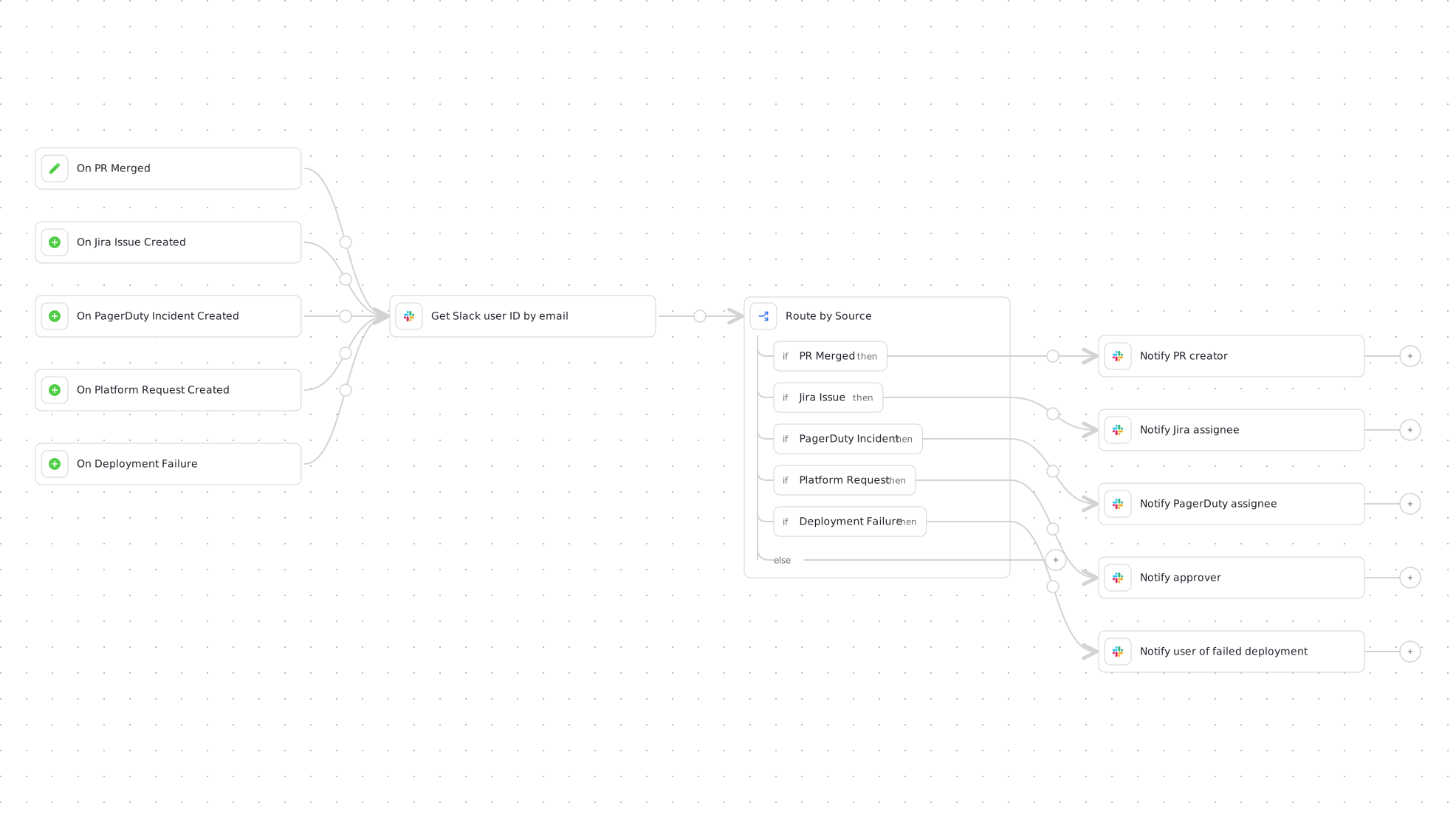
This guide demonstrates how to build a single workflow that sends Slack messages to users using Port's Slack app. The workflow covers five common notification scenarios from one graph: it listens for merged pull requests, new Jira issues, new PagerDuty incidents, and new platform requests, and it can also be invoked on demand, for example from another workflow when a deployment fails. In each case, it uses the email address from your Port integrations (such as GitHub, Jira, and PagerDuty) to look up the corresponding Slack user ID and send a targeted message to that user.
Common use cases
- Pull request notifications: Notify reviewers when PRs are assigned or merged.
- Jira notifications: Notify users when their Jira issues are assigned.
- On-call handoffs: Notify the next person on-call when their shift is starting.
- Approval requests: Notify approvers when their approval is needed for platform requests.
- Deployment notifications: Alert developers when their deployments complete or fail.
Prerequisites
- Port's Slack app installed in your workspace.
- Access to the Slack app bot token (automatically created as a system secret).
- The integrations for the notification sources you plan to keep: Port's GitHub Ocean integration for pull request notifications, and Port's Jira and PagerDuty integrations for issue and incident notifications.
How it works
The workflow has five triggers that all feed the same two-step core: look up the recipient's Slack ID by email, then send them a direct message.
| Notification | Fires when | Recipient |
|---|---|---|
| Pull request merged | A githubPullRequest entity is updated and its status is merged | The PR creator |
| Jira issue assigned | A jiraIssue entity is created | The issue assignee |
| PagerDuty incident | A pagerdutyIncident entity is created | The incident assignee |
| Approval request | A platformRequest entity is created | The request approver |
| Failed deployment | The self-service trigger runs, manually or invoked by another workflow | The email passed in the triggered_by_email input |
When any trigger fires:
- The Get Slack user ID node extracts the recipient's email from whichever trigger fired and looks it up using Slack's
users.lookupByEmailAPI. - The Route by source condition node checks which source triggered the run and routes to a message node tailored to it, which sends the direct message using Slack's
chat.postMessageAPI.
Build the workflow
-
Go to the workflows page in Port.
-
Click + Workflow.
-
Fill out the Create new workflow form, then click Confirm.
-
Click the
{...}button to open the JSON editor and paste the workflow JSON below:Send Slack message to user workflow (click to expand)
{"identifier": "send_slack_message_to_user","title": "Send Slack message to user","icon": "Slack","description": "Looks up a user's Slack ID by email and sends them a targeted message when a PR is merged, a Jira issue or PagerDuty incident is assigned, an approval is needed, or a deployment fails","nodes": [{"identifier": "trigger_pr_merged","title": "On PR Merged","config": {"type": "EVENT_TRIGGER","event": {"type": "ENTITY_UPDATED","blueprintIdentifier": "githubPullRequest"},"condition": {"type": "JQ","expressions": [".diff.after.properties.status == \"merged\""],"combinator": "and"}}},{"identifier": "trigger_jira_issue","title": "On Jira Issue Created","config": {"type": "EVENT_TRIGGER","event": {"type": "ENTITY_CREATED","blueprintIdentifier": "jiraIssue"}}},{"identifier": "trigger_pagerduty_incident","title": "On PagerDuty Incident Created","config": {"type": "EVENT_TRIGGER","event": {"type": "ENTITY_CREATED","blueprintIdentifier": "pagerdutyIncident"}}},{"identifier": "trigger_platform_request","title": "On Platform Request Created","config": {"type": "EVENT_TRIGGER","event": {"type": "ENTITY_CREATED","blueprintIdentifier": "platformRequest"}}},{"identifier": "trigger_manual","title": "On Deployment Failure","description": "Run manually or invoke from another workflow","config": {"type": "SELF_SERVE_TRIGGER","userInputs": {"properties": {"triggered_by_email": {"type": "string","title": "Recipient email"},"identifier": {"type": "string","title": "Service identifier"},"image": {"type": "string","title": "Image"},"environment": {"type": "string","title": "Environment"},"run_id": {"type": "string","title": "Deployment run ID"}},"required": ["triggered_by_email","identifier","image","environment","run_id"]},"published": true}},{"identifier": "get_slack_user_id","title": "Get Slack user ID by email","icon": "Slack","config": {"type": "WEBHOOK","url": "https://slack.com/api/users.lookupByEmail?email={{ .outputs.trigger.diff.after.relations.creator // .outputs.trigger.diff.after.properties.assignee // .outputs.trigger.diff.after.properties.approver // .outputs.trigger.triggered_by_email }}","agent": false,"synchronized": true,"method": "GET","headers": {"Content-Type": "application/x-www-form-urlencoded","Authorization": "Bearer {{ .secrets[\"__SLACK_APP_BOT_TOKEN_T123\"] }}"}}},{"identifier": "route_by_source","title": "Route by Source","config": {"type": "CONDITION","outlets": [{"identifier": "pr_merged","title": "PR Merged","expression": "(.outputs.trigger.diff.after.blueprint // \"manual\") == \"githubPullRequest\""},{"identifier": "jira_issue","title": "Jira Issue","expression": "(.outputs.trigger.diff.after.blueprint // \"manual\") == \"jiraIssue\""},{"identifier": "pagerduty_incident","title": "PagerDuty Incident","expression": "(.outputs.trigger.diff.after.blueprint // \"manual\") == \"pagerdutyIncident\""},{"identifier": "platform_request","title": "Platform Request","expression": "(.outputs.trigger.diff.after.blueprint // \"manual\") == \"platformRequest\""},{"identifier": "deployment_failure","title": "Deployment Failure","expression": "(.outputs.trigger.diff.after.blueprint // \"manual\") == \"manual\""}]}},{"identifier": "notify_pr_creator","title": "Notify PR creator","icon": "Slack","config": {"type": "WEBHOOK","url": "https://slack.com/api/chat.postMessage","agent": false,"synchronized": true,"method": "POST","headers": {"Content-Type": "application/json; charset=utf-8","Authorization": "Bearer {{ .secrets[\"__SLACK_APP_BOT_TOKEN_T123\"] }}"},"body": {"channel": "{{ .outputs.get_slack_user_id.response.user.id }}","text": "🚀 Your pull request has been merged","blocks": [{"type": "section","text": {"type": "mrkdwn","text": "Hi <@{{ .outputs.get_slack_user_id.response.user.id }}>,\n\nYour pull request *{{ .outputs.trigger.diff.after.title }}* has been merged! 🚀"}},{"type": "section","fields": [{"type": "mrkdwn","text": "*Repository:*\n{{ .outputs.trigger.diff.after.relations.repository }}"},{"type": "mrkdwn","text": "*Merged At:*\n{{ .outputs.trigger.diff.after.properties.mergedAt }}"}]},{"type": "actions","elements": [{"type": "button","text": {"type": "plain_text","text": "View PR"},"url": "{{ .outputs.trigger.diff.after.properties.link }}"}]}]}}},{"identifier": "notify_jira_assignee","title": "Notify Jira assignee","icon": "Slack","config": {"type": "WEBHOOK","url": "https://slack.com/api/chat.postMessage","agent": false,"synchronized": true,"method": "POST","headers": {"Content-Type": "application/json; charset=utf-8","Authorization": "Bearer {{ .secrets[\"__SLACK_APP_BOT_TOKEN_T123\"] }}"},"body": {"channel": "{{ .outputs.get_slack_user_id.response.user.id }}","text": "🔔 You have been assigned a Jira issue","blocks": [{"type": "section","text": {"type": "mrkdwn","text": "Hi <@{{ .outputs.get_slack_user_id.response.user.id }}>,\n\nYou have been assigned to a Jira issue:"}},{"type": "section","fields": [{"type": "mrkdwn","text": "*Issue:*\n{{ .outputs.trigger.diff.after.properties.title }}"},{"type": "mrkdwn","text": "*Status:*\n{{ .outputs.trigger.diff.after.properties.status }}"},{"type": "mrkdwn","text": "*Priority:*\n{{ .outputs.trigger.diff.after.properties.priority }}"},{"type": "mrkdwn","text": "*Assigned At:*\n{{ .outputs.trigger.diff.after.properties.updatedAt }}"}]},{"type": "actions","elements": [{"type": "button","text": {"type": "plain_text","text": "View Issue"},"url": "{{ .outputs.trigger.diff.after.properties.url }}"}]}]}}},{"identifier": "notify_pagerduty_assignee","title": "Notify PagerDuty assignee","icon": "Slack","config": {"type": "WEBHOOK","url": "https://slack.com/api/chat.postMessage","agent": false,"synchronized": true,"method": "POST","headers": {"Content-Type": "application/json; charset=utf-8","Authorization": "Bearer {{ .secrets[\"__SLACK_APP_BOT_TOKEN_T123\"] }}"},"body": {"channel": "{{ .outputs.get_slack_user_id.response.user.id }}","text": "🚨 You have been assigned a new PagerDuty incident!","blocks": [{"type": "section","text": {"type": "mrkdwn","text": "Hi <@{{ .outputs.get_slack_user_id.response.user.id }}>,\n\nYou have been assigned to a new PagerDuty incident:\n*Incident:* {{ .outputs.trigger.diff.after.properties.title }}\n*Priority:* {{ .outputs.trigger.diff.after.properties.priority }}\n*Service:* {{ .outputs.trigger.diff.after.properties.service }}"}},{"type": "actions","elements": [{"type": "button","text": {"type": "plain_text","text": "View Incident"},"url": "https://app.port.io/pagerdutyIncident/{{ .outputs.trigger.diff.after.identifier }}"}]}]}}},{"identifier": "notify_approver","title": "Notify approver","icon": "Slack","config": {"type": "WEBHOOK","url": "https://slack.com/api/chat.postMessage","agent": false,"synchronized": true,"method": "POST","headers": {"Content-Type": "application/json; charset=utf-8","Authorization": "Bearer {{ .secrets[\"__SLACK_APP_BOT_TOKEN_T123\"] }}"},"body": {"channel": "{{ .outputs.get_slack_user_id.response.user.id }}","text": "✅ Approval request","blocks": [{"type": "section","text": {"type": "mrkdwn","text": "Hi <@{{ .outputs.get_slack_user_id.response.user.id }}>,\n\nA new platform request requires your approval:"}},{"type": "section","fields": [{"type": "mrkdwn","text": "*Request:*\n{{ .outputs.trigger.diff.after.properties.title }}"},{"type": "mrkdwn","text": "*Type:*\n{{ .outputs.trigger.diff.after.properties.requestType }}"},{"type": "mrkdwn","text": "*Requester:*\n{{ .outputs.trigger.diff.after.properties.requester }}"},{"type": "mrkdwn","text": "*Created:*\n{{ .outputs.trigger.diff.after.properties.createdAt }}"}]},{"type": "actions","elements": [{"type": "button","text": {"type": "plain_text","text": "Review Request"},"url": "https://app.port.io/platformRequest/{{ .outputs.trigger.diff.after.identifier }}"}]}]}}},{"identifier": "notify_deployment_user","title": "Notify user of failed deployment","icon": "Slack","config": {"type": "WEBHOOK","url": "https://slack.com/api/chat.postMessage","agent": false,"synchronized": true,"method": "POST","headers": {"Content-Type": "application/json; charset=utf-8","Authorization": "Bearer {{ .secrets[\"__SLACK_APP_BOT_TOKEN_T123\"] }}"},"body": {"channel": "{{ .outputs.get_slack_user_id.response.user.id }}","text": "🚨 Your deployment has failed.","blocks": [{"type": "section","text": {"type": "mrkdwn","text": "Hi <@{{ .outputs.get_slack_user_id.response.user.id }}>,\n\nYour deployment of service *{{ .outputs.trigger.identifier }}* (image: {{ .outputs.trigger.image }}) to environment *{{ .outputs.trigger.environment }}* has failed."}},{"type": "section","fields": [{"type": "mrkdwn","text": "*Run ID:*\n{{ .outputs.trigger.run_id }}"}]}]}}}],"connections": [{"sourceIdentifier": "trigger_pr_merged","targetIdentifier": "get_slack_user_id"},{"sourceIdentifier": "trigger_jira_issue","targetIdentifier": "get_slack_user_id"},{"sourceIdentifier": "trigger_pagerduty_incident","targetIdentifier": "get_slack_user_id"},{"sourceIdentifier": "trigger_platform_request","targetIdentifier": "get_slack_user_id"},{"sourceIdentifier": "trigger_manual","targetIdentifier": "get_slack_user_id"},{"sourceIdentifier": "get_slack_user_id","targetIdentifier": "route_by_source"},{"sourceIdentifier": "route_by_source","targetIdentifier": "notify_pr_creator","sourceOutletIdentifier": "pr_merged"},{"sourceIdentifier": "route_by_source","targetIdentifier": "notify_jira_assignee","sourceOutletIdentifier": "jira_issue"},{"sourceIdentifier": "route_by_source","targetIdentifier": "notify_pagerduty_assignee","sourceOutletIdentifier": "pagerduty_incident"},{"sourceIdentifier": "route_by_source","targetIdentifier": "notify_approver","sourceOutletIdentifier": "platform_request"},{"sourceIdentifier": "route_by_source","targetIdentifier": "notify_deployment_user","sourceOutletIdentifier": "deployment_failure"}]} -
Click Apply changes.
The workflow references the bot token secret as __SLACK_APP_BOT_TOKEN_T123. To find your secret's actual name:
- Open the Credentials modal and click on the
Secretstab. - Look for a secret named
__SLACK_APP_BOT_TOKEN_<team_id>where<team_id>is your Slack workspace ID (e.g.T0206G5RTJQ), and replace__SLACK_APP_BOT_TOKEN_T123with it in every node that uses it.
Customize the workflow
Keep only the sources you use
If one of the blueprints does not exist in Port (for example platformRequest, which is a custom blueprint), remove its trigger node, its condition outlet, its message node, and their connections before publishing the workflow.
Adjust the email lookup
The get_slack_user_id node builds the recipient's email with a single jq expression that returns the first non-empty value among:
.outputs.trigger.diff.after.relations.creator- the PR creator (GitHub)..outputs.trigger.diff.after.properties.assignee- the Jira or PagerDuty assignee..outputs.trigger.diff.after.properties.approver- the platform request approver..outputs.trigger.triggered_by_email- the input of the self-service trigger.
Only the trigger that fired produces outputs, so the other paths resolve to null and jq's // operator skips them. If your blueprints store emails under different properties, update these paths in the lookup node's url.
Add a new source
To notify users from another source:
- Add an event trigger node for the blueprint and connect it to the
get_slack_user_idnode. - Append the path of the property holding the recipient's email to the lookup node's
//chain. - Add an outlet for the blueprint to the
route_by_sourcecondition node. - Add a message node with the Slack blocks you want, and connect it to the new condition outlet.
Send from another workflow
The self-service trigger doubles as an API entry point, so any workflow can send a Slack message by invoking this one. For example, to notify a user when their deployment fails, add an asynchronous webhook node to your deployment workflow's failure branch:
Invoke the notification workflow on failure (click to expand)
{
  "identifier": "notify_on_deploy_failure",
  "title": "Notify on Deploy Failure",
  "config": {
    "type": "WEBHOOK",
    "method": "POST",
    "synchronized": false,
    "url": "https://api.port.io/v1/workflows/send_slack_message_to_user/runs",
    "body": {
      "inputs": {
        "triggered_by_email": "{{ .workflowRun.trigger.by.email }}",
        "identifier": "{{ .outputs.trigger.service }}",
        "image": "{{ .outputs.trigger.image }}",
        "environment": "{{ .outputs.trigger.environment }}",
        "run_id": "{{ .workflowRun.identifier }}"
      }
    }
  }
}
Connect this node from your deployment condition's failure branch, and adjust the field paths (.outputs.trigger.service, .outputs.trigger.image, and so on) to match your deployment workflow's actual trigger inputs. The trigger a workflow run API starts the run from the workflow's self-service trigger.
If your deployment workflow does not have a failure branch yet, see the Promote to production workflow guide for a full example of branching on deployment status with a CONDITION node and onFailure.
Let's test it
- Test the failed deployment branch from the builder: click
Execute workflow, choose theOn Deployment Failuretrigger when prompted (workflows with multiple triggers ask which trigger to run the test from), and fill in test values. You can also run it from the Self-service page. - Test the event branches by creating or updating a matching entity, for example updating a
githubPullRequestentity's status tomergedor creating ajiraIssueentity. Event branches can't be started from the builder's test button, which currently requires a self-service trigger. - Go to the Workflows page, open the workflow, and check the Runs tab for the latest run.
- Verify that the Slack message was sent to the intended user, and that the condition routed to the branch matching the source.
- If a run failed, expand the failing node in the run details to see its output and logs. See Track & manage runs for more details.