Set up a skills registry
By the end of this guide, you will have a single place to view, assign, and consume every skill in your organization, as long as it's written somewhere other than a developer's local machine.
We'll build this in three parts:
- Turn the lights on - model skills as entities in Port so every skill your org has authored shows up in one place, wherever it's stored.
- Assign skills to groups - control who can see and use each skill, by team, department, or project.
- Enable discovery and distribution - let developers find and install approved skills through the UI, an MCP tool, or an API hook.
Common use cases
- Give every team a governed set of AI skills instead of copy-pasted local
SKILL.mdfiles that drift out of sync. - Assign each user only the skills relevant to their work, instead of loading every skill in the org into an agent's context.
- Track each skill's owner and where its source of truth lives, instead of relying on tribal knowledge.
Prerequisites
This guide assumes you have:
- A Port account with admin permissions to create blueprints and teams.
- Skills stored as
SKILL.mdfiles in a code or artifact registry. This guide uses GitHub, but the same approach works with GitLab, JFrog, Tessl, or any other registry, as long as it can host files and generate a stable URL to each one. - Familiarity with the structure of skills, the format
SKILL.mdfiles follow.
Step 1: Turn the lights on
Before you can assign or distribute skills, Port needs to know they exist. We'll model each skill as an entity, so your org's entire skill inventory becomes visible in one catalog, regardless of which repository it lives in.
Create the skill blueprint
Let's create a blueprint that represents a skill. We'll keep it minimal here; see the Skills overview for more properties and configuration options as your registry matures.
-
Go to the Data model page in Port.
-
Click on
+ Blueprint. -
Click on the
{...} Edit JSONbutton. -
Copy and paste the following JSON configuration:
Skill blueprint (click to expand)
{"identifier": "skill","title": "Skill","icon": "Learn","ownership": {"type": "Direct","title": "Owning Teams"},"schema": {"properties": {"description": {"title": "Description","type": "string","description": "What the skill does, and when an agent should use it"},"instructions": {"title": "Instructions","type": "string","format": "markdown","description": "The skill's SKILL.md content"},"fileUrl": {"title": "Skill file URL","type": "string","format": "url","description": "Direct link to the SKILL.md file in the registry"},"version": {"title": "Version","type": "string"},"location": {"title": "Location","type": "string","default": "global","description": "Where the skill installs on an agent's filesystem","enum": ["global", "project"],"enumColors": {"global": "lightGray","project": "lightGray"}},"publish_status": {"title": "Publish status","type": "string","default": "pending","description": "Whether this skill was published to the registry's default branch","enum": ["pending", "published", "not published", "deprecated"],"enumColors": {"pending": "darkGray","published": "green","not published": "red","deprecated": "brown"}}},"required": ["description"]},"calculationProperties": {"cliInstall": {"title": "Install command","type": "string","format": "markdown","description": "Ready-to-run command that installs this skill on an agent's filesystem","calculation": "(.properties.fileUrl | split(\"/blob/\")) as $parts | ($parts[1] | split(\"/\")) as $segs | ($segs[1:-1] | join(\"/\")) as $dir | ($parts[0] + \"/tree/\" + $segs[0] + \"/\" + $dir) as $treeUrl | \"npx skills add \" + $treeUrl"}},"mirrorProperties": {"group_identifiers": {"title": "Group identifiers","path": "group.$identifier"}},"aggregationProperties": {},"relations": {"group": {"title": "Groups","description": "Team(s)/group(s) this skill is scoped to for read access. Empty means visible to everyone.","target": "_team","required": false,"many": true}}} -
Click Save to create the blueprint.
A few things are worth calling out in this blueprint:
cliInstallis a calculation, not a stored value. It's a JQ expression that derives an install command fromfileUrl, so nobody types it by hand and it can't drift out of sync with where the file actually lives. This example callsnpx skills, the open source agent-skills CLI, which auto-detects installed agents, such as Claude Code, Cursor, or Codex, and installs the skill for whichever one it finds. If your org standardizes on a different CLI, swap in your own tool's invocation. The calculation only needs to produce the right command string fromfileUrl.instructionsis what makes a skill loadable by Port MCP. It stores the actualSKILL.mdcontent. The Port MCP server'sload_skilltool returns whatever is in this property for a given skill identifier, so if it's empty,load_skillhas nothing to return, even if every other property on the entity looks complete. Keep this in mind if you're extending an existingskillblueprint that doesn't have it yet:load_skillsupport depends on this one field being populated.publish_statusis what makes the registry trustworthy. Set it to"published"for skills that live on your registry's default branch, and"pending"for skills that were proposed but not yet approved or rejected.groupandgroup_identifiersscope who a skill is visible to. We'll assign skills to groups and put this relation to use in Step 2.
Score skill quality with a scorecard
A scorecard gives you a visible, org-wide bar for what "production ready" means, instead of leaving it as tribal knowledge. This example scores a skill Bronze once it has a version, Silver once it has an owning team, and Gold once it's assigned to at least one group:
Production readiness scorecard (click to expand)
{
  "identifier": "skill_production_readiness",
  "title": "Production readiness",
  "blueprint": "skill",
  "levels": [
    { "title": "Basic", "color": "lightGray" },
    { "title": "Bronze", "color": "bronze" },
    { "title": "Silver", "color": "silver" },
    { "title": "Gold", "color": "gold" }
  ],
  "rules": [
    {
      "identifier": "has_version",
      "title": "Has a version",
      "level": "Bronze",
      "query": {
        "combinator": "and",
        "conditions": [{ "operator": "isNotEmpty", "property": "version" }]
      }
    },
    {
      "identifier": "has_owning_team",
      "title": "Has owning team(s)",
      "level": "Silver",
      "query": {
        "combinator": "and",
        "conditions": [{ "operator": "isNotEmpty", "property": "$team" }]
      }
    },
    {
      "identifier": "assigned_to_group",
      "title": "Assigned to group(s)",
      "level": "Gold",
      "query": {
        "combinator": "and",
        "conditions": [{ "operator": "isNotEmpty", "property": "group_identifiers" }]
      }
    }
  ]
}
Treat this as a starting point rather than a standard. Swap in whatever your org actually cares about instead, such as description quality, whether the skill passed an eval, or usage over the last 30 days.
Map skills from your registry
Now let's connect a real registry so entities populate automatically instead of being created by hand. This guide uses GitHub through the GitHub Ocean integration, but the same shape of mapping works for GitLab v2, or any integration that can expose files by path, for a registry like JFrog or Tessl.
-
Go to the connectors page in Port.
-
Find your GitHub integration and click Manage.
-
Go to the Mapping tab.
-
Add the following mapping, which discovers
SKILL.mdfiles under the common places skills live, such as.claude/skills,.cursor/skills,.codex/skills, or a top-levelskills/folder, and maps their frontmatter and instructions onto the skill entity:GitHub Ocean skill kind mapping (click to expand)
deleteDependentEntities: falsecreateMissingRelatedEntities: trueenableMergeEntity: trueresources:- kind: skillselector:query: 'true'paths:- path: .agents/skills/**/SKILL.mdexcludeArchived: false- path: .agent/skills/**/SKILL.mdexcludeArchived: false- path: .cursor/skills/**/SKILL.mdexcludeArchived: false- path: .claude/skills/**/SKILL.mdexcludeArchived: false- path: .codex/skills/**/SKILL.mdexcludeArchived: false- path: .github/skills/**/SKILL.mdexcludeArchived: false- path: .opencode/skills/**/SKILL.mdexcludeArchived: false- path: skills/**/SKILL.mdexcludeArchived: falseport:entity:mappings:identifier: .__repository.full_name + "/" + .skill.skillMdPathtitle: .skill.name // .skill.skillMdPathblueprint: '"skill"'properties:description: .skill.descriptioninstructions: .skill.instructionsfileUrl: .__repository.html_url + "/blob/" + .__branch + "/" + .skill.skillMdPathversion: .skill.frontmatter.version // "0.1.0"location: '"global"'publish_status: '"published"' -
Click Save & Resync.
Skills synced this way carry publish_status: "published", since they're on the branch you configured as the source of truth. If your team routes proposed skills through a pull request review before they merge, keep those out of this mapping. A separate flow should create them as "pending" instead, so they don't show up as installable until someone approves them.
See ingest skills from Git for the file-kind mapping, which you will need if you also want to sync references/ or assets/ alongside SKILL.md, and for the GitLab v2 equivalent of this mapping.
At this point, every skill your GitHub integration can see, in any repository and wherever it physically sits in the folder structure, shows up as one entity in Port. That's the "lights on" part done: one catalog, populated automatically, kept in sync with Git.
Step 2: Assign skills to groups
A registry with no access control shows every skill to everyone, including ones that are half-finished or scoped to a single team's workflow. Let's fix that by assigning skills to groups.
Create or reuse groups
Port teams have a type property of either team (a leaf team) or group (a broader grouping, such as a department, project, or guild, that can contain multiple teams). If you already have teams that match how you want to segment skills, for example by department or project, you can use those directly. Otherwise:
- Go to the Users & Teams page in Port.
- Create a new team for each group you want to scope skills to (by role, department, project, or anything else that fits your org).
- Set its
typetogroupif it represents a broader category rather than a single leaf team.
See Manage users & teams for the full team-management flow.
Assign skills to a group
The blueprint from Step 1 already carries a group relation to _team. Set it on a skill entity, either manually from the entity's page, or by extending the GitHub mapping to derive it (for example, from the repository's path or a team: field in the SKILL.md frontmatter), to scope that skill to one or more groups.
A skill with no group assigned is unscoped, and stays visible to everyone once the permission policy below is in place. Assign one or more groups to a skill to restrict it.
Scope read access to group members
Now let's make group_identifiers actually control who can see a skill.
-
Go to the Data model page, expand the
skillblueprint, click the...button, and select Permissions. -
Switch to the Entities tab and click Edit JSON.
-
Set the
readpolicy so that, by default, onlyAdmin(and optionally a dedicated moderator role you create for your platform team) can read every skill, while everyone else's access is gated by a dynamic policy:{"entities": {"read": {"roles": ["Admin"],"policy": {"combinator": "or","rules": [{ "property": "group_identifiers", "operator": "isEmpty" },{"property": "group_identifiers","operator": "containsAny","value": { "context": "userTeams", "property": "$identifier" }}]}}}}
This grants read access to a skill when either:
- It isn't assigned to any group (
group_identifiersis empty), so newly ingested skills stay visible while you sort them into groups. - The requesting user belongs to at least one of the groups the skill is assigned to, meaning their teams overlap with
group_identifiers.
- Click Save.
Leave register, update, and unregister restricted to Admin (or your moderator role) rather than opening them the same way. Skills should mostly arrive through the Git mapping from Step 1, not manual edits, so there's little reason to let group membership grant write access too.
For the full permission model, including roles, team ownership, per-property overrides, and how to test a policy against a specific user with the permission simulator, see Port catalog RBAC.
Step 3: Enable discovery and distribution
With entities modeled and access scoped, developers need a way to actually find and install the skills they're allowed to use. Here are three options, in increasing order of how much you automate away.
Discover skills through the UI
The simplest option needs no extra setup beyond a dashboard. Create a catalog page for the skill blueprint, filtered to publish_status = published, with the columns people actually need to pick a skill: description, owning team, groups, and the cliInstall install command.
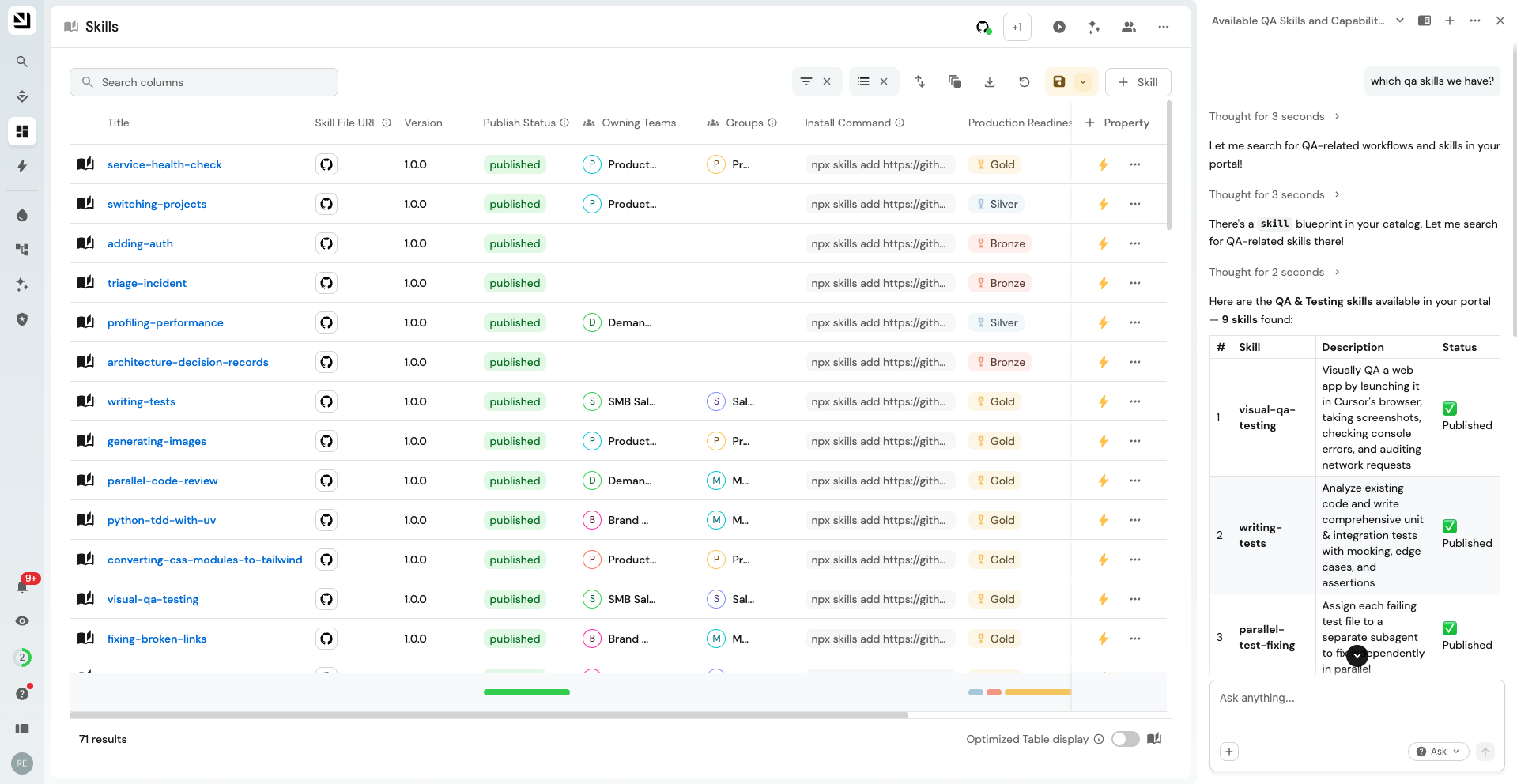
Because of the permissions from Step 2, each user's view already only shows the skills they have access to. From there, a developer can search the table's own search bar for what they need, copy the matching skill's cliInstall value, and paste it into a terminal on the machine running their coding agent. They can just as easily ask Port AI something like "which QA skills do we have?" and get the same result as a natural-language answer.
Discover skills through Port MCP
With the Port MCP server connected, any agent can already query skill entities like any other entities in your catalog, filtered and scoped by that developer's own Port permissions, since MCP tool calls run as the authenticated user. No extra setup is needed for this baseline capability; it's just list_entities against the skill blueprint.
For better discoverability, though, we recommend publishing a dedicated "find-skills" skill org-wide, so an agent checks the registry on its own instead of a developer having to know to ask for it.
How it works
- The agent notices a request that looks like something a skill might already cover, or that the user wants to write a new skill, and searches the registry before doing anything else.
- It confirms the right blueprint and its exact property names first, rather than guessing, since these can be renamed or org-specific.
- It searches by keyword across the skill's identifier, title, and description, then filters to
publishedskills and checks the production-readiness scorecard before recommending anything. - It presents the matching skill, its review status, and the ready-to-run
cliInstallcommand. - If a shell is available, it runs the install command directly; otherwise, it calls Port MCP's
load_skillto load the skill'sinstructionsstraight into the session. - If nothing relevant exists, it says so, offers to help with the task itself using its general capabilities instead of a skill, and suggests writing one so the next developer who needs this doesn't start from zero either.
Register the skill
find-skills can't rely on the flow it powers for every other skill, since an agent can't discover find-skills through find-skills before it's installed. It needs a one-time push instead, the same way any other piece of shared developer tooling reaches a new machine: your admins distribute it through whatever provisioning your org already uses for that, such as MDM, a configuration-management playbook, or a dotfiles repo synced at login. If you don't have that kind of pipeline in place, the low-effort fallback is to just hand new developers its cliInstall command as a one-time, manual step, for example as a line in your onboarding docs, since it's no different from installing any other tool once when a laptop is set up.
The find-skills skill
Adjust the blueprint identifier, property names, and example install command below to match your own org before rolling it out.
find-skills SKILL.md (click to expand)
---
name: find-skills
description: Helps users discover existing agent skills in your org's own skills registry (tracked as `skill` entities in Port's context lake, queried live via the Port MCP server) before they build something new. Use this when the user asks "how do I do X", "find a skill for X", "is there a skill that can...", wants to extend their agent's capabilities, or mentions a task that a specialized skill might already cover. Also use this, proactively, whenever the user says they want to *create* or *write* a new skill, so you can check the registry for an existing or overlapping one first and avoid a duplicate.
---

# Find skills

This skill helps you discover, evaluate, and install skills that already exist
in your organization's Port skills registry, instead of reinventing one from
scratch. It queries the registry live through the Port MCP server, so it
always reflects the current state of what's been published, not a static
list.

## When to use this skill

Use this skill when the user:

- Asks "how do I do X" where X might be a common task with an existing skill.
- Says "find a skill for X" or "is there a skill for X".
- Asks "can you do X" where X is a specialized capability.
- Expresses interest in extending agent capabilities.
- Wants to search for tools, templates, or workflows.
- Mentions they wish they had help with a specific domain (design, testing, deployment, etc.).
- **Wants to create, write, or draft a new skill.** Run this skill's search
  first, silently, before starting the draft. If something already covers
  the need (or mostly does), tell the user before writing anything new. The
  registry tracks near-duplicates explicitly (see
  [Step 4](#step-4-verify-quality-before-recommending) and
  [Creating a new skill](#creating-a-new-skill-check-the-registry-first)), so
  skipping this check is how an org ends up with five slightly different
  versions of the same skill.

## What is your org's skills registry?

Every skill your org has authored or adopted (for Claude Code, Cursor, Codex,
etc.) is tracked as an entity in Port's context lake, one entity per
`SKILL.md` file. This is your organization's own curated, internally
governed set of skills, with review status, ownership, and quality signals
attached in Port.

Skills are still *installed* with whatever CLI your org has standardized on;
Port doesn't reinvent that part. What Port adds is the discovery and
governance layer on top: which skills exist, who owns them, whether they've
been reviewed, and the exact install command for each one, pre-built into a
Port property (`cliInstall`) so nobody has to construct it by hand.

**Blueprint identifiers, property names, and scorecards below are a worked
example.** Confirm the real ones in your org with `list_blueprints` before
you rely on them (see Step 2), since they can be renamed or org-specific.

## How to help users find skills

### Step 1: Understand what they need

When a user asks for help with something, identify:

1. The domain (for example, React, testing, design, deployment, incident response).
2. The specific task (for example, writing tests, creating dashboards, reviewing PRs).
3. Keywords likely to appear in a matching skill's name or description.

### Step 2: Find the skill blueprint

Before searching, confirm which blueprint models skills in this org; don't
assume the identifier without checking, since it can be renamed or
org-specific.

Call `list_blueprints` (no identifiers) and scan the summary for one that
looks like it represents an installable skill: it typically has a required
`description` property, path/location-style properties (`path`, `fileUrl`,
`source`, `branch`), a `version`, and, most tellingly, a calculation
property that builds an install command (such as `cliInstall`). Don't
confuse it with adjacent blueprints that sound similar but aren't the thing
to search, such as one that tracks usage stats *about* skills rather than
the skills themselves.

Once you've identified the right blueprint, call `list_blueprints` again
**with its identifier** to get the exact property and relation keys. You will
need these verbatim for filtering and for reading results. Never guess a
property name, since a wrong one fails the whole query.

### Step 3: Search for skills

Query entities on that blueprint with `list_entities`. The tool supports a
composable `query` with filter rules, so combine a few:

- **Name/keyword matching**: use `contains` on both `$identifier` and
  `$title` combined with `"or"`, using a single keyword at a time (for
  example `"terraform"`, not `"terraform infrastructure setup"`). If the
  blueprint also has a free-text `description` property, add a `contains`
  rule on it too, still under the `"or"` combinator, to catch skills whose
  title doesn't literally contain the keyword.

  **`contains` is a plain, case-insensitive substring match, not a
  tokenized or full-text search.** It matches a fragment anywhere,
  including mid-word, so a short or common keyword produces false
  positives (for example, `"orm"` matches `terraform` and `performance`,
  not just an ORM skill). Prefer a distinctive whole-word keyword, and
  skim the returned titles before presenting them; don't assume every hit
  is actually relevant.
- **Only show real, usable skills** by filtering `publish_status =
  "published"` (see Step 4 for why), unless the user explicitly wants to
  see drafts or rejected attempts too.

Pass `include` with everything you will need for the rest of this flow in one
call; there's no need for a narrower search pass followed by a separate
lookup. At minimum: `$identifier`, `$title`, `description`,
`publish_status`, the production-readiness scorecard field (Step 4), and
whatever lets you link back to the source and install it (for example
`fileUrl` and the `cliInstall` calculation property). If a first search
returns nothing or too little, broaden the keyword before concluding
nothing exists; a single narrower term often surfaces matches a multi-word
phrase misses.

### Step 4: Verify quality before recommending

**Do not recommend a skill from a name/description match alone.** From what
Step 3 already fetched, check two signals before presenting it:

1. **Publish status**: only recommend entities where `publish_status` (or
   this org's equivalent) is `published`. `pending` means it hasn't cleared
   review yet, `not published`/`deprecated` means it was rejected or
   retired; surface these only if the user asks specifically, and say why
   they're flagged.
2. **Production readiness scorecard**: if the blueprint carries a
   production-readiness-style scorecard, call `list_scorecards` with its
   identifier to see what it measures, then read the level straight off
   the entity data Step 3 already fetched. Prefer Silver/Gold over
   Basic/Bronze; a Basic level means the skill hasn't picked up a version,
   an owning team, or a group assignment yet, which is worth a caveat even
   if you still recommend it.

### Step 5: Present options to the user

When you find relevant, published, well-scored skills, present:

1. The skill's name and what it does (its `description`).
2. Its review signal (publish status, and the scorecard levels that matter).
3. The install command, already in hand from Step 3, no extra lookup needed.
4. A link to the source file (`fileUrl` or equivalent) so the user can skim
   it before installing.

Example response:

```
I found a skill in the registry that covers this: "api-smoke-testing" -
starts the dev server, discovers API routes from the codebase, hits every
endpoint, and reports which ones error out. It's published and scores
Silver on production readiness.

To install it:
npx skills add https://github.com/your-org/skills-registry/tree/main/skills/testing/api-smoke-testing

Source: https://github.com/your-org/skills-registry/blob/main/skills/testing/api-smoke-testing/SKILL.md
```

### Step 6: Offer to install

How you install depends on what this session can actually do; check before
picking a path:

**A. A shell/CLI tool (for example Bash) is available; prefer this.** Run
the install command exactly as it came back from the blueprint's
calculation property (`cliInstall`) in Step 3; don't reconstruct it from
the parts yourself, since the calculation already encodes the right CLI
invocation and any org-specific conventions, and that can change without
this skill needing an update.

**B. No shell available (for example a desktop app without a terminal);
use `load_skill`.** Call Port MCP's `load_skill` with the entity's full
`$identifier` as `name`. This only works if the entity's `instructions`
property is populated; if it isn't, `load_skill` won't return this skill's
content.

Either way, installing puts a new skill in front of the user going
forward, so state what you're about to install and get an explicit
go-ahead before doing it; don't install silently just because a match was
found.

## Creating a new skill? Check the registry first

When the user wants to write a new skill, run Steps 2 to 4 above against
their intended topic *before* drafting anything. Three outcomes:

- **A published skill already covers it**: tell them, show it (Step 5),
  and ask if they'd rather use or extend that one instead of duplicating
  it.
- **Something related exists but doesn't fully overlap**: mention it so
  they can decide whether to build alongside it or extend it, and check
  whether the blueprint tracks a `duplicate_of`-style relation they should
  set once their new skill is registered.
- **Nothing relevant exists**: proceed with drafting the new skill; when
  it's ready, check `list_self_service_triggers` for a publish workflow.
  Don't assume the trigger's name or inputs are the same in every org;
  look it up rather than hardcoding it.

## When no skills are found

If no relevant skills exist in the registry:

1. Acknowledge that no existing skill was found; say what you searched for.
2. Offer to help with the task directly using your general capabilities.
3. Suggest creating one (see above) so the next person who needs this
   doesn't start from zero either.
Distribute skills through a Port API hook
The MCP path above works well for day-to-day discovery: an agent that's already running can find a relevant skill and offer to install it right when it's needed. What it can't offer is a guarantee. A skill only reaches a user's filesystem if an agent happens to trigger find-skills in that particular session, decides the request is a match, and has a shell available to run the install command. Without a shell, the best it can do is call load_skill, which loads the skill into that one conversation rather than onto disk, so the next session starts from zero again.
If you need every user to have every skill they're entitled to, whether or not an agent ever happened to ask for it, that calls for something deterministic instead. That's what the pattern below does: it installs every skill a user has access to onto their filesystem at the start of every session, so it's natively available to whatever agent runs there afterward, regardless of that agent's own MCP connection.
Claude Code, for example, fires a SessionStart hook before its MCP connections finish connecting, so the hook can't call an MCP tool; it has to talk to Port directly over the REST API instead, authenticating as the requesting user rather than as a shared service account:
- Org/service-account credentials (
client_credentialsfrom a service account) bypass per-user access control entirely. Using one here would sync every published skill to every machine, ignoring the groups from Step 2. - Personal credentials, generated by each user from their own Port credentials page, are treated as that user when used to call the API, and follow the same permission rules as a UI session. A hook built on personal credentials naturally syncs only the skills that user is allowed to see, with no extra filtering logic required.
This example targets Claude Code on macOS; adapt the credential storage and hook registration mechanism to whatever your agent supports (a Cursor rule, a VS Code extension activation event, and so on). The governance principle, personal credentials only, no shared secret, carries over regardless of the tool.
How it works
- A
SessionStarthook fires automatically at the start of every Claude Code session, before MCP connections are ready, and runssync_skills.py. - The script reads a personal client ID/secret pair from the local credential store.
- It exchanges that pair for a short-lived Port access token, caching it locally so it isn't re-minted every session.
- It queries the
skillblueprint for entities wherepublish_status = published, scoped to the properties it needs. - For each skill, it runs the entity's
cliInstallcommand as a detached background process, so session startup never blocks on an install. - Everything is logged, and the hook always exits successfully; a Port outage or a bad credential can never block a session from starting.
Because npx skills add <url> derives its local folder name deterministically from the source URL, re-running the same command every session naturally overwrites the existing folder in place. That's the whole "always get the latest version" mechanism; the hook itself does no version bookkeeping.
The code
sync_skills.py (click to expand)
#!/usr/bin/env python3
"""
Claude Code SessionStart hook: sync Port-assigned skills.

Fetches "skill" entities from Port (filtered to what the connected user can
see, via a personal access token) and installs/updates each one locally by
running its `cliInstall` command. Designed to never block session startup:
all errors are logged and swallowed, and installs run as detached background
processes.
"""

import json
import os
import shlex
import subprocess
import sys
import time
import traceback
import urllib.error
import urllib.request

HOOK_DIR = os.path.dirname(os.path.abspath(__file__))
LOG_PATH = os.path.join(HOOK_DIR, "last-run.log")
TOKEN_CACHE_PATH = os.path.join(HOOK_DIR, ".token-cache.json")
KEYCHAIN_SERVICE = "port-skills-hook"
API_BASE = "https://api.port.io/v1"
TOKEN_SAFETY_MARGIN_SECONDS = 300


def log(message):
    with open(LOG_PATH, "a") as f:
        f.write(f"[{time.strftime('%Y-%m-%d %H:%M:%S')}] {message}\n")


def emit_context(message):
    print(json.dumps({
        "hookSpecificOutput": {
            "hookEventName": "SessionStart",
            "additionalContext": message,
        }
    }))


def read_hook_input():
    try:
        raw = sys.stdin.read()
        data = json.loads(raw) if raw.strip() else {}
    except Exception:
        data = {}
    return data.get("cwd") or os.getcwd()


def get_credentials():
    user = os.environ.get("USER", "")
    result = subprocess.run(
        ["security", "find-generic-password", "-a", user, "-s", KEYCHAIN_SERVICE, "-w"],
        capture_output=True, text=True,
    )
    if result.returncode != 0:
        raise RuntimeError(
            "No Port credentials found in Keychain. Run "
            "~/.claude/hooks/port-skills/setup-credentials.sh once to set them up."
        )
    blob = json.loads(result.stdout.strip())
    return blob["clientId"], blob["clientSecret"]


def http_json(url, method="GET", body=None, headers=None):
    data = json.dumps(body).encode() if body is not None else None
    req = urllib.request.Request(url, data=data, method=method)
    req.add_header("Content-Type", "application/json")
    for k, v in (headers or {}).items():
        req.add_header(k, v)
    with urllib.request.urlopen(req, timeout=15) as resp:
        return json.loads(resp.read().decode())


def get_access_token(client_id, client_secret):
    now = time.time()
    if os.path.exists(TOKEN_CACHE_PATH):
        try:
            with open(TOKEN_CACHE_PATH) as f:
                cache = json.load(f)
            if cache.get("expiresAt", 0) - TOKEN_SAFETY_MARGIN_SECONDS > now:
                return cache["accessToken"]
        except Exception:
            pass

    resp = http_json(
        f"{API_BASE}/auth/access_token",
        method="POST",
        body={"clientId": client_id, "clientSecret": client_secret},
    )
    access_token = resp["accessToken"]
    expires_in = resp.get("expiresIn", 3 * 3600)
    cache = {"accessToken": access_token, "expiresAt": now + expires_in}
    fd = os.open(TOKEN_CACHE_PATH, os.O_WRONLY | os.O_CREAT | os.O_TRUNC, 0o600)
    with os.fdopen(fd, "w") as f:
        json.dump(cache, f)
    return access_token


def fetch_skills(access_token):
    url = f"{API_BASE}/blueprints/skill/entities/search"
    query = {
        "query": {
            "combinator": "and",
            "rules": [{"property": "publish_status", "operator": "=", "value": "published"}],
        },
        "include": ["$identifier", "$title", "description", "version", "location", "cliInstall"],
    }
    try:
        resp = http_json(url, method="POST", body=query, headers={"Authorization": f"Bearer {access_token}"})
    except urllib.error.HTTPError as e:
        if e.code == 401 and os.path.exists(TOKEN_CACHE_PATH):
            os.remove(TOKEN_CACHE_PATH)
        raise
    return resp.get("entities", [])


def queue_install(entity, project_cwd):
    title = entity.get("title", entity.get("identifier", "<unknown>"))
    props = entity.get("properties", {})
    cli_install = props.get("cliInstall")
    location = props.get("location", "global")
    version = props.get("version", "?")

    if not cli_install:
        log(f"SKIP {title}: no cliInstall property")
        return False

    args = shlex.split(cli_install) + ["-y"]
    if location == "global":
        args.append("-g")
        run_dir = os.path.expanduser("~")
    else:
        run_dir = project_cwd

    with open(LOG_PATH, "a") as logfile:
        subprocess.Popen(
            args, cwd=run_dir, stdout=logfile, stderr=logfile,
            stdin=subprocess.DEVNULL, start_new_session=True,
        )
    log(f"QUEUED {title} v{version} ({location}) -> {' '.join(args)} [cwd={run_dir}]")
    return True


def main():
    project_cwd = read_hook_input()
    log(f"--- sync run start (cwd={project_cwd}) ---")

    try:
        client_id, client_secret = get_credentials()
        access_token = get_access_token(client_id, client_secret)
        skills = fetch_skills(access_token)
    except Exception as e:
        log(f"ERROR: {e}\n{traceback.format_exc()}")
        emit_context("Port skills sync failed - see ~/.claude/hooks/port-skills/last-run.log")
        return

    queued = 0
    for entity in skills:
        try:
            if queue_install(entity, project_cwd):
                queued += 1
        except Exception as e:
            log(f"ERROR queuing {entity.get('title', entity.get('identifier'))}: {e}")

    log(f"--- sync run done: {queued}/{len(skills)} skills queued ---")
    emit_context(
        f"Port skills sync: queued {queued} of {len(skills)} skill(s) for background "
        f"install/update (see ~/.claude/hooks/port-skills/last-run.log for results)."
    )


if __name__ == "__main__":
    try:
        main()
    except Exception:
        log(f"FATAL: {traceback.format_exc()}")
    sys.exit(0)
setup-credentials.sh (click to expand)
#!/bin/bash
# One-time setup: store your PERSONAL Port client ID + client secret in the
# macOS Keychain so the SessionStart hook (sync_skills.py) can use them.
#
# IMPORTANT: use a PERSONAL credential (generated from your own Port
# "Credentials" modal in the app), NOT an org/service-account credential.
# Personal credentials carry your own permissions, so the skills the hook
# fetches match exactly what you can see in Port. A service-account/org
# credential would bypass per-user permissions entirely.
#
# Run this yourself, directly in your terminal. Do not paste your client
# secret anywhere else (chat, files, etc.); this script reads it straight
# into the Keychain and nowhere else.

set -euo pipefail

SERVICE_NAME="port-skills-hook"

echo "Port personal credential setup"
echo "  1. Open https://app.port.io (click the ... menu -> Credentials)"
echo "  2. Generate a PERSONAL client ID + client secret (not a service account)"
echo

read -rp "Client ID: " CLIENT_ID
read -rsp "Client secret (input hidden): " CLIENT_SECRET
echo

if [[ -z "$CLIENT_ID" || -z "$CLIENT_SECRET" ]]; then
  echo "Client ID and secret are both required. Aborting." >&2
  exit 1
fi

# Store as a single JSON blob so one Keychain entry holds both values.
CREDENTIAL_JSON=$(printf '{"clientId":"%s","clientSecret":"%s"}' "$CLIENT_ID" "$CLIENT_SECRET")

# Remove any existing entry first so re-running this script updates it cleanly.
security delete-generic-password -a "$USER" -s "$SERVICE_NAME" >/dev/null 2>&1 || true

security add-generic-password \
  -a "$USER" \
  -s "$SERVICE_NAME" \
  -w "$CREDENTIAL_JSON" \
  -U

unset CLIENT_ID CLIENT_SECRET CREDENTIAL_JSON

echo "Stored in macOS Keychain under service \"$SERVICE_NAME\"."
echo "You can verify with: security find-generic-password -a \"$USER\" -s \"$SERVICE_NAME\""
Register the hook
Merge this into ~/.claude/settings.json on each machine (append into any existing hooks.SessionStart array rather than overwriting it):
{
  "hooks": {
    "SessionStart": [
      {
        "hooks": [
          {
            "type": "command",
            "command": "python3 $HOME/.claude/hooks/port-skills/sync_skills.py",
            "timeout": 30
          }
        ]
      }
    ]
  }
}
For an org-wide rollout, prefer Claude Code's enterprise managed settings file over each user's own settings.json, since users can edit or remove a hook from their own file. Put the same hooks.SessionStart block into:
| OS | Path |
|---|---|
| macOS | /Library/Application Support/ClaudeCode/managed-settings.json |
| Linux/WSL | /etc/claude-code/managed-settings.json |
| Windows | C:\Program Files\ClaudeCode\managed-settings.json |
Claude Code applies hooks from only the highest-ranked settings source by default, so a managed SessionStart hook silently stops any hook a user already had in their own settings.json. If you need both to run, set "managedSourcesBehavior": "merge" in the managed settings file (Claude Code 2.1.242 or later).
Both scripts assume Port's EU API (api.port.io). If your org is hosted on US Port (app.us.port.io), replace https://api.port.io/v1 with https://api.us.port.io/v1 in sync_skills.py before distributing it.
What each user still has to do
Rolling out the code and the hook registration doesn't sync anything by itself; each user still generates their own credential once:
- Go to
app.port.io, open the...menu, and select Credentials. - Generate a personal client ID and client secret, not a service account, and make sure the secret is fully revealed (not a masked preview) before copying it.
- Run
bash ~/.claude/hooks/port-skills/setup-credentials.shand paste both values in when prompted.
From their next session onward, the hook runs automatically, with a short note on how many skills it queued.
Troubleshooting
| Symptom in the log | Likely cause |
|---|---|
No Port credentials found in Keychain | The setup script hasn't been run yet. |
invalid_credentials from /v1/auth/access_token | Client ID/secret mistyped or mismatched; regenerate in Port and rerun setup. |
user_not_found | Wrong region (US vs EU) configured for this account. |
| An "additional property" error from the search endpoint | The request body's filter needs to be nested as {"query": {"combinator", "rules"}}, with include at the top level, not inside query and not as a URL parameter. |
Continue building your skills registry
This guide gets skills modeled, grouped, and discoverable. From here:
- Ship new skills through one golden path - give developers one standard way to propose a new skill, with review tracked in a dashboard instead of ad hoc pull requests.
- Certify skills to meet industry and org standards - add an AI-driven review of description quality on top of the production-readiness scorecard built here.
- Avoid duplicate skills in your org registry - catch a duplicate skill before it reaches the registry, and again during certification.
- Bundle skills into plugins - group related skills into installable plugins once you have enough of them to start overlapping.
- Measure the ROI of skills in your org registry - connect real Claude usage and spend data to the registry, and catch skills that pass every check but still aren't worth their cost.
Related pages
- Skills overview: the full blueprint schema,
references/assetshandling, and manual entity creation. - Ingest skills from Git: GitOps ingestion in depth, including the file-kind mapping and folder-kind alternative.
- Skills usage analytics: measure which skills teams actually use.
- Port catalog RBAC: the full permission model referenced in Step 2.
- Port MCP server: how
load_skilland other tools work.