Comparison operators
This page details the available comparison operators when writing rules as part of the search route.
= (Equal)
The = operator checks exact matches of the specified value:
{
  "operator": "=",
  "property": "myProperty",
  "value": "myExactValue"
}
This operator can also be used to check the value of boolean properties:
{
  "operator": "=",
  "property": "myBooleanProperty",
  "value": true
}
For datetime properties, the = operator only supports ISO8601 format strings:
{
  "operator": "=",
  "property": "$createdAt",
  "value": "2022-07-26T16:38:06.839Z"
}
The = operator only supports ISO8601 format strings for datetime values.
To use preset date ranges (like "lastWeek", "today", etc.), use the between or notBetween operators instead.
!= (Not Equal)
The != operator checks exact matches of the specified value and returns all results that fail to satisfy the check:
{
  "operator": "!=",
  "property": "myProperty",
  "value": "myExactValue"
}
This operator can also be used to check the value of boolean properties:
{
  "operator": "!=",
  "property": "myBooleanProperty",
  "value": false
}
The = and != operators are not supported on array-type properties and may produce unexpected or incorrect results. For array properties, use containsAny, isEmpty, or isNotEmpty instead.
However, the != and notIn operators work correctly on string and enum-valued properties to exclude specific values from results.
> (Greater Than)
The > operator checks values larger than the specified value:
{
  "operator": ">",
  "property": "myNumericProperty",
  "value": 7
}
>= (Greater Than or Equal)
The >= operator checks values larger than or equal to the specified value:
{
  "operator": ">=",
  "property": "myNumericProperty",
  "value": 7
}
< (Less Than)
The < operator checks values less than the specified value:
{
  "operator": "<",
  "property": "myNumericProperty",
  "value": 7
}
<= (Less Than or Equal)
The <= operator checks values less than or equal to the specified value:
{
  "operator": "<=",
  "property": "myNumericProperty",
  "value": 7
}
isEmpty
The isEmpty operator checks if the value of the specified property is null:
{
  "operator": "isEmpty",
  "property": "myProperty"
}
isNotEmpty
The isNotEmpty operator checks if the value of the specified property is not null:
{
  "operator": "isNotEmpty",
  "property": "myProperty"
}
propertySchema
The propertySchema filter can be used with any standard operator. It allows you to filter entities based on a properties matching a specific type (for example, find all string properties with a given value):
- String
- URL
{
  "propertySchema": {
    "type": "string"
  },
  "operator": "=",
  "value": "My value"
}
{
  "propertySchema": {
    "type": "string",
    "format": "url"
  },
  "operator": "=",
  "value": "https://example.com"
}
- The
propertySchemacan be used with any Port property; - The
propertySchemareplaces thepropertyfilter when performing property schema search.
between
The between operator checks datetime values and returns entities whose relevant datetime property matches the given range:
{
  "operator": "between",
  "property": "$createdAt",
  "value": {
    "preset": "lastWeek"
  }
}
Available Presets:
last3Years- In the past 3 yearslast2Years- In the past 2 yearslast12Months- In the past 365 dayslast6Months- In the past 180 dayslast3Months- In the past 90 dayslastMonth- In the past 30 dayslast2Weeks- In the past 2 weekslastWeek- In the past weeklastDay- In the past daytoday- Todaytomorrow- Tomorrowyesterday- YesterdaynextDay- In the next daynextWeek- In the next weeknext2Weeks- In the next 2 weeksnextMonth- In the next 30 daysnext3Months- In the next 90 daysnext6Months- In the next 180 daysnext12Months- In the next 365 days
When using the catalog page UI, these presets are available via the is operator when filtering datetime properties.
The future date presets (nextDay, nextWeek, next2Weeks, nextMonth, next3Months, next6Months, next12Months) are only available in the catalog page filters and initial filters. They are not supported in table widgets or other locations.
The between operator also supports standard date ranges:
{
  "combinator": "and",
  "rules": [
    {
      "operator": "between",
      "property": "$createdAt",
      "value": {
        "from": "2022-07-26T16:38:06.839Z",
        "to": "2022-07-29T17:00:28.006Z"
      }
    }
  ]
}
notBetween
The notBetween operator checks datetime values and returns entities whose relevant datetime property does not match the given range:
{
  "operator": "notBetween",
  "property": "$createdAt",
  "value": {
    "preset": "lastWeek"
  }
}
contains
The contains operator checks if the specified value exists within a string property:
{
  "property": "myStringProperty",
  "operator": "contains",
  "value": "mySubString"
}
doesNotContains
The doesNotContains operator checks if the specified value does not exists in the specified property:
{
  "operator": "doesNotContains",
  "property": "myStringProperty",
  "value": "otherValue"
}
containsAny
The containsAny operator checks if any of the specified strings exist in the target array:
{
  "operator": "containsAny",
  "property": "myArrayProperty",
  "value": ["Value1", "Value2", ...]
}
beginsWith
The beginsWith operator checks if the specified property starts with the specified value:
{
  "operator": "beginsWith",
  "property": "myStringProperty",
  "value": "myString"
}
doesNotBeginsWith
The doesNotBeginsWith operator checks if the specified property does not start with the specified value:
{
  "operator": "doesNotBeginsWith",
  "property": "myStringProperty",
  "value": "otherValue"
}
endsWith
The endsWith operator checks if the specified property ends with the specified value:
{
  "operator": "endsWith",
  "property": "myStringProperty",
  "value": "myString"
}
doesNotEndsWith
The doesNotEndsWith operator checks if the specified property does not end with the specified value:
{
  "operator": "doesNotEndsWith",
  "property": "myStringProperty",
  "value": "otherValue"
}
in
The in operator checks if a string property is equal to one or more specified string values:
- Standard
- Dynamic Filter
{
  "property": "myStringProperty",
  "operator": "in",
  "value": ["Value1", "Value2"]
}
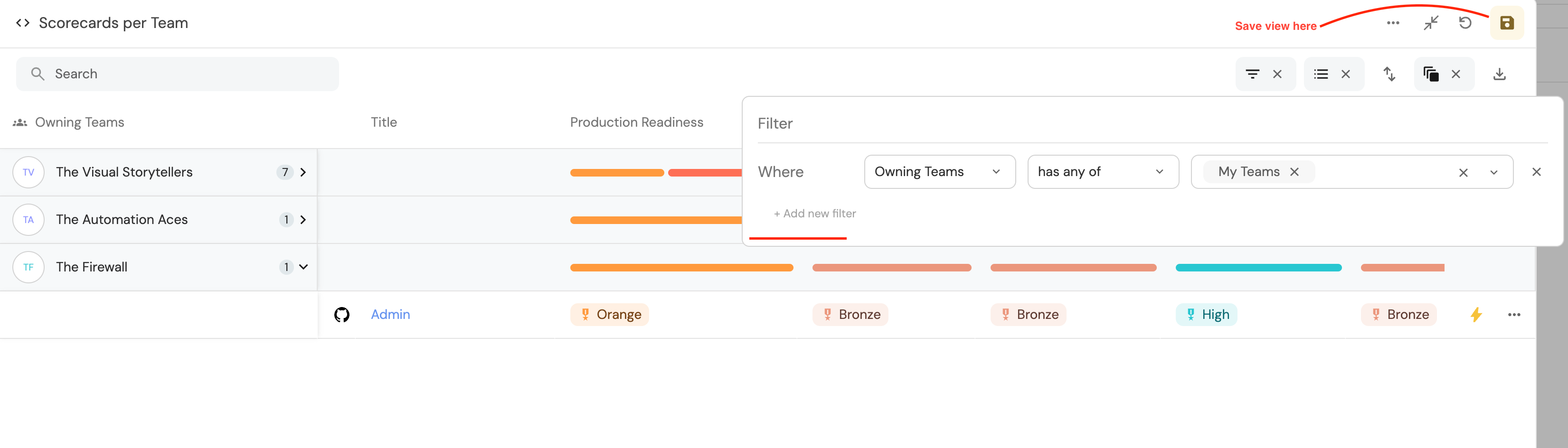
In order to filter entities that belong to one or more of your teams you can use the special My Teams filter:
{
  "property": "$team",
  "operator": "in",
  "value": ["My Teams"]
}
You can also use the My Teams filter in the UI:
notIn
The notIn operator checks if a string property is not equal to all of the specified string values:
{
  "property": "myStringProperty",
  "operator": "notIn",
  "value": ["Value1", "Value2"]
}