Structure & syntax
This page details the structure and syntax used to build search queries in Port, including how to construct search requests, define rules, use combinators, and apply operators to filter entities.
Search request
A search request contains filters and rules to find matching entities in your software catalog.
To search for entities using the API, see the search route.
A search request is comprised of the following elements:
| Field | Description |
|---|---|
combinator | Defines the logical operation to apply to the query rules. |
rules | An array of search rules to filter results with. |
For example:
{
  "combinator": "and",
  "rules": [
    {
      "property": "$blueprint",
      "operator": "=",
      "value": "myBlueprint"
    },
    {
      "property": "$identifier",
      "operator": "contains",
      "value": "myIdentifierPart"
    }
  ]
}
The query above searches for all entities based on the myBlueprint blueprint whose identifier contains the string myIdentifierPart.
Combinator
There are two available combinators:
and- will apply a logical AND operation between all rules, requiring all of them to satisfy for a given asset in order to return it.or- will apply a logical OR operation between all rules, requiring at least one of them to satisfy for a given asset in order to return it.
If you only have a single rule in your query, the combinator has no effect. But keep in mind that it still needs to be included to adhere to the query structure. In the following example, only a single rule appears in the Single rule query example (click to expand)
rules array, so the combinator field has no effect:
- And
- Or
{
  "combinator": "and",
  "rules": [
    {
      "property": "$blueprint",
      "operator": "=",
      "value": "myBlueprint"
    },
    {
      "property": "$identifier",
      "operator": "contains",
      "value": "myIdentifierPart"
    }
  ]
}
{
  "combinator": "or",
  "rules": [
    {
      "property": "$blueprint",
      "operator": "=",
      "value": "myBlueprint"
    },
    {
      "property": "$identifier",
      "operator": "contains",
      "value": "myIdentifierPart"
    }
  ]
}
Nested queries
Rules can be nested, An item in the rules array can itself be a {combinator, rules} object, allowing you to build complex boolean logic:
{
  "combinator": "or",
  "rules": [
    {
      "combinator": "and",
      "rules": [
        { "property": "language", "operator": "=", "value": "Python" },
        { "property": "tier", "operator": "=", "value": "production" }
      ]
    },
    {
      "combinator": "and",
      "rules": [
        { "property": "language", "operator": "=", "value": "Go" },
        { "property": "tier", "operator": "=", "value": "critical" }
      ]
    }
  ]
}
The query above matches entities that are either (Python AND production) or (Go AND critical).
All rules in a query are evaluated simultaneously and there is no short-circuit logic. For example, if the top-level combinator is "or" with five nested rule groups, all five groups are evaluated for every entity even if the first group already matches. The "or" combinator means an entity is included in the results if at least one group matches, but it does not skip evaluating the remaining groups.
Rules
A search rule is a small filtering unit, used to control the search output.
Here is an example search rule:
{
  "property": "$blueprint",
  "operator": "=",
  "value": "microservice"
}
Port has 2 types of search rule operators:
- Comparison (e.g.
=,>). - Relation (e.g.
relatedTo).
Comparison operators
Structure
| Field | Description |
|---|---|
operator | Search operator to use when evaluating this rule, see a list of available operators below |
property | Property to filter by according to its value. It can be a meta-property such as $identifier, or one of the standard properties |
value | The value to filter by |
Operators
A wide variety of operators are available, see them here.
Relation operators
Several relation-based operators are available, see them here.
Contextual query rules
Contextual query rules inject the logged-in user's identity into a query at evaluation time, allowing you to access that user's properties and/or owning teams. You can mix contextual query rules freely with other rules as part of your queries.
Where contextual query rules are supported
| Location | Supported | Notes |
|---|---|---|
| Catalog page initial filters | ✅ | Filter entities shown on a catalog page based on the viewer |
| Dashboard widget filters | ✅ | Scope chart/table widgets to the logged-in user |
Self-service action dataset rules | ✅ | Filter entities in an entity input dropdown |
| API search requests | ✅ | Context is derived from the API token's associated user |
The older dynamic properties syntax ({{getUserTeams()}}) is deprecated. Contextual query rules are the replacement, they work in all the same places including self-service action inputs and API requests.
How to use contextual query rules
This can be used in either the property or value key in a query rule:
- Property
- Value
{
   ...other rule keys
   "property": {
      "context": "user" | "userTeams",
      "property": "prop"
  }
}
{
  ...other rule keys
   "value": {
      "context": "user" | "userTeams",
      "property": "prop"
  }
}
Available contexts
| Context | Description |
|---|---|
user | The entity of the user triggering the query |
userTeams | The entities of the owning teams of the user triggering the query |
Usage examples
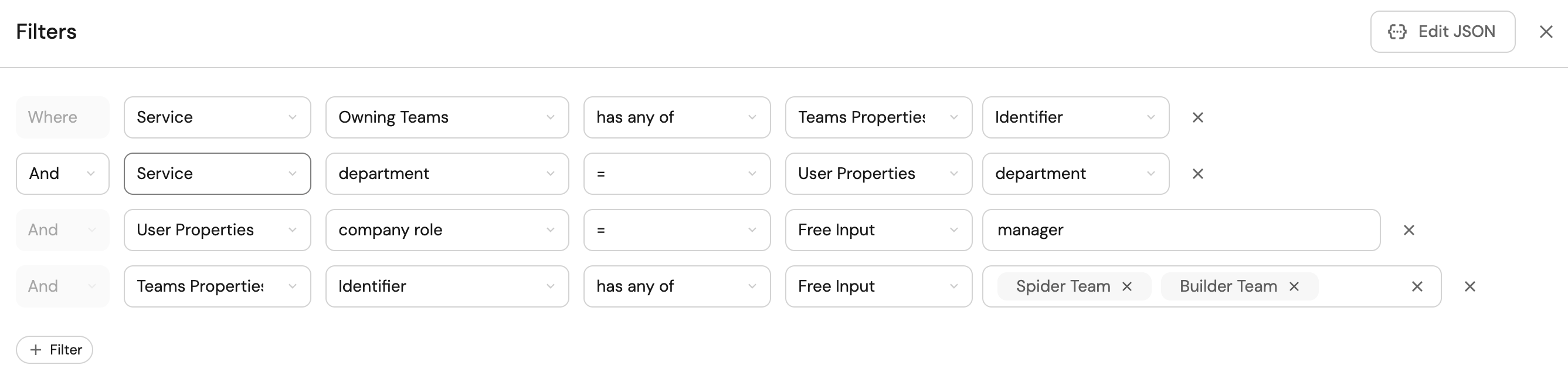
The following rule will result in the entities owned by any one of the user's teams:
[
  ...other rules
  {
    "property": "$team",
    "operator": "containsAny",
    "value": {
      "context": "userTeams",
      "property": "$identifier"
    }
  }
]
The following rule will result in entities with the same department as the user's:
[
  ...other rules
  {
    "property": "department",
    "operator": "=",
    "value": {
      "context": "user",
      "property": "department"
    }
  }
]
The following rule asserts that only users with manager role will get the resulting entities:
[
  ...other rules
  {
    "property": {
      "context": "user",
      "property": "company_role"
    },
    "operator": "=",
    "value": "manager"
  }
]
The following rule asserts that only users in the user's team/s will get the resulting entities:
[
  ...other rules
  {
    "property": {
      "context": "userTeams",
      "property": "$identifier"
    },
    "operator": "containsAny",
    "value": ["Spider Team", "Builder Team"]
  }
]
For examples of using contextual values with relation path filters, see filter with contextual values.
Filter by relations/scorecards
When using the search a blueprint's entities API route, you can also filter results by relations or scorecards.
See the following examples for each filter type:
- Relation
- Scorecard
- Scorecard rule
{
  "relation": "relationId",
  "operator": "=",
  "value": "value"
}
{
  "scorecard": "scorecardId",
  "operator": "=",
  "value": "Bronze"
}
{
  "scorecard": "scorecardId",
  "scorecardRule": "scorecardRuleId",
  "operator": "=",
  "value": "Bronze"
}
Dynamic properties
Dynamic properties are deprecated and will be discontinued soon. Use contextual query rules instead, which work in more places and provide access to the full user/team entity.
When using Port's UI, you can use properties of the logged-in user when writing rules by using the following functions:
getUserTeams- a list of the teams the user belongs to.getUserEmail- the user's email.getUserFullName- the user's full name.blueprint- the blueprint identifier of the current page.
These functions are evaluated only in Port's UI context: catalog page initial filters and dashboard widget filters. They are not evaluated in self-service action schemas (e.g., dataset rules on entity inputs) or API requests. Using them there will yield empty values. For action inputs, use contextual query rules instead.
Usage examples
[
  {
    "property": "$team",
    "operator": "containsAny",
    "value": ["{{getUserTeams()}}"]
  }
]
[
  {
    "property": "emails",
    "operator": "contains",
    "value": "{{getUserEmail()}}"
  }
]
[
  {
    "property": "name",
    "operator": "=",
    "value": "{{getUserFullName()}}"
  }
]
[
  {
    "property": "$blueprint",
    "operator": "=",
    "value": "{{blueprint}}"
  }
]