Reusable workflows
A sub-workflow is a workflow that another workflow calls. The workflow that makes the call is the parent, and the one that gets called is the child. Sub-workflows are how you reuse logic in Port: you build a sequence of steps once, and any number of workflows can run it.
Two nodes make this work:
- The workflow trigger goes in the child. It is the entry point other workflows can call.
- The execute workflow node goes in the parent. It picks the child, passes input, and decides whether to wait for the result.
Sub-workflows are in beta and may change.
When to use sub-workflows
Reach for a sub-workflow when one of these is true:
- You want a workflow that is easy to follow. Once a workflow has dozens of nodes, it is easier to read and safer to edit in smaller pieces. Move a coherent chunk, such as "provision a cloud environment", into a child so the parent reads as a short list of steps.
- Several workflows need the same logic. An approval flow or a provisioning sequence that you copy into many workflows has to be fixed in every copy. As a child, it lives in one place, and every parent picks up the fix.
- You want to hide implementation details. The parent only needs to know what to pass in and what happens next. How the child does its work, and which tools it calls, stays inside the child.
- Your nodes return large outputs. The outputs of all the nodes in a run share a 16 MB limit, so a run with large payloads can reach it. A child workflow is a separate run with its own limit, so moving the heavy steps into a child keeps their outputs out of the parent run.
- Different people own different parts. A platform team can maintain a shared child workflow while other teams build parents that call it.
If your workflow is small and runs in one place, you probably don't need a sub-workflow. A direct sequence of nodes is easier to read.
How it works
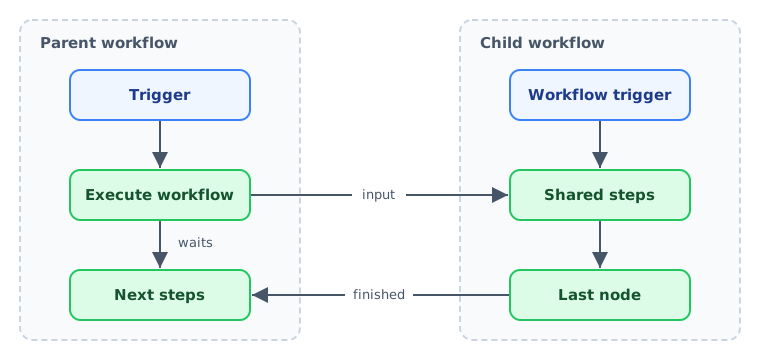
- The execute workflow node in the parent starts a run of the child through the child's workflow trigger.
- The
inputyou set on the node becomes the output of the child's workflow trigger, so the child reads it like any other trigger output, for example.outputs.trigger.service. - If Wait for completion is on, the parent node stays open until the child run finishes, then the parent continues. If it is off, the parent continues as soon as the child run starts.
Port links the two runs. On the run page, you can move between a child run and the parent node run that started it.
Build a sub-workflow
Let's build a child workflow that provisions an environment, and call it from a parent that runs when a service is deployed.
Step 1: Create the child workflow
- Create a new workflow. In the trigger picker, under Another workflow, select When called by another workflow.
- Build the shared steps after the trigger. Read the values the parent passes in from the trigger's output, for example
{{ .outputs.trigger.service }}. - Save the workflow.
The workflow trigger has no input schema, so document the expected input in the trigger's title and description. Those fields show up in every parent's trigger picker, so writers of parent workflows know what to pass in.
To make an existing workflow callable instead, open the Add node dialog, go to Add another trigger, and select When called by another workflow under Another workflow.
A workflow trigger is published by default, and parents can call it while Published is on. Turn it off only when you want to pause calls to the workflow.
Step 2: Call the child from the parent
- Open the parent workflow in the builder.
- Click + on the node you want to continue from, and under Flow controls select Execute workflow.
- Select the node and choose the child under Workflow, then its workflow trigger under Trigger. When the child has only one workflow trigger, Port selects it for you.
- Write the Input as a JSON object. You can use JQ templates to pass data from earlier nodes.
- Choose whether to wait, and what happens if the child fails. See wait and failure handling.
The node in the parent's JSON looks like this:
{
  "identifier": "provision_environment",
  "title": "Provision environment",
  "config": {
    "type": "EXECUTE_WORKFLOW",
    "workflowIdentifier": "provision-environment",
    "triggerIdentifier": "called-by-workflow",
    "input": {
      "service": "{{ .outputs.trigger.service }}",
      "environment": "production"
    },
    "wait": true,
    "onFailure": "terminate"
  }
}
For every setting, see the execute workflow reference.
Wait and failure handling
| You want | Set |
|---|---|
| The parent to use the result of the child, or to run later steps only after the child is done | Wait for completion on |
| The parent to stop when the child fails | On failure set to Terminate (default) |
| The parent to carry on when the child fails, for example to send a notification | On failure set to Continue |
| The parent to start the child and move on immediately | Wait for completion off |
On failure is available only while Wait for completion is on. Turning waiting off clears it, because the parent no longer sees how the child ends.
The node also has a Timeout (minutes) setting, which defaults to 1 day. If the child is still running when it passes, the parent node run is concluded as timed out. See node timeout.
Limitations
- Call chains are checked. A workflow can only appear once in a chain of calls, so the current workflow is left out of the Workflow list, and a chain where A calls B and B calls A is not allowed. A chain also has a maximum depth. These checks run when the workflow runs, not when you save it.
- Deleting affects callers. Parents that call a workflow trigger need it to exist, so check which parents use it before you delete a workflow trigger, or a workflow that has one. Port shows a warning before you confirm.
- Cancelling a parent also cancels the children it is waiting on.
Next steps
- Execute workflow - Settings and configuration for the parent's node.
- Workflow trigger - Settings and configuration for the child's entry point.
- Data flow - How outputs and JQ templates pass data between nodes.